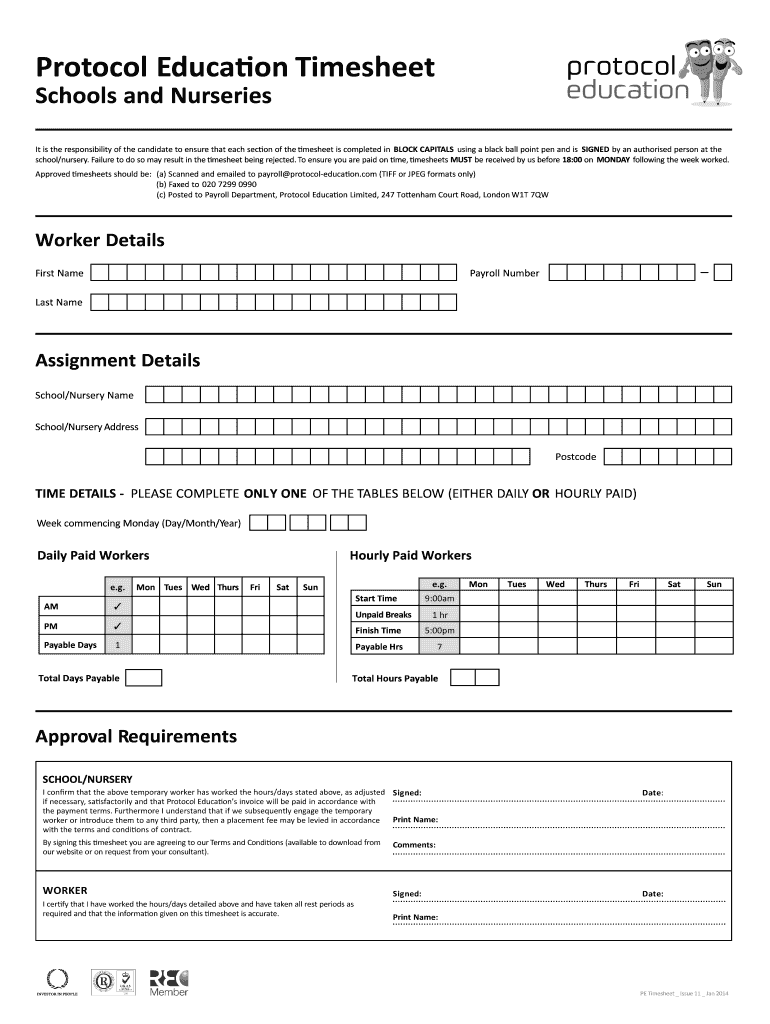
N and is SIGNED by an authorised person at the school/nursery. Failure to do so may result in the timesheet being rejected. To ensure you are paid on time, timesheets MUST be received by us before 18:00 on MONDAY following the week worked. Approved timesheets should be: (a) Scanned and emailed to payroll@protocol-education.com (TIFF or JPEG formats only) (b) Faxed to 020 7299 0990 (c) Posted to Payroll Department, Protocol Education Limited, 247 Tottenham Court Road, London W1T 7QW Worker Detai.
Loading

Open form follow the instructions

Easily sign the form with your finger

Send filled & signed form or save
How to fill out the Protocol Education Timesheet online
Filling out the Protocol Education Timesheet accurately is crucial for timely payment. This guide provides step-by-step instructions to help users complete the form online effectively.
Follow the steps to complete your timesheet accurately.
- Press the 'Get Form' button to retrieve the Protocol Education Timesheet and open it in an appropriate editor.
- Begin by entering your worker details. This includes your first name, last name, and payroll number. Ensure that all information is entered in BLOCK CAPITALS.
- Next, provide the assignment details. Fill in the school or nursery name, address, and the postcode. Accurate details are essential for processing.
- Specify the week commencing by entering the date in the format of Day/Month/Year.
- Depending on your payment structure, complete either the daily or hourly paid section. For daily paid workers, fill in the days worked and any unpaid breaks. For hourly paid workers, list the start time, finish time, and total hours worked.
- In the approval requirements section, ensure that the designated person at the school or nursery signs and prints their name, confirming that the hours/days worked are accurate.
- As the worker, sign and date the timesheet certifying that the information provided is true and complete.
- Once you have filled in all sections, review the timesheet for any errors before saving your changes. You can download, print, or share the completed form as needed.
Complete your Protocol Education Timesheet online today for efficient processing.
Experience a faster way to fill out and sign forms on the web. Access the most extensive library of templates available.
Related content
Jan 15, 2016 — Protocol Involves (check all that apply as listed in the protocol...
The HR Admin may search and view employee's timesheet through the “Select Employee”...
Get answers to your most pressing questions about US Legal Forms API.
How to fill out a time management sheet?
Filling out a time management sheet, like a Protocol Education Timesheet, starts with planning your tasks for each day. Enter the dates and allocate specific hours to each task you aim to accomplish. Reviewing this sheet regularly helps you stay organized and enhances your time management skills.
What is a timesheet with an example?
A timesheet is a record of hours worked by an employee during a specific period. For example, a Protocol Education Timesheet could show the dates of the week, hours spent on different tasks, and total hours worked. This document helps in tracking productivity and ensuring accurate payroll.
How do you fill out a timesheet?
To fill out a Protocol Education Timesheet, write down the specific dates you're reporting. For each day, detail the hours and minutes worked, and include any necessary comments or notes that may be required. Proper documentation helps prevent errors and delays in compensation.
How do I fill out my timesheet?
Filling out your Protocol Education Timesheet is straightforward. Begin by entering your personal details, including your name and employee ID. Then, input the hours worked for each day, ensuring you account for any breaks or overtime, if applicable.
How to process a timesheet?
Processing a Protocol Education Timesheet involves reviewing the recorded hours for accuracy. Once verified, submit the timesheet through the designated system or platform, like US Legal Forms, which simplifies this process. Keep track of submission deadlines to ensure timely payment.
How to record time on a timesheet?
To record time on a Protocol Education Timesheet, start by entering the date for each work session. Next, specify the hours worked in the designated sections for each day. Double-check your entries to ensure accuracy, and make sure to submit the timesheet on time for processing.
How do I add a timesheet in Deputy?
To add a timesheet in Deputy, access your account and go to the specific timesheet section. Here, you can enter all necessary information, including hours worked and any relevant details regarding your shifts. Make sure to review everything accurately, ensuring alignment with Protocol Education Timesheet requirements before saving.
How do I add a timesheet to Deputy?
Adding a timesheet to Deputy is a straightforward process. First, log into your Deputy account and navigate to the timesheet feature. You can select the relevant dates and input your hours worked according to the Protocol Education Timesheet guidelines before submitting your entries.
How do I record a timesheet?
To record a Protocol Education Timesheet, you need to log into your account on the Frontline Education platform. From there, navigate to the timesheet section and document your worked hours according to specific guidelines. Ensure you save your entries to prevent any loss of data.
How do I enter a timesheet?
Entering a Protocol Education Timesheet involves accessing the designated online portal. Once logged in, locate the timesheet section, and start entering your daily hours, ensuring to specify any relevant details or notes. After completing the entries, review and submit the timesheet for processing.
Use professional pre-built templates to fill in and sign documents online faster. Get access to thousands of forms.
If you believe that this page should be taken down, please follow our DMCA take down process here.
This form is available in several versions. Select the version you need from the drop-down list below.