Loading
Get Original Report
How it works
-

Open form follow the instructions
-

Easily sign the form with your finger
-

Send filled & signed form or save
How to fill out the Original Report online
Filling out the Original Report online can be a straightforward process if you follow the proper steps. This guide provides a detailed walkthrough of each component of the report, ensuring that users understand how to complete the form accurately and efficiently.
Follow the steps to complete the Original Report online.
- Click ‘Get Form’ button to obtain the form and open it in the editor.
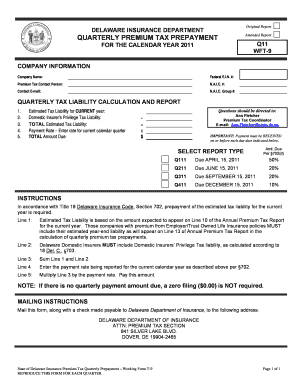
- Begin by filling in the Company Information section. Enter your company name, federal E.I.N. number, premium tax contact person's name, N.A.I.C. number, contact email, and N.A.I.C. group number.
- Proceed to the Quarterly Tax Liability Calculation and Report section. Here, calculate the estimated tax liability based on your expected amounts for the current year. Line 1 is for the estimated figure that will appear on the Annual Premium Tax Report, and be sure to factor in the amounts from Employer/Trust Owned Life Insurance policies if applicable.
- On Line 2, enter the Domestic Insurer’s Privilege Tax liability for Delaware Domestic Insurers as required under §703.
- For Line 3, sum the amounts you entered in Line 1 and Line 2 to get the total estimated tax liability.
- Fill out Line 4 with the payment rate being reported for the current calendar year as specified under §702.
- Calculate the total amount due by multiplying the total estimated tax liability from Line 3 by the payment rate from Line 4, and enter this in Line 5.
- Remember that if there is no amount due for the quarter, you are not required to file a zero amount ($0.00).
- Once all sections have been completed, review the form for accuracy. You can then save changes, download, print, or share the form as necessary.
Complete your Original Report online today for an efficient filing experience.
If your instructor turns on originality reports for an assignment, you can use the reports to identify uncited content and unintentional plagiarism before you turn in your work. The reports compare your Google Docs or Slides files against webpages and books on the internet.
Industry-leading security and compliance
US Legal Forms protects your data by complying with industry-specific security standards.
-
In businnes since 199725+ years providing professional legal documents.
-
Accredited businessGuarantees that a business meets BBB accreditation standards in the US and Canada.
-
Secured by BraintreeValidated Level 1 PCI DSS compliant payment gateway that accepts most major credit and debit card brands from across the globe.