Loading
Get Mail: - Ucdenver
How it works
-

Open form follow the instructions
-

Easily sign the form with your finger
-

Send filled & signed form or save
How to fill out the Mail: - Ucdenver online
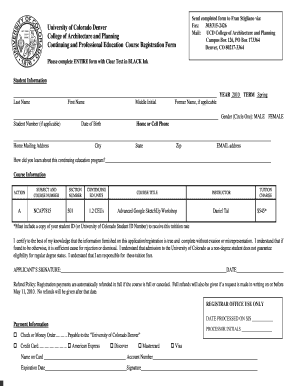
Filling out the Mail: - Ucdenver form is essential for registering for continuing education courses at the University of Colorado Denver. This guide will walk you through each section of the form, providing clear and concise instructions to ensure your submission is successful.
Follow the steps to complete your registration form effectively.
- Click ‘Get Form’ button to obtain the form and open it in the editor.
- Begin by filling in the 'Student Information' section. Provide your last name, first name, and middle initial. If you have a former name, include it in the designated field. Indicate your gender by circling the appropriate option, and enter your student number if applicable. Complete the remaining fields with your date of birth, home mailing address, phone number, email address, and how you learned about the program.
- In the 'Course Information' section, indicate the action you wish to take and fill in the subject and course number (e.g., NCAP7815) along with the section number (e.g., 501). Specify the course title, instructor's name, and the number of continuing education units (e.g., 1.2 CEUs). Be sure to note the tuition charge, and remember to attach a copy of your student ID to benefit from the tuition rate.
- In the certification statement, read through the declarations carefully. Sign and date the form to validate your information and acknowledge your responsibility for the tuition fees.
- Review the refund policy provided and ensure you understand the terms regarding refunds for course cancellations and written requests.
- Finally, complete the 'Payment Information' section. Indicate your payment method by selecting either check, money order, or credit card. If using a credit card, fill in the required information including the card holder's name, account number, expiration date, and signature.
- Once all sections are completed, save the form with your changes. You can now download, print, or share the completed form as needed.
Complete your registration form online to ensure a smooth entry into your desired course.
Related links form
mail.com is a web portal and web-based email service provider owned by the internet company 1&1 Mail & Media Inc., headquartered in Philadelphia, Pennsylvania, United States. 1&1 Mail & Media Inc. is a subsidiary of United Internet Group, a publicly listed internet services company based in Montabaur, Germany.
Industry-leading security and compliance
US Legal Forms protects your data by complying with industry-specific security standards.
-
In businnes since 199725+ years providing professional legal documents.
-
Accredited businessGuarantees that a business meets BBB accreditation standards in the US and Canada.
-
Secured by BraintreeValidated Level 1 PCI DSS compliant payment gateway that accepts most major credit and debit card brands from across the globe.