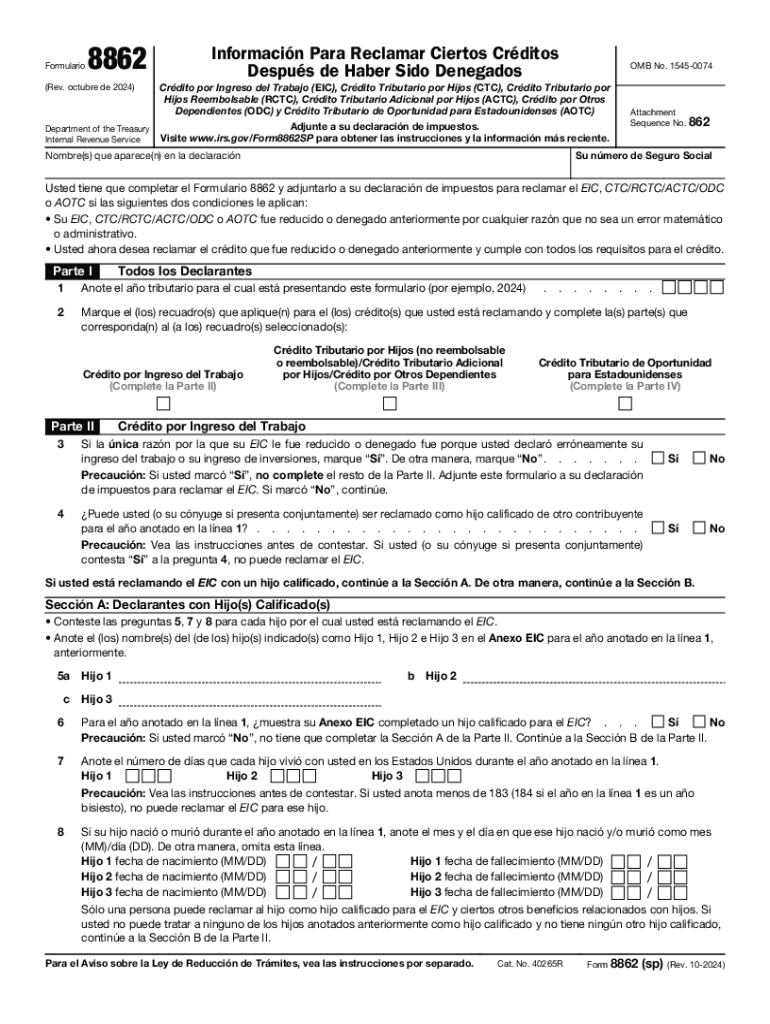
Dito Tributario por Hijos Reembolsable (RCTC), Cr dito Tributario Adicional por Hijos (ACTC), Cr dito por Otros Dependientes (ODC) y Cr dito Tributario de Oportunidad para Estadounidenses (AOTC) Adjunte a su declaraci n de impuestos. Department of the Treasury Visite www.irs.gov/Form8862SP para obtener las instrucciones y la informaci n m s reciente. Internal Revenue Service (Rev. octubre de 2024) Attachment Sequence No. 862 Su n mero de Seguro Social Nombre(s) que aparece(n) en la d.
Loading

Open form follow the instructions

Easily sign the form with your finger

Send filled & signed form or save
How to fill out the IRS 8862 (SP) online
The IRS Form 8862 (SP) is essential for individuals who have had their credits denied but wish to claim them again. This guide offers a clear, step-by-step approach to completing the form online, ensuring you understand each section and field.
Follow these steps to fill out Form 8862 (SP) online.
- Click ‘Get Form’ button to access the IRS 8862 (SP) form and open it in your preferred editor.
- Indicate the tax year for which you are submitting the form by writing the year in the designated space.
- Check the applicable boxes for the credits you are claiming, including Earned Income Credit (EIC) and Child Tax Credit (CTC), and complete the corresponding sections.
- If claiming EIC, respond to the questions in Part II: Section A or Section B based on whether you have qualifying children.
- For Section A, provide names and details for each qualifying child, including their living situation and any relevant dates of birth or death.
- If completing Section B (for those without qualifying children), provide information about your residency in the U.S. and your and your spouse's ages.
- In Part III, list the names of each child or dependent for whom you are claiming the Child Tax Credit (CTC) and respond to related eligibility questions.
- In Part IV, answer questions regarding the American Opportunity Tax Credit (AOTC) for qualifying students, including their status and whether the credit has been claimed previously.
- Review all entries for accuracy and completeness before submitting.
- Once verified, you can save changes, download, print, or share the completed form.
Start filing your IRS Form 8862 (SP) online today to reclaim your eligible credits.
Experience a faster way to fill out and sign forms on the web. Access the most extensive library of templates available.
Related content
Usted tiene que completar el Formulario 8862 y adjuntarlo a su declaración de impuestos...
Form 8862 may be required. If your American opportu- nity credit was denied ... Form...
Feb 20, 2018 — other credits, see your tax form instructions. Child Tax Credit. Form...
Get answers to your most pressing questions about US Legal Forms API.
Can I file form 8862 electronically in the IRS?
Form 8862 must be attached to your tax return if you are e-filing. If it's not, the IRS could reject your return.
How do I remove form 8862?
Click Federal from the dropdown in forms explorer, then click the Forms and Schedules dropdown (if it is not already expanded). Scroll down and right-click Form 8862, then click Delete Copy, then click Yes to confirm.
What IRS forms cannot be filed electronically?
In addition, some Forms 1040, 1040-A, 1040-EZ, and 1041 cannot be e-filed if they have attached forms, schedules, or documents that IRS does not accept electronically.
What is the meaning of 8862?
Form 8862 - Earned Income Credit Claim After Disallowance. Form 8862 Information To Claim Certain Credits After Disallowance is used to claim the Earned Income Credit (EIC) if this credit was previously reduced or disallowed by the IRS, and you now wish to claim the credit on this year's return.
How to fill out 8862 Form pdf?
How to fill out a 8862 form? Start by entering personal information such as your name, address, and Social Security number. Indicate the tax year you're claiming the Earned Income Credit (EIC) for. Answer questions related to EIC disqualification, if applicable.
Can Form 8862 be filed electronically?
You can include IRS Form 8862 when filing your tax return electronically. If the IRS sent you a notice requesting that you complete the form, mail it to the address provided in the letter. Please note that a signature is not required on the completed form.
How do I file Form 8862 electronically with TurboTax?
Here's how to file Form 8862 in TurboTax. Open or continue your return. Navigate to Form 8862: ... You'll come to the Earned Income Credit section. ... Answer the questions. ... Select Continue and then Done.
What is the IRS form 8862 used for?
Taxpayers complete Form 8862 and attach it to their tax return if: Their earned income credit (EIC), child tax credit (CTC)/additional child tax credit (ACTC), credit for other dependents (ODC) or American opportunity credit (AOTC) was reduced or disallowed for any reason other than a math or clerical error.
Use professional pre-built templates to fill in and sign documents online faster. Get access to thousands of forms.
If you believe that this page should be taken down, please follow our DMCA take down process here.