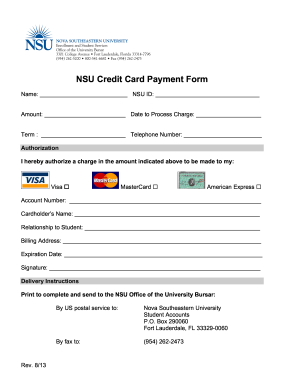
_____________________ Telephone Number: ________________________ Authorization I hereby authorize a charge in the amount indicated above to be made to my: Visa MasterCard American Express Account Number: ___________________________________________________________ Cardholder’s Name: _________________________________________________________ Relationship to Student: ______________________________________________________ Billing Address: ____________________________________________.
Open form follow the instructions
Easily sign the form with your finger
Send filled & signed form or save
How to fill out the NSU Credit Card Authorization online
Filling out the NSU Credit Card Authorization form is a straightforward process that allows you to authorize payments conveniently. This guide provides clear, step-by-step instructions to ensure that you complete the form accurately and securely.
Follow the steps to complete the authorization form online.
- Click ‘Get Form’ button to obtain the form and open it in the editor.
- Enter your full name in the designated field at the top of the form. This helps identify the account associated with the payment.
- Provide your NSU ID number. This is essential for the university to process your authorization correctly.
- Indicate the amount you wish to charge. Ensure it is accurate to avoid processing issues.
- Specify the date you want the charge to be processed. This ensures timely payment.
- Fill in the term for which the payment is being made.
- Provide your telephone number. This is necessary for any follow-up or clarification required regarding your authorization.
- In the authorization section, select the type of card you are using by filling in the appropriate box next to Visa, MasterCard, or American Express.
- Enter your credit card account number. Ensure the number is accurate to prevent payment failure.
- Type the cardholder’s name as it appears on the credit card. This is to verify card ownership.
- Specify your relationship to the student. This clarifies your authority to authorize the charge.
- Provide the billing address associated with the credit card. This information is necessary for validation purposes.
- Enter the expiration date of the credit card to ensure it is valid for processing.
- Sign the form to authorize the transaction. This is a crucial step, as it confirms your consent.
- Once you have completed all sections of the form, review it for any errors. After confirming accuracy, you can save changes, download, print, or share the completed form.
Complete your NSU Credit Card Authorization online with confidence.
Experience a faster way to fill out and sign forms on the web. Access the most extensive library of templates available.
Related content
The credit bureaus must also send written confirmation to you within five business days...
Complete and sign this form to authorize Norfolk State University to make a one-time...
If the other device cannot be powered on without a SIM card, you can insert your SIM card...
Get answers to your most pressing questions about US Legal Forms API.
How to fill credit card payment authorization?
Filling out credit card payment authorization entails providing your personal and credit card information clearly. Include the billing address associated with the card, as it helps with verification. Don’t forget to read any disclaimers before signing to ensure you comply with the terms. NSU Credit Card Authorization simplifies this process, allowing you to handle payment authorizations with confidence.
How to fill out a credit card authorization form?
To effectively fill out a credit card authorization form, ensure you enter your name, billing address, and credit card number accurately. Provide the expiration date and security code as required. Signing the form is essential to confirm your authorization for the transaction. For ease and security, consider using NSU Credit Card Authorization when dealing with multiple forms.
Is it safe to fill out a credit card authorization form?
Yes, it is safe to fill out a credit card authorization form as long as you use a secure platform. Always look for HTTPS in the URL and ensure the site is reputable. Additionally, consider using NSU Credit Card Authorization, which is designed with security in mind to protect your sensitive information throughout the transaction process.
How do I fill out an authorization form?
Filling out an authorization form involves entering your personal details and specifying the authorization purpose. Ensure you provide any required account information and follow the instructions carefully. Do not forget to sign the form as your consent to authorize the specified request. NSU Credit Card Authorization can assist you in managing this process efficiently, ensuring all data is filled out correctly.
How do I authorize a credit card transaction?
To authorize a credit card transaction, you need to provide the seller with your credit card details, either verbally or through a secure form. The merchant will run the information through their payment system to verify and approve the transaction. It's crucial to ensure that the system used for processing is secure to protect your information. NSU Credit Card Authorization offers robust solutions to help manage your credit card transactions safely.
How to fill out a debit authorization form?
When filling out a debit authorization form, begin with your contact information and bank details. Provide the debit card number, expiration date, and any additional required information. Always read through the terms provided in the form before signing to ensure you fully understand the transaction. Utilizing NSU Credit Card Authorization helps simplify these processes and keeps your information secure.
How do I fill out a credit card authorization form?
To fill out a credit card authorization form, start by providing your basic personal information, such as your name and billing address. Next, include your credit card information, including the card number, expiration date, and security code. Finally, ensure you sign and date the form to authorize the transaction. Using NSU Credit Card Authorization can streamline this process when you are working with various vendors.
Why is my credit card not authorized?
Your credit card may not be authorized for several reasons, including insufficient funds, expired card details, or incorrect information provided during the transaction. It’s important to double-check your details and consult with your card issuer if you encounter repeated authorization issues. If you're using NSU Credit Card Authorization and experience problems, consider checking your account status for a seamless experience.
What is an authorization key?
An authorization key is a unique code that is generated during the credit card authorization process. It acts as proof of approval from the card issuer and is essential for completing the transaction. Understanding the role of the authorization key in NSU Credit Card Authorization helps ensure that all payments are secure and legitimate.
What is a credit card authorization letter?
A credit card authorization letter is a written document that allows an individual to authorize another person to use their credit card for a specified purpose. This letter typically includes the cardholder's information, the authorized person's details, and the limitations of use. When dealing with NSU Credit Card Authorization, this letter can help facilitate secure transactions when you are unable to be present.
Use professional pre-built templates to fill in and sign documents online faster. Get access to thousands of forms.
If you believe that this page should be taken down, please follow our DMCA take down process here.
This form is available in several versions. Select the version you need from the drop-down list below.