Loading
Get (916) 654-6288 Return To: Employer Account No
How it works
-

Open form follow the instructions
-

Easily sign the form with your finger
-

Send filled & signed form or save
How to use or fill out the (916) 654-6288 Return To: Employer Account No online
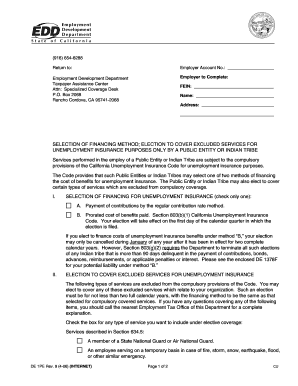
Completing the (916) 654-6288 Return To: Employer Account No form is essential for public entities and Indian tribes to manage their unemployment insurance financing. This guide provides detailed steps to ensure you fill out the form accurately and efficiently online.
Follow the steps to successfully complete your form online.
- Click ‘Get Form’ button to access the (916) 654-6288 Return To: Employer Account No form and open it in your preferred online editor.
- In the section labeled 'Employer to Complete', input the Federal Employer Identification Number (FEIN), the full name of the employer, and the complete address.
- For the 'Selection of Financing Method' section, choose only one option for how you wish to finance unemployment insurance benefits. Mark the box next to either ‘A. Payment of contributions by the regular contribution rate method’ or ‘B. Prorated cost of benefits paid’.
- If you selected the financing method option 'B', note that this election can only be canceled during January of the year following two complete calendar years of its implementation.
- In the ‘Election to Cover Excluded Services for Unemployment Insurance’ section, check the boxes next to any types of services you want to include under elective coverage. These services must adhere to the categories outlined in the form.
- Ensure to attach a copy of the resolution from the governing body that approved the elective coverage for services as specified under Section 710 of the Unemployment Insurance Code.
- Fill out the additional fields for the name of the public entity or Indian tribe, the signature of the authorized individual, their title, business telephone number, fax number, and date of submission.
- Once all sections are filled out completely and accurately, review the form for any errors. After ensuring that all information is correct, save your changes, and you can then download, print, or share the form as needed.
Complete your unemployment insurance form online today for efficient processing!
If you have lost, misplaced, or never received your EDD Customer Account Number, contact the EDD: Online: Go to Ask EDD and select the category Unemployment Insurance Benefits, the subcategory UI Online (UIO), and the topic EDD Customer Account Number.
Industry-leading security and compliance
US Legal Forms protects your data by complying with industry-specific security standards.
-
In businnes since 199725+ years providing professional legal documents.
-
Accredited businessGuarantees that a business meets BBB accreditation standards in the US and Canada.
-
Secured by BraintreeValidated Level 1 PCI DSS compliant payment gateway that accepts most major credit and debit card brands from across the globe.