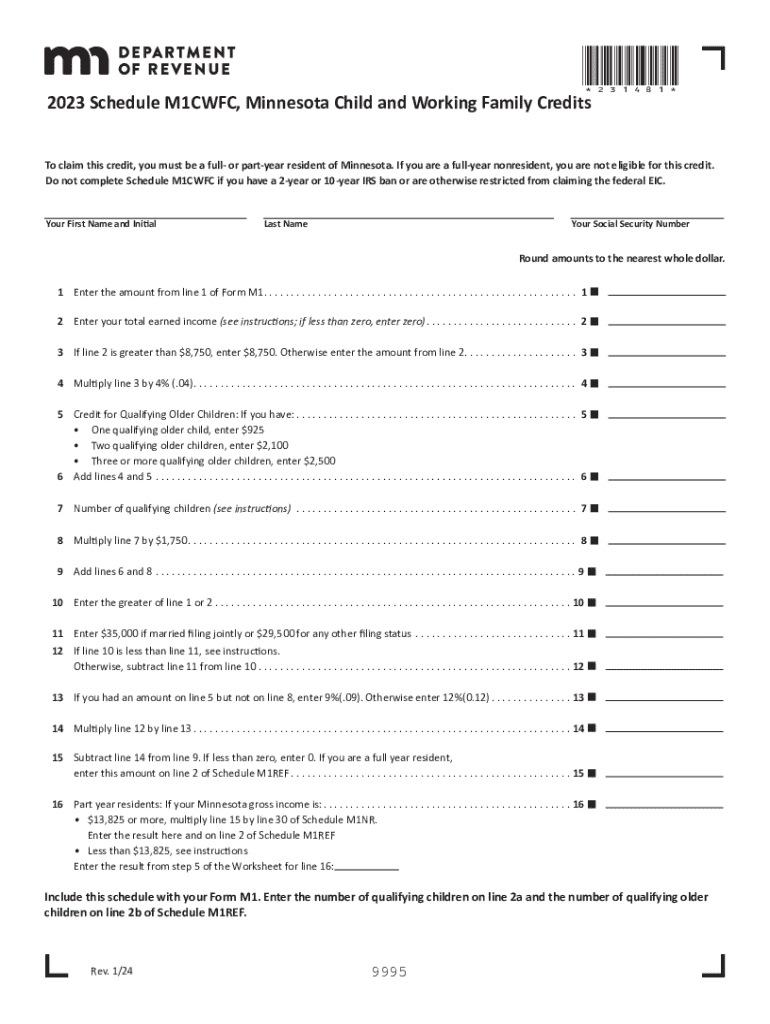
*231481*2023 Schedule M1CWFC, Minnesota Child and Working Family CreditsTo claim this credit, you must be a full or partyear resident of Minnesota. If you are a fullyear nonresident, you are not eligible.

Open form follow the instructions

Easily sign the form with your finger

Send filled & signed form or save
How to fill out the MN DoR Schedule M1CWFC (Formerly M1WFC) online
This guide provides a comprehensive walkthrough for completing the MN DoR Schedule M1CWFC (Formerly M1WFC) online. Users will learn how to fill out each section of the form accurately to claim the Minnesota Working Family Credit and Child Tax Credit.
Follow the steps to complete your Schedule M1CWFC online.
- Press the ‘Get Form’ button to access the Schedule M1CWFC, allowing you to open it in your chosen online editing tool.
- Provide your first name and initial, followed by your last name in the designated fields.
- Enter your Social Security Number in the appropriate section to ensure your identification is verified for processing.
- Round amounts to the nearest whole dollar when entering any financial figures.
- On line 1, input the amount from line 1 of Form M1. This establishes your base for the credit calculation.
- For line 2, enter your total earned income based on the instructions. Ensure that if the total is less than zero, you enter zero.
- For line 3, if the amount on line 2 surpasses $8,750, simply enter $8,750. Otherwise, input the amount from line 2.
- Multiply the figure from line 3 by 4% (0.04) for line 4 and enter the result.
- Refer to line 5 for the credit for qualifying older children. If applicable, enter the corresponding amount for the number of qualifying children you have.
- Add together the values from lines 4 and 5 for line 6.
- For line 7, input the number of qualifying children as instructed; this information can be obtained from Schedule M1DQC.
- Multiply the number of qualifying children on line 7 by $1,750 to determine the amount to be entered on line 8.
- Combine the values from lines 6 and 8 for line 9.
- On line 10, enter the greater amount of either line 1 or line 2.
- Provide specific amounts on line 11 based on your filing status—$35,000 if married filing jointly; $29,500 for any other status.
- If necessary, complete line 12 by subtracting line 11 from line 10, following the instructions if line 10 is less than line 11.
- Continue to line 13, entering 9% (0.09) if you have an amount on line 5 but not on line 8; otherwise, enter 12% (0.12).
- For line 14, multiply the amount from line 12 by the percentage from line 13 and enter the result.
- For line 15, subtract the amount on line 14 from line 9. If the result is less than zero, enter zero.
- If you are a part-year resident, complete line 16 by following the specific instructions based on your gross income.
- Once completed, ensure you save the changes, and choose to download, print, or share the form as needed.
Start filing your MN DoR Schedule M1CWFC online now to take advantage of your eligible credits.
Experience a faster way to fill out and sign forms on the web. Access the most extensive library of templates available.
Related content
Jul 1, 2024 — This is especially important if the return contains Schedule M1WFC...
Jul 1, 2024 — 2023 Tax Forms. Schedule M1CWFC, Child and Working Family Credits...
Jul 1, 2024 — The May 2023 tax bill generally conformed Minnesota to the federal...
Get answers to your most pressing questions about US Legal Forms API.
What is the Minnesota claim of right credit?
Line 10 — Claim of Right The credit amount is the difference between your tax liability for that year with and without the income. Include a copy of the recom- puted tax return showing the tax liability computed without the repaid income.
How much is the earned income credit in MN?
Eligibility No Children3 or More Qualifying Children Single AGI limit: $18,591 Max credit: $632 AGI limit: $59,899 Max credit: $7,830 Married (filing jointly) AGI limit: $25,511 Max credit: $632 AGI limit: $66,819 Max credit: $7,830 * Figures are for tax year 2024 (filing by April 2025).
What is the refundable education credit?
An education credit helps with the cost of higher education by reducing the amount of tax owed on your tax return. If the credit reduces your tax to less than zero, you may get a refund. There are two education credits available: the American opportunity tax credit (AOTC) and the lifetime learning credit (LLC).
What is considered a refundable credit?
Refundable tax credits are called “refundable” because if you qualify for a refundable credit and the amount of the credit is larger than the tax you owe, you will receive a refund for the difference. For example, if you owe $800 in taxes and qualify for a $1,000 refundable credit, you would receive a $200 refund.
Who gets a Minnesota property tax refund?
There are two types of property tax refunds in Minnesota. One is income based and you may apply for this if your household income is less than $128,280; you owned and occupied a home in Minnesota; are filing a refund for 2021 or later; did not rent out your home; and did not use your home for business.
Is Minnesota getting a Child Tax Credit in 2024?
Minnesota is set to become the first state in the nation to roll out an advanced payment option of the Child Tax Credit beginning with tax year 2024. This option will give parents the flexibility to receive the money from the credit at intervals throughout the year instead of all at once when filing their returns.
What is the Minnesota refundable credit?
August 2024 Minnesota offers two refundable income tax credits targeted toward lower-income individuals: the child credit and the working family credit. The two credits are intertwined—taxpayers add together the two credits, and the combined amount is phased down based on income.
What is the new tax child credit for 2024?
Up to $1,700 per qualifying child in 2024 and 2025 is refundable with the Additional Child Tax Credit. You can find out if you're eligible for this refundable credit by completing the worksheet in IRS Form 8812.
Use professional pre-built templates to fill in and sign documents online faster. Get access to thousands of forms.
If you believe that this page should be taken down, please follow our DMCA take down process here.