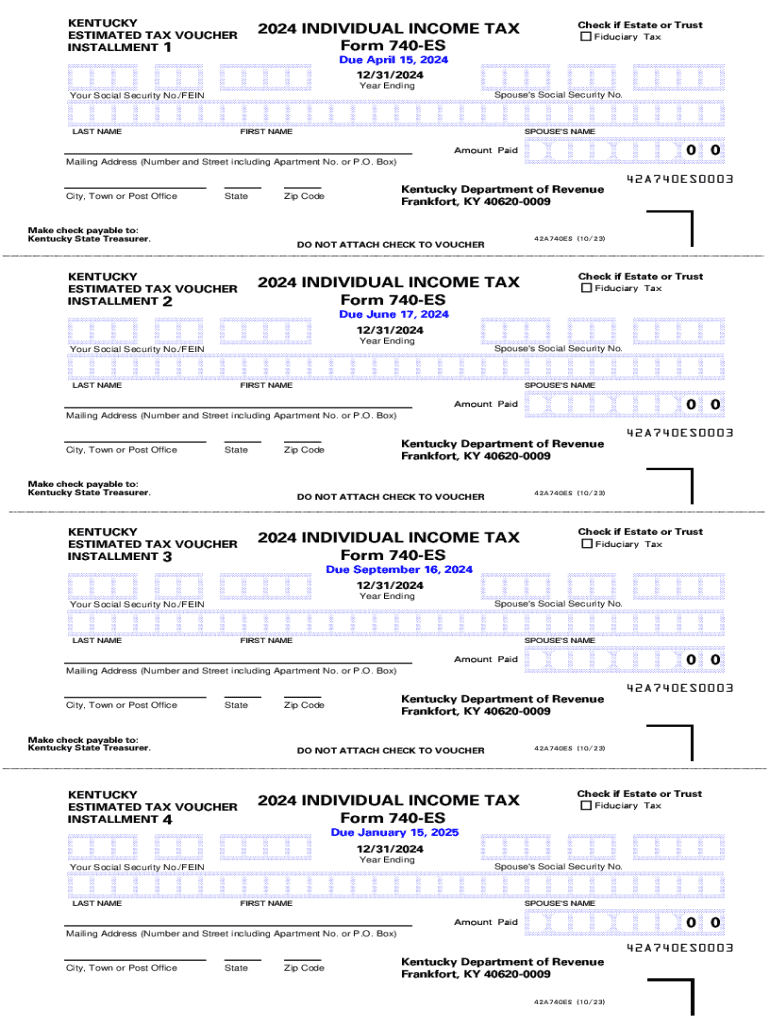
CD CCCD CCD CCCCD AAAAAAAAAAAAAAAAAAAAAAAAAAAAAAB CCCCCCCCCCCCCCCCCCCCCCCCCCCCCCD AAAAAAAAAB 0 0 EFCEFCEFCD Year Ending Spouse's Social Security No. Your Social Security No./FEIN LAST NAME FIRST NAME SPOUSE'S NAME Amount Paid Mailing Address (Number and Street including Apartment No. or P.O. Box) City, Town or Post Office State Kentucky Department of Revenue Frankfort, KY 40620-0009 Zip Code Make check payable to: Kentucky State Treasurer. 42A740ES (10/23) DO NOT ATTACH CHECK TO VO.
Loading

Open form follow the instructions

Easily sign the form with your finger

Send filled & signed form or save
How to fill out the KY DoR 740-ES online
Filling out the Kentucky Department of Revenue Form 740-ES online is a straightforward process that helps individuals manage their estimated tax payments. This guide will walk you through each section of the form to ensure you complete it accurately.
Follow the steps to fill out the form successfully.
- Click 'Get Form' button to access the Kentucky Department of Revenue Form 740-ES and open it in the digital editor.
- Enter your Social Security number or Federal Employer Identification Number (FEIN) in the designated field to identify yourself.
- Provide your last name and first name, followed by your spouse's name if applicable. This information is essential for proper identification.
- If the form is being filled out for an estate or trust, check the appropriate box to indicate this status.
- Fill in your mailing address, ensuring to include your apartment number or P.O. Box, city, state, and zip code. Accurate mailing information is crucial for correspondence.
- Specify the amount you are paying with this voucher in the 'Amount Paid' section to indicate your payment.
- Select the year ending for which you are making the estimated tax payment. This specifies the tax year relevant to your payment.
- Review all information entered on the form to ensure accuracy. Correct any mistakes before proceeding.
- Once you have completed all fields, you can choose to save changes, download, print, or share the form according to your needs.
Complete your documents online today to stay on track with your tax obligations.
Experience a faster way to fill out and sign forms on the web. Access the most extensive library of templates available.
Related content
Pay by check using Form 740-ES. Make check payable to. Kentucky State Treasurer, and write...
• Form 740-PTET–ES: Created to allow an electing pass- through entity to report...
Jul 24, 2020 — o Adds policy on the Soldier for Life Transition Assistance Program...
Get answers to your most pressing questions about US Legal Forms API.
Do I need to file a non resident tax return for Kentucky?
Non-residents and part-year residents must file an income tax return (Form 740-NP, Kentucky Nonresident and Part-Year Resident Individual Income Tax Return) if any gross income from Kentucky sources or other sources exceeds the modified gross income limits for their family size.
Who must file a Kentucky nonresident tax return?
Other Residents Non-residents and part-year residents must file an income tax return (Form 740-NP, Kentucky Nonresident and Part-Year Resident Individual Income Tax Return) if any gross income from Kentucky sources or other sources exceeds the modified gross income limits for their family size.
What is a Kentucky 740 form?
Kentucky Form 740/740-NP – Personal Income Tax Return for Residents / Nonresidents or Part-Year Residents. Kentucky Form 740 – Family Size Tax Credit Worksheet.
Does Ky require estimated tax payments?
Form 720ES in 3 installments if your tax liability is over $5,000 a year. Kentucky follows the IRS standards for estimated payments. If you will owe $500 or more in tax for the current year, you are required to make 90% of the tax due, over quarterly payments.
Who is subject to the Kentucky llet tax?
Calculating KY Limited Liability Entity Tax (LLET) Kentucky imposes a tax on every business that is protected from liability by the laws of the state. This includes corporations, LLCs, S-Corporations, limited partnerships, and other types of businesses.
What is the pension exclusion for 2024 in Kentucky?
For 2024 the exclusion amount is 100% of taxable retirement benefits, or $31,110, whichever amount is less. The subtraction is figured for each taxpayer listed on the return. Please enter the amounts in the corresponding boxes to correctly calculate the return.
Does a non-resident have to file taxes?
You must file Form 1040-NR, U.S. Nonresident Alien Income Tax Return only if you have income that is subject to tax, such as wages, tips, scholarship and fellowship grants, dividends, etc. Refer to Foreign Students and Scholars for more information.
Who is tax exempt in Kentucky?
Tax-exempt customers Some customers are exempt from paying sales tax under Kentucky law. Examples include government agencies, some nonprofit organizations, and merchants purchasing goods for resale. Sellers are required to collect a valid exemption or resale certificate from buyers to validate each exempt transaction.
Use professional pre-built templates to fill in and sign documents online faster. Get access to thousands of forms.
If you believe that this page should be taken down, please follow our DMCA take down process here.