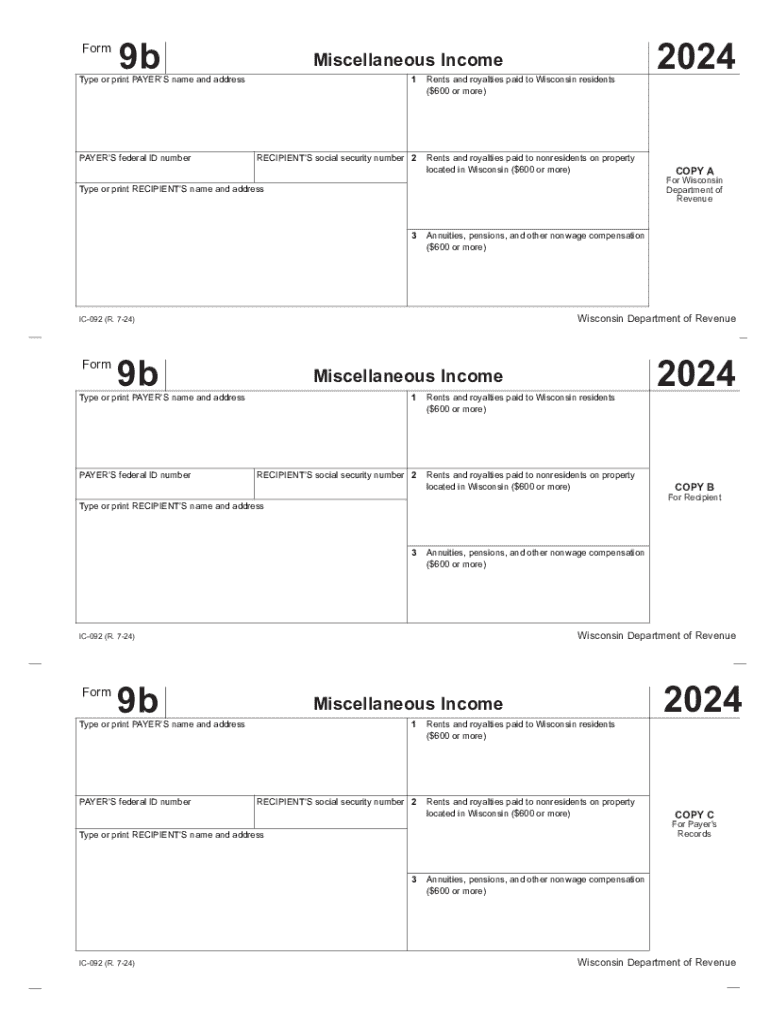
0 or more) Rents and royalties paid to nonresidents on property located in Wisconsin ($600 or more) Type or print RECIPIENT S name and address 3 Wisconsin Department of Revenue 9b Miscellaneous Income 1 Type or print PAYER S name and address PAYER S federal ID number RECIPIENT S social security number 2 Rents and royalties paid to Wisconsin residents ($600 or more) Rents and royalties paid to nonresidents on property located in Wisconsin ($600 or more) Type or print RECIPIENT.
Loading

Open form follow the instructions

Easily sign the form with your finger

Send filled & signed form or save
How to fill out the WI DoR 9b online
Filling out the WI DoR 9b form online helps streamline the reporting of miscellaneous income, such as rents, royalties, and annuities. This guide provides detailed instructions to assist users in completing the form accurately and efficiently.
Follow the steps to complete the WI DoR 9b form online.
- Click the ‘Get Form’ button to obtain the form and open it in the document editor.
- In the first section, enter the payer’s name and address clearly. Provide the payer’s federal identification number in the designated field.
- Input the recipient’s social security number accurately to ensure correct identification and reporting.
- Proceed to Box 1 to report any rents and royalties paid to Wisconsin residents. Only include amounts of $600 or more.
- For Box 2, report rents and royalties paid to nonresidents on properties located in Wisconsin, ensuring to include amounts of $600 or more.
- In Box 3, detail any annuities, pensions, and other nonwage compensation paid to Wisconsin residents or to nonresidents for services performed in Wisconsin, again noting only amounts of $600 or more.
- Review all entered information carefully for accuracy before finalizing the form.
- Once complete, save your changes. You can then download, print, or share the completed form as needed.
Complete your WI DoR 9b form online today to ensure timely and accurate reporting.
Experience a faster way to fill out and sign forms on the web. Access the most extensive library of templates available.
Related content
Give Copy B of Form 9b to the recipient of the payment and keep Copy C for your records...
Dec 31, 2019 — Tax Rates Reduced – The tax rate for the first and second tax bracket...
Get answers to your most pressing questions about US Legal Forms API.
What is Wisconsin standard deduction?
As shown in Table 1, for 2022, a single tax- payer with Wisconsin AGI less than $16,990 has a standard deduction of $11,790; for single tax- payers with AGI in excess of $115,240, no standard deduction is provided.
Where can I get Wisconsin tax forms?
For those who do not have internet access or the ability to print, paper forms and instructions are available upon request. Call or visit any of the Department of Revenue offices located throughout the state. Call (608) 266-2486.
Use professional pre-built templates to fill in and sign documents online faster. Get access to thousands of forms.
If you believe that this page should be taken down, please follow our DMCA take down process here.