Loading
Form preview
  • US Legal Forms
  • Form Library
  • More Forms
  • More Multi-State Forms
  • Non-scannable Forms Form Revision And Release Dates

Get Non-scannable Forms Form Revision And Release Dates

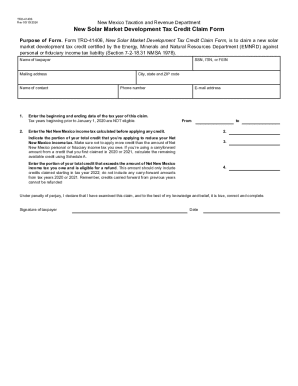
TRD41406 Rev 05/15/2024New Mexico Taxation and Revenue DepartmentNew Solar Market Development Tax Credit Claim Form Purpose of Form. Form TRD41406, New Solar Market Development Tax Credit Claim Form,.

How it works

  1. Open form

    Open form follow the instructions

  2. Easily sign form

    Easily sign the form with your finger

  3. Share form

    Send filled & signed form or save

How to fill out the NON-SCANNABLE FORMS Form Revision And Release Dates online

Completing the NON-SCANNABLE FORMS Form Revision And Release Dates online is a straightforward process that requires attention to detail. This guide aims to support users in accurately filling out each section of the form, ensuring compliance and successful submission.

Follow the steps to complete the form efficiently.

  1. Click the ‘Get Form’ button to obtain the form and access it in the editor.
  2. Fill in the name of the taxpayer in the designated field. This should be the individual or entity claiming the credit.
  3. Provide the mailing address, including city, state, and ZIP code. Ensure that this information is complete and accurate.
  4. Enter the Social Security Number (SSN), Individual Taxpayer Identification Number (ITIN), or Federal Employer Identification Number (FEIN) as applicable.
  5. Input the contact person's name and phone number for any queries related to the form.
  6. Specify the email address for electronic communication regarding the form and its processing.
  7. Indicate the beginning and ending dates of the tax year for which this claim is being made. Note that tax years starting before January 1, 2020, are not eligible.
  8. Fill in the amount of Net New Mexico income tax calculated prior to applying any credits.
  9. Indicate the portion of the total credit being applied to reduce the Net New Mexico income tax. Ensure not to exceed the tax owed.
  10. Enter the portion of the total credit that exceeds the amount of Net New Mexico income tax owed and that is eligible for a refund, applicable only for credits claimed starting in tax year 2022.
  11. Review the declaration under penalty of perjury section. Ensure you confirm the accuracy of the claim before proceeding.
  12. Sign and date the form to confirm that all information provided is true and complete.
  13. After completing the form, users can save changes, download the completed form, print it, or share it as needed.

Start completing your documents online now for a seamless experience.

Get form

Experience a faster way to fill out and sign forms on the web. Access the most extensive library of templates available.
Get form

Related content

Form Revision and Release Dates
Sep 30, 2020 — NON-SCANNABLE FORMS. Form Revision and Release Dates. Tax. Program. Tax...
Learn more
Publication 1167 (Rev. 03-2013)
Cited by 2 — These forms frequently have revision dates that are valid for longer than...
Learn more
v5.2.0
Sep 12, 2023 — When creating checklists and adding forms, you can now make form fields...
Learn more

Related links form

SAP Customer TransformationDeloitteServices Digital Marketing 6th Edition Pdf Kiken Yochi Job/Jobsite Hazard Assessment Worksheet

Questions & Answers

Get answers to your most pressing questions about US Legal Forms API.

Contact support

Individual returns Electronically filed Form 1040 returns are generally processed within 21 days. We're currently processing paper returns received during the months below.

When filling out the Form 4506-T, please consider the following: Do not use white out or write over a mistake. If you make a change, line out and initial the change. Beware of address lines! Print clearly and do not abbreviate words in your address.

Please do not use white out. A new form must be completed and submitted for processing. If claiming “EXEMPT” on the W-4, fields in STEPS 2 - 4 must be blank. If claiming “EXEMPT” on the DE-4 for state taxes, the Check Box on line three must be MARKED and LINES 1 & 2 must be blank.

If you realize there was a mistake on your return, you can amend it using Form 1040-X, Amended U.S. Individual Income Tax Return. For example, a change to your filing status, income, deductions, credits, or tax liability means you need to amend your return.

You can use white out, so long as the resulting correction is clearly legible. If there's any question in your mind, you should prepare a new form from scratch. ing to the IRS, “Although handwritten forms are acceptable, they must be completely legible and accurate to avoid processing errors.

Request a Correction: If a mistake is confirmed, ask your preparer to amend your tax return. They can file Form 1040-X to correct any errors on your original return. File an Amended Return: If your preparer is unresponsive or unwilling to help, you can file an amended return yourself using Form 1040-X.

Get This Form Now!

Use professional pre-built templates to fill in and sign documents online faster. Get access to thousands of forms.
Get form
If you believe that this page should be taken down, please follow our DMCA take down processhere.

Industry-leading security and compliance

US Legal Forms protects your data by complying with industry-specific security standards.
  • In businnes since 1997
    25+ years providing professional legal documents.
  • Accredited business
    Guarantees that a business meets BBB accreditation standards in the US and Canada.
  • Secured by Braintree
    Validated Level 1 PCI DSS compliant payment gateway that accepts most major credit and debit card brands from across the globe.
Get NON-SCANNABLE FORMS Form Revision And Release Dates
Get form
  • Adoption
  • Bankruptcy
  • Contractors
  • Divorce
  • Home Sales
  • Employment
  • Identity Theft
  • Incorporation
  • Landlord Tenant
  • Living Trust
  • Name Change
  • Personal Planning
  • Small Business
  • Wills & Estates
  • Packages A-Z
  • Affidavits
  • Bankruptcy
  • Bill of Sale
  • Corporate - LLC
  • Divorce
  • Employment
  • Identity Theft
  • Internet Technology
  • Landlord Tenant
  • Living Wills
  • Name Change
  • Power of Attorney
  • Real Estate
  • Small Estates
  • Wills
  • All Forms
  • Forms A-Z
  • Form Library
  • Legal Hub
  • About Us
  • Help Portal
  • Legal Resources
  • Blog
  • Affiliates
  • Contact Us
  • Delete My Account
  • Site Map
  • Industries
  • Forms in Spanish
  • Localized Forms
  • State-specific Forms
  • Forms Kit
  • Real Estate Handbook
  • All Guides
  • Notarize
  • Incorporation services
  • For Consumers
  • For Small Business
  • For Attorneys
  • USLegal
  • FormsPass
  • pdfFiller
  • signNow
  • altaFlow
  • DocHub
  • Instapage
Form Packages
  • Adoption
  • Bankruptcy
  • Contractors
  • Divorce
  • Home Sales
  • Employment
  • Identity Theft
  • Incorporation
  • Landlord Tenant
  • Living Trust
  • Name Change
  • Personal Planning
  • Small Business
  • Wills & Estates
  • Packages A-Z
Form Categories
  • Affidavits
  • Bankruptcy
  • Bill of Sale
  • Corporate - LLC
  • Divorce
  • Employment
  • Identity Theft
  • Internet Technology
  • Landlord Tenant
  • Living Wills
  • Name Change
  • Power of Attorney
  • Real Estate
  • Small Estates
  • Wills
  • All Forms
  • Forms A-Z
  • Form Library
Customer Service
  • Legal Hub
  • About Us
  • Help Portal
  • Legal Resources
  • Blog
  • Affiliates
  • Contact Us
  • Delete My Account
  • Site Map
  • Industries
  • Forms in Spanish
  • Localized Forms
  • State-specific Forms
  • Forms Kit
Legal Guides
  • Real Estate Handbook
  • All Guides
Prepared for you
  • Notarize
  • Incorporation services
Our Customers
  • For Consumers
  • For Small Business
  • For Attorneys
Our Sites
  • USLegal
  • FormsPass
  • pdfFiller
  • signNow
  • altaFlow
  • DocHub
  • Instapage
Social Media
Call us now toll free:
+1 833 426 79 33
As seen in:
© Copyright 1999-2026 airSlate Legal Forms, Inc. 3720 Flowood Dr, Flowood, Mississippi 39232
  • Your Privacy Choices
  • Terms of Service
  • Privacy Notice
  • Content Takedown Policy
  • Bug Bounty Program