Loading
Get Krum Isd Cheerleader Tryout Teacher Evaluation 2012-2026
How it works
-

Open form follow the instructions
-

Easily sign the form with your finger
-

Send filled & signed form or save
How to fill out the Krum ISD Cheerleader Tryout Teacher Evaluation online
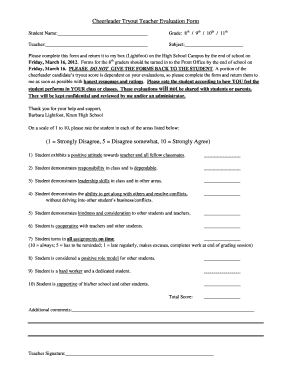
This guide provides clear instructions on completing the Krum ISD Cheerleader Tryout Teacher Evaluation online. Follow these steps to ensure you accurately assess your student’s performance and contribute to their tryout process.
Follow the steps to complete the evaluation form online.
- Press the ‘Get Form’ button to access the evaluation form and open it in your preferred editor.
- Begin by filling in the student’s name in the designated area at the top of the form.
- Select the appropriate grade level for the student from the options provided: 8th, 9th, 10th, or 11th.
- Enter your name as the teacher in the section labeled 'Teacher'.
- Specify the subject you teach in the provided space.
- Access the rating scale section where you will rate the student on various qualities. Use a scale from 1 to 10, where 1 represents 'Strongly Disagree' and 10 represents 'Strongly Agree'. Fill in each rating according to your observations in your classroom.
- Review the additional comments section to provide any further feedback about the student’s performance or character.
- Sign the form in the space provided for the teacher’s signature.
- Once all fields are completed, you can save your changes, download the form, print it, or share it as needed.
Complete the Krum ISD Cheerleader Tryout Teacher Evaluation online today!