Loading
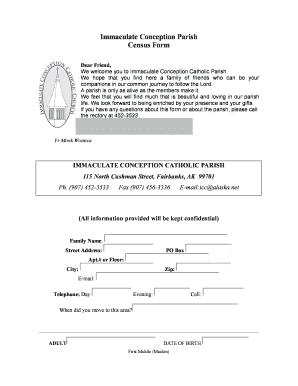
Get Immaculate Conception Parish Census Form - Moving To Alaska
How it works
-

Open form follow the instructions
-

Easily sign the form with your finger
-

Send filled & signed form or save
How to fill out the Immaculate Conception Parish Census Form - Moving To Alaska online
Filling out the Immaculate Conception Parish Census Form - Moving To Alaska is an important step in becoming part of a welcoming community. This guide provides clear, step-by-step instructions to help you easily complete the form online.
Follow the steps to fill out the census form effectively.
- Click ‘Get Form’ button to access the form and open it in your preferred document editor.
- Begin filling out the form by entering your family name, street address, PO Box if applicable, apartment number or floor, city, and zip code.
- Provide your contact information, including your email address and telephone numbers for day, evening, and cell.
- Indicate when you moved to the area by providing the date.
- For each adult in your household, enter their full name, including first, middle (maiden if applicable), and last names. Provide their date of birth and marital status, selecting from options such as Single, Married, Divorced, or Widow(er).
- Include the religious affiliation of each adult, noting if they are Catholic or Non-Catholic, along with their occupation. Indicate their sacraments received (e.g., Baptized, Confirmed).
- For children at home, list each child's name, date of birth, and their sacrament status (Baptized, First Communion, Confirmed).
- If there are other adults in your household, provide their names, relationships to the family, dates of birth, occupations, and sacrament statuses.
- Answer the question regarding special needs in your family, specifying any needs if applicable.
- For non-Catholics, indicate if you would like to know more about the Catholic Church.
- Decide whether you wish to receive parish envelopes by answering yes or no.
- Specify any language spoken in your home other than English and list any talents or skills you are willing to share with the parish family.
- Finally, enter today's date before submitting the form.
- Once you have completed the form, review all entries for accuracy. You can then save the changes, download a copy, print it, or share it as needed. Click the SEND button to submit your form.
Complete your Census Form online today to help us welcome you to our parish community.
Industry-leading security and compliance
US Legal Forms protects your data by complying with industry-specific security standards.
-
In businnes since 199725+ years providing professional legal documents.
-
Accredited businessGuarantees that a business meets BBB accreditation standards in the US and Canada.
-
Secured by BraintreeValidated Level 1 PCI DSS compliant payment gateway that accepts most major credit and debit card brands from across the globe.