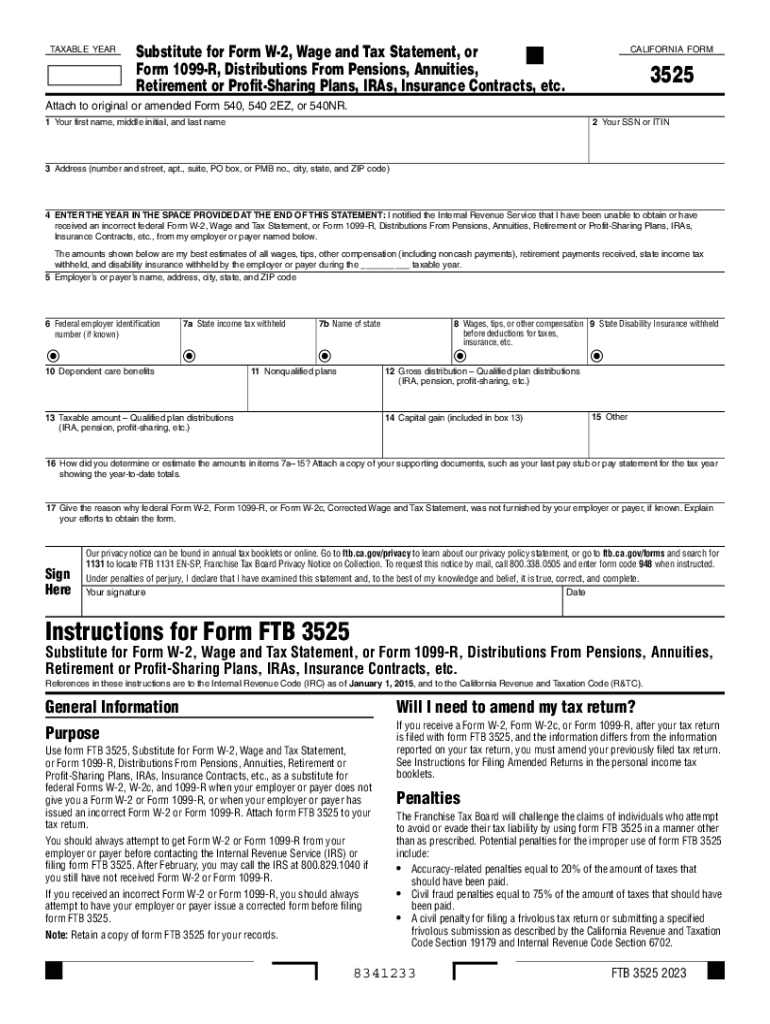
5 Attach to original or amended Form 540, 540 2EZ, or 540NR. 1 Your first name, middle initial, and last name 2 Your SSN or ITIN 3 Address (number and street, apt., suite, PO box, or PMB no., city, state, and ZIP code) 4 ENTER THE YEAR IN THE SPACE PROVIDED AT THE END OF THIS STATEMENT: I notified the Internal Revenue Service that I have been unable to obtain or have received an incorrect federal Form W-2, Wage and Tax Statement, or Form 1099-R, Distributions From Pensions, Annuities, Retire.
Loading

Open form follow the instructions

Easily sign the form with your finger

Send filled & signed form or save
How to fill out the CA FTB 3525 online
Filling out the CA FTB 3525 form can be essential if you are unable to obtain a proper W-2 or 1099-R from your employer or payer. This guide provides step-by-step instructions for completing the form online to ensure accurate submission.
Follow the steps to fill out the form correctly.
- Click the ‘Get Form’ button to obtain the form and open it in the editor.
- Begin by entering your first name, middle initial, and last name in the appropriate fields. Ensure that your name matches your tax records.
- Provide your social security number (SSN) or individual taxpayer identification number (ITIN) in the specified section.
- Fill in your address, including number and street, apartment or suite number, city, state, and ZIP code.
- In the provided space, enter the taxable year for which you are submitting this form.
- List the name, address, city, state, and ZIP code of your employer or payer who failed to provide the required tax documents.
- If known, include the federal employer identification number (EIN).
- Enter the state income tax withheld in the appropriate box.
- Record your wages, tips, or other compensation before any deductions.
- Indicate any state disability insurance withheld from your income.
- Provide details for any dependent care benefits received, if applicable.
- Fill out the information regarding gross distribution from qualified plans, including pensions or retirement accounts.
- Enter the taxable amount of the distributions received during the taxable year.
- Document any capital gain included in the taxable amount.
- Provide details for any other relevant financial information as required.
- Describe how you estimated the amounts for lines 7a to 15 and attach supporting documents, such as your final pay stub showing year-to-date totals.
- Explain the reason why the federal Form W-2 or Form 1099-R was not issued, along with any efforts you made to obtain it.
- Sign and date the form to certify that the information provided is correct, complete, and truthful.
- Once completed, save your changes, and you may choose to download, print, or share the form as needed.
Begin completing your CA FTB 3525 form online today.
Experience a faster way to fill out and sign forms on the web. Access the most extensive library of templates available.
Related content
Use form FTB 3525, Substitute for Form W-2, Wage and Tax Statement, or Form 1099-R...
Jul 1, 2005 — The California Franchise Tax Board 2006 Annual Report was published in...
Jan 1, 2019 — book may differ between the USA and Canada. ... 81-2022-0416 ... PD3525...
Get answers to your most pressing questions about US Legal Forms API.
How do I pay $800 minimum franchise tax?
How do I pay the annual franchise tax? Go to .ftb.ca.gov/pay. Choose “Bank Account” Choose Web Pay Business or Web Pay Personal, depending on the entity type. Follow the prompts to provide the requested information and pay the tax.
What is the due date of CA LLC fee?
Annual fee Due date: 15th day of the 4th month after the close of your tax year. You must estimate and pay the fee by the 15th day of the 6th month of the current tax year. Use Estimated Fee for LLCs (3536) 12 when making your payment.
Do you have to pay the $800 California S Corp fee the final year?
All California LLCs or corporations that choose S Corp taxation must pay a 1.5% state franchise tax on their net income. This is paid by the business itself, not the LLC members or corporate shareholders. Also, all LLCs and S Corps must pay a minimum franchise tax of $800 annually, except for the first year.
Is California waiving the LLC fee?
California has dropped its filing fees for starting a new limited liability company (LLC) and many other business entities until June 30, 2023.
When won t California LLCs have to pay annual $800 tax their first year?
California law generally imposes a minimum franchise tax of $800 on every corporation incorporated, qualified to transact business, or doing business in California. A corporation that incorporates or qualifies to do business in California is exempt from paying the minimum franchise tax in its first taxable year.
What is form 3525?
Use form FTB 3525, Substitute for Form W-2, Wage and Tax Statement, or Form 1099-R, Distributions From Pensions, Annuities, Retirement or Profit-Sharing Plans, IRAs, Insurance Contracts, etc., as a substitute for federal Forms W-2, W-2c, and 1099-R when your employer or payer does not give you a Form W-2 or Form 1099-R ...
Do you have to pay the $800 California LLC fee the final year?
Every LLC that is doing business or organized in California must pay an annual tax of $800. This yearly tax will be due, even if you are not conducting business, until you cancel your LLC.
Do you have to pay the $800 California C Corp fee the first year?
California law generally imposes a minimum franchise tax of $800 on every corporation incorporated, qualified to transact business, or doing business in California. A corporation that incorporates or qualifies to do business in California is exempt from paying the minimum franchise tax in its first taxable year.
Use professional pre-built templates to fill in and sign documents online faster. Get access to thousands of forms.
If you believe that this page should be taken down, please follow our DMCA take down process here.