Loading
Get Mt Mga/51 2011-2026
How it works
-

Open form follow the instructions
-

Easily sign the form with your finger
-

Send filled & signed form or save
How to fill out the MT MGA/51 online
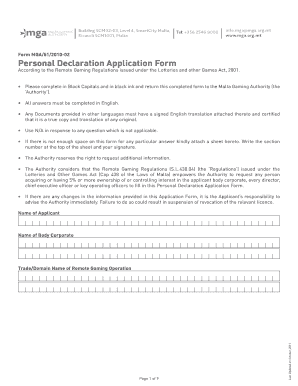
Filing the MT MGA/51 Personal Declaration Application Form is essential for individuals seeking approval from the Malta Gaming Authority. This guide provides step-by-step instructions to ensure that users can complete the form accurately and efficiently.
Follow the steps to successfully complete the MT MGA/51 online.
- Click ‘Get Form’ button to access the MT MGA/51 form and open it for editing.
- Begin by entering the applicant's name and the name of the body corporate. Ensure that these fields are completed in block capitals.
- In the personal details section, provide comprehensive information such as name, maiden name, profession, title, address, phone numbers, and email address. Use 'N/A' for any non-applicable questions.
- Complete the passport and travel information fields, including passport number, place of issue, date of issue, and expiration date.
- If applicable, list all addresses where you have resided in the last five years, stating the duration for each address.
- Answer questions regarding any arrests or legal action accurately, providing details if necessary in an attached sheet.
- Fill in your employment history for the past five years, detailing each employer, job title, duration, and reasons for leaving.
- Provide information on any directorships and business affiliations. This may require an attached page with further details.
- Nominate a bank for reference, providing contact details and the name of a contact person who can vouch for your financial history.
- Complete the financial details section, confirming if you have ever declared bankruptcy or availed laws related to insolvency.
- In the declaration section, insert your name, identity card number, and other required information. Ensure you sign and date the declaration.
- Attach any necessary documents as indicated in the enclosures section. Mark the boxes for all enclosures you are submitting.
- Review your completed form for accuracy. Once satisfied, you can save changes, download, print, or share the form as appropriate.
Complete your MT MGA/51 application online to ensure a smooth and efficient filing process.