
Open form follow the instructions

Easily sign the form with your finger

Send filled & signed form or save
How to fill out the VA DoT 502 online
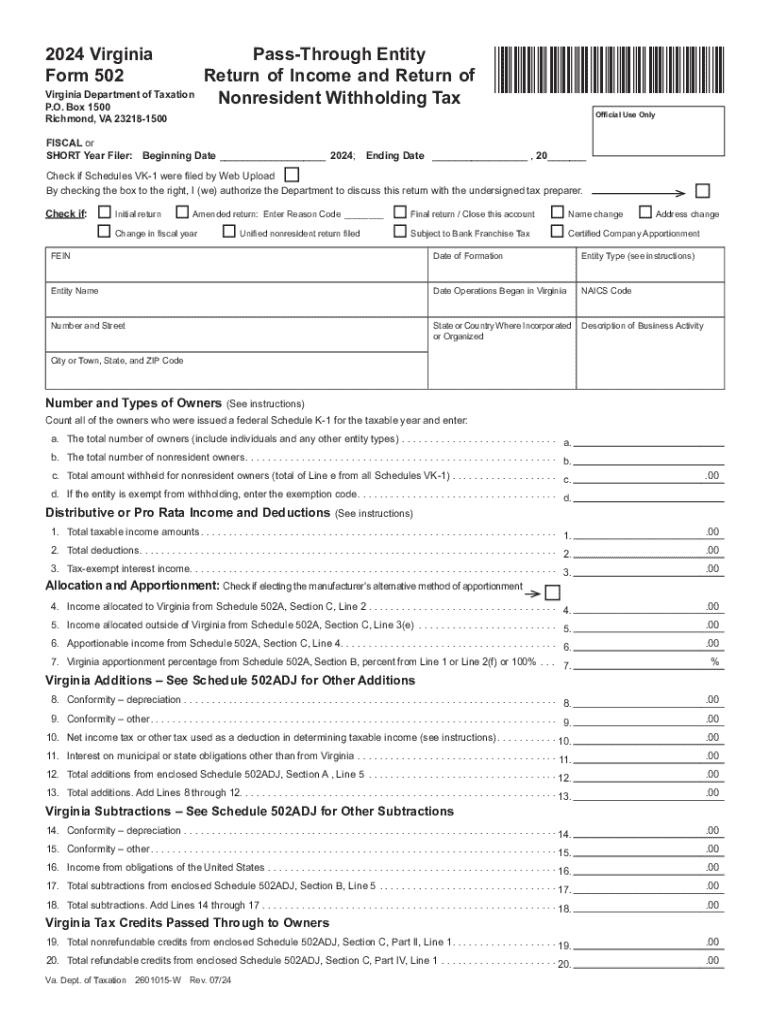
Filling out the VA DoT 502 form for pass-through entities is an essential task for tax compliance in Virginia. This guide provides clear, step-by-step instructions on how to successfully complete this form online.
Follow the steps to accurately complete the VA DoT 502 form.
- Click ‘Get Form’ button to obtain the form and open it for completion.
- Enter the fiscal year or short year information in the designated fields, including the beginning and ending dates.
- Indicate if any Schedules VK-1 were filed by checking the appropriate box.
- Check the relevant boxes for the type of return: initial, amended (with a reasoning code), final return, name change, bank franchise tax, or certified company apportionment.
- Fill in the Federal Employer Identification Number (FEIN) and the date of formation of the entity.
- Select the entity type from the provided options and enter the entity name.
- Input the date operations began in Virginia and the NAICS code to classify your business activity.
- Provide your business address, including the number and street, city or town, state, and ZIP code.
- Count the number and types of owners; fill in the total number of owners and total number of nonresident owners.
- Enter the total amount withheld for nonresident owners and any exemption code if applicable.
- Proceed to input the total taxable income amounts and all relevant financial lines such as deductions and income allocations.
- After entering all necessary information, review for accuracy before finalizing.
- Once completed, you can save your changes, download the form, or opt to print or share it as needed.
Get started on completing your VA DoT 502 form online today!
Experience a faster way to fill out and sign forms on the web. Access the most extensive library of templates available.
Related content
How do I apply for unemployment benefits? You can apply online at www.jobs.state.nm.us or...
The Bureau of Labor Statistics is the principal fact-finding agency for the Federal...
To access a form field, you prefix it with a pound symbol and input, eg. #input/Name to...
Use professional pre-built templates to fill in and sign documents online faster. Get access to thousands of forms.
If you believe that this page should be taken down, please follow our DMCA take down process here.