Loading
Form preview
  • US Legal Forms
  • Other Templates
  • More Forms
  • More Multi-State Forms
  • Special Capital Gains/extraordinary Dividend Election And ...

Get Special Capital Gains/extraordinary Dividend Election And ...

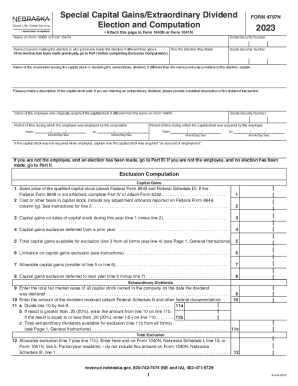
PRINT FORM RESET FORMSpecial Capital Gains/Extraordinary Dividend Election and ComputationFORM 4797N2023 Attach this page to Form 1040N or Form 1041N. Name on Form 1040N or Form 1041NSocial Security.

How it works

  1. Open form

    Open form follow the instructions

  2. Easily sign form

    Easily sign the form with your finger

  3. Share form

    Send filled & signed form or save

How to fill out the Special Capital Gains/Extraordinary Dividend Election And Computation online

This guide provides clear and comprehensive instructions for completing the Special Capital Gains/Extraordinary Dividend Election and Computation Form 4797N online. It is structured to help users navigate each step effectively, ensuring they meet all necessary requirements for their capital gains or extraordinary dividends.

Follow the steps to successfully complete the form online.

  1. Press the ‘Get Form’ button to obtain the Special Capital Gains/Extraordinary Dividend Election and Computation Form 4797N and open it in your preferred editor.
  2. Enter your name as it appears on Form 1040N or Form 1041N, followed by your Social Security Number. Ensure your details are accurate to avoid processing issues.
  3. Fill in the name of the person making the election (if different from the above) and provide their Social Security Number along with the year the election was made.
  4. Identify the corporation that issued the capital stock or declared the extraordinary dividend, explaining any differences if necessary.
  5. Provide a detailed description of the capital stock sold or the extraordinary dividend claimed, ensuring clarity for evaluation purposes.
  6. Input the relevant dates related to the acquisition of the capital stock and the period of employment with the corporation related to employment.
  7. Proceed to the Exclusion Computation section and populate the fields for sales price, cost basis, and capital gains analysis as required.
  8. After entering all the necessary information, review the details for accuracy, then save changes, download, print, or share the completed form as needed.

Complete your Special Capital Gains/Extraordinary Dividend Election online today.

Get form

Experience a faster way to fill out and sign forms on the web. Access the most extensive library of templates available.
Get form

Related content

Special Capital Gains/Extraordinary Dividend...
The election may be made even if there is no sale or exchange of stock, or no...
Learn more
26 U.S. Code § 643 - Definitions applicable to...
Gains from the sale or exchange of capital assets shall be excluded to the extent that...
Learn more
2011 - Instructions for Form 1120S
Jan 31, 2012 — ... (Form 1120), if you have capital gains or losses. Excess Net Passive...
Learn more

Related links form

OMB Number: 2900-0260 Patricia A Marriage - Planning Mackay Qld Gov Change Healthcare Epayment Enrollment Authorization Form 65-0229 - 7800 SERIES Relay Modules. Checkout And Test

Get This Form Now!

Use professional pre-built templates to fill in and sign documents online faster. Get access to thousands of forms.
Get form
If you believe that this page should be taken down, please follow our DMCA take down processhere.
Get Special Capital Gains/Extraordinary Dividend Election And ...
Get form
  • Adoption
  • Bankruptcy
  • Contractors
  • Divorce
  • Home Sales
  • Employment
  • Identity Theft
  • Incorporation
  • Landlord Tenant
  • Living Trust
  • Name Change
  • Personal Planning
  • Small Business
  • Wills & Estates
  • Packages A-Z
  • Affidavits
  • Bankruptcy
  • Bill of Sale
  • Corporate - LLC
  • Divorce
  • Employment
  • Identity Theft
  • Internet Technology
  • Landlord Tenant
  • Living Wills
  • Name Change
  • Power of Attorney
  • Real Estate
  • Small Estates
  • Wills
  • All Forms
  • Forms A-Z
  • Other Templates
  • Legal Hub
  • About Us
  • Help Portal
  • Legal Resources
  • Blog
  • Affiliates
  • Contact Us
  • Delete My Account
  • Site Map
  • Industries
  • Forms in Spanish
  • Localized Forms
  • State-specific Forms
  • Forms Kit
  • Real Estate Handbook
  • All Guides
  • Notarize
  • Incorporation services
  • For Consumers
  • For Small Business
  • For Attorneys
  • USLegal
  • FormsPass
  • pdfFiller
  • signNow
  • altaFlow
  • DocHub
  • Instapage
Form Packages
  • Adoption
  • Bankruptcy
  • Contractors
  • Divorce
  • Home Sales
  • Employment
  • Identity Theft
  • Incorporation
  • Landlord Tenant
  • Living Trust
  • Name Change
  • Personal Planning
  • Small Business
  • Wills & Estates
  • Packages A-Z
Form Categories
  • Affidavits
  • Bankruptcy
  • Bill of Sale
  • Corporate - LLC
  • Divorce
  • Employment
  • Identity Theft
  • Internet Technology
  • Landlord Tenant
  • Living Wills
  • Name Change
  • Power of Attorney
  • Real Estate
  • Small Estates
  • Wills
  • All Forms
  • Forms A-Z
  • Other Templates
Customer Service
  • Legal Hub
  • About Us
  • Help Portal
  • Legal Resources
  • Blog
  • Affiliates
  • Contact Us
  • Delete My Account
  • Site Map
  • Industries
  • Forms in Spanish
  • Localized Forms
  • State-specific Forms
  • Forms Kit
Legal Guides
  • Real Estate Handbook
  • All Guides
Prepared for you
  • Notarize
  • Incorporation services
Our Customers
  • For Consumers
  • For Small Business
  • For Attorneys
Our Sites
  • USLegal
  • FormsPass
  • pdfFiller
  • signNow
  • altaFlow
  • DocHub
  • Instapage
Social Media
Call us now toll free:
+1 833 426 79 33
As seen in:
© Copyright 1999-2026 airSlate Legal Forms, Inc. 17 Station Street, Ste. 203, Brookline, MA 02445
  • Your Privacy Choices
  • Terms of Service
  • Privacy Notice
  • Content Takedown Policy
  • Bug Bounty Program