Loading
Get Case Report By Date Of Entry And Physician Group 2003 - Washoecounty
How it works
-

Open form follow the instructions
-

Easily sign the form with your finger
-

Send filled & signed form or save
How to fill out the Case Report By Date Of Entry And Physician Group 2003 - Washoecounty online
Completing the Case Report By Date Of Entry And Physician Group 2003 - Washoecounty online is essential for accurate reporting of Hepatitis C cases. This guide provides step-by-step instructions to help you navigate the form in a clear and efficient manner.
Follow the steps to effectively fill out the form.
- Press the ‘Get Form’ button to access the form and open it for editing.
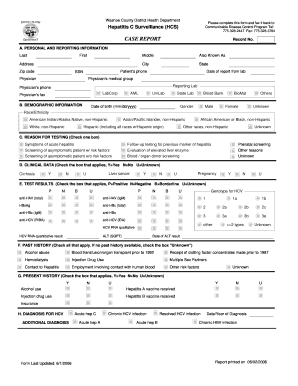
- Begin by filling out Section A, Personal and Reporting Information. This includes the patient’s first name, last name, address, city, state, zip code, phone number, social security number (SSN), report date from lab, physician's medical group, physician's name, reporting lab, physician’s phone, and fax number.
- In Section B, Demographic Information, indicate the patient's gender, date of birth, and race/ethnicity by selecting the appropriate options from the provided choices.
- Proceed to Section C, Reason for Testing. Select one box that best describes why the patient was tested for Hepatitis C.
- Section D requires you to check the appropriate box for clinical data related to cirrhosis, liver cancer, and pregnancy based on the patient's condition.
- In Section E, Test Results, check the applicable boxes for various tests conducted, including genotype for HCV and other serological markers.
- Section F focuses on Past History. Check all relevant risk factors, or mark 'Unknown' if this information is not available.
- In Section G, Present History, provide current health behaviors by checking the appropriate boxes for alcohol use, vaccination history, and insurance status.
- Lastly, complete Section H for Diagnosis by indicating the type of hepatitis diagnosis and the date/year of diagnosis, if applicable.
- Once all sections are filled out, review the information for accuracy. You can then choose to save changes, download, print, or share the completed form as needed.
Take the next step in your documentation process and complete the Case Report online.
Industry-leading security and compliance
US Legal Forms protects your data by complying with industry-specific security standards.
-
In businnes since 199725+ years providing professional legal documents.
-
Accredited businessGuarantees that a business meets BBB accreditation standards in the US and Canada.
-
Secured by BraintreeValidated Level 1 PCI DSS compliant payment gateway that accepts most major credit and debit card brands from across the globe.