Loading
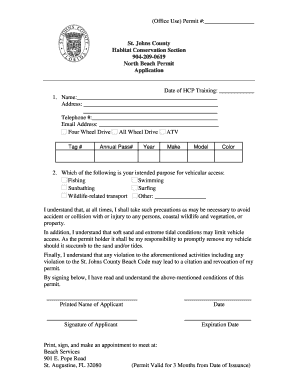
Get (office Use) Permit #: Print, Sign, And Make An Appointment To Meet ...
How it works
-

Open form follow the instructions
-

Easily sign the form with your finger
-

Send filled & signed form or save
How to use or fill out the (Office Use) Permit #: Print, Sign, And Make An Appointment To Meet ... online
Filling out the (Office Use) Permit #: Print, Sign, And Make An Appointment To Meet ... can be straightforward when you understand each section of the form. This guide will provide clear instructions to help you complete the application correctly and efficiently.
Follow the steps to fill out your permit application with ease.
- Press the ‘Get Form’ button to access the permit application and open it for editing.
- In the 'Date of HCP Training' field, enter the date you completed the required training.
- Fill in your personal details: write your full name, address, telephone number, and email address in the designated fields.
- Indicate your vehicle type by selecting either 'Four Wheel Drive', 'All Wheel Drive', or 'ATV'. Provide the tag number and annual pass number if applicable.
- Record the year, make, model, and color of your vehicle in the provided fields.
- Choose your intended purpose for vehicular access from the options listed: fishing, swimming, sunbathing, surfing, wildlife-related transport, or specify another purpose.
- Review the terms related to responsibility and safety. Ensure you understand the precautions necessary to avoid accidents or injuries.
- In the area for your signature, print your name, date, and sign the application to confirm that you have read and understand the conditions.
- Finally, save your changes. You can then download, print, or share the completed permit application as needed.
Complete your permit application online today to ensure a smooth experience.
Items associated with a property that are on, over, or under the public way (streets, sidewalks, and parkways) such as signs, canopies, awnings, and lighting require a BACP public way use permit. All BACP Public Way Use permitting occurs through the City of Chicago's Inspections, Permitting & Licensing web portal.
Industry-leading security and compliance
US Legal Forms protects your data by complying with industry-specific security standards.
-
In businnes since 199725+ years providing professional legal documents.
-
Accredited businessGuarantees that a business meets BBB accreditation standards in the US and Canada.
-
Secured by BraintreeValidated Level 1 PCI DSS compliant payment gateway that accepts most major credit and debit card brands from across the globe.