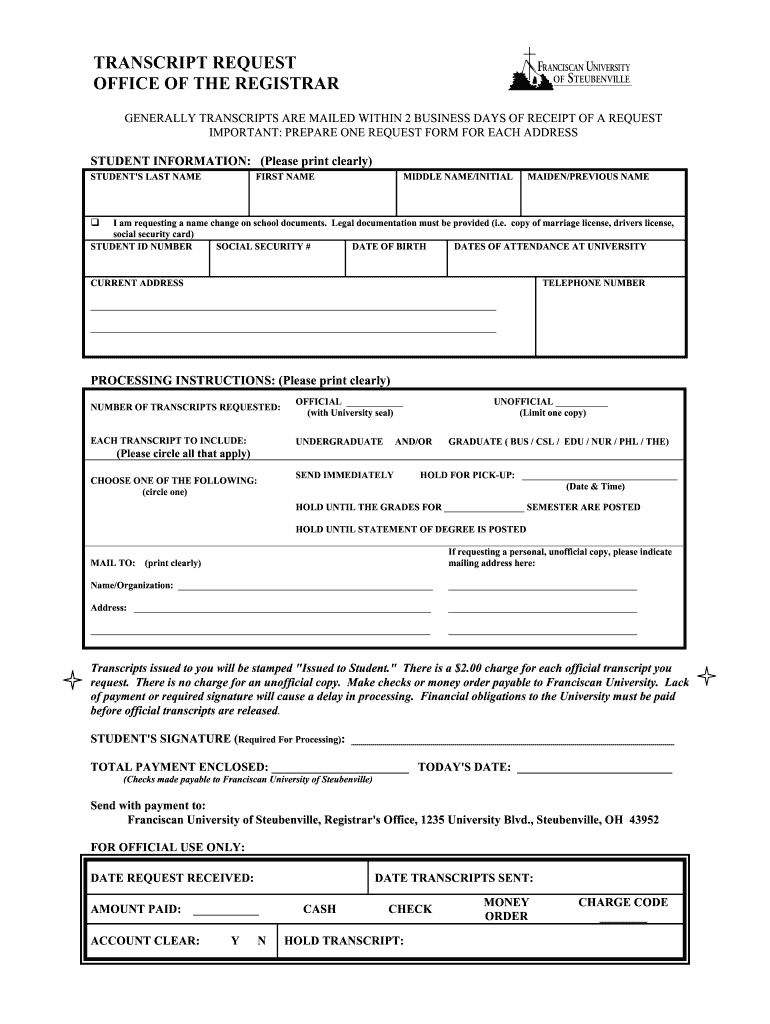
Please print clearly) STUDENT'S LAST NAME FIRST NAME MIDDLE NAME/INITIAL MAIDEN/PREVIOUS NAME q I am requesting a name change on school documents. Legal documentation must be provided (i.e. copy of marriage license, drivers license, social security card) STUDENT ID NUMBER SOCIAL SECURITY # DATE OF BIRTH DATES OF ATTENDANCE AT UNIVERSITY CURRENT ADDRESS TELEPHONE NUMBER ______________________________________________________________________________________ ______________________________.
Loading

Open form follow the instructions

Easily sign the form with your finger

Send filled & signed form or save
How to fill out the Franciscan University of Steubenville Transcript Request online
Filling out the Franciscan University of Steubenville Transcript Request form is an important step in securing your academic transcripts. This guide will help you navigate through the online submission process with ease, ensuring you provide all necessary information accurately and clearly.
Follow the steps to complete your transcript request online.
- Press the ‘Get Form’ button to access the transcript request form and open it for editing.
- Begin by entering your personal information in the designated fields. Clearly provide your last name, first name, middle name or initial, and any previous names you may have used.
- Include your Student ID number, Social Security number, and date of birth. Make sure all details are input accurately to avoid processing delays.
- Specify your dates of attendance at the university to assist the registrar’s office in locating your academic records.
- Provide your current address and telephone number for communication purposes.
- Indicate the number of transcripts you are requesting and whether they should be official (with the university seal) or unofficial. Circle the relevant options for undergraduate or graduate transcripts.
- Choose how you would like the transcripts to be processed. Options include: sending them immediately, holding for pickup, or holding until certain grades or degrees are posted.
- If you are requesting an unofficial copy for personal use, clearly write the mailing address where you want it sent.
- Sign the form to confirm your request, ensuring that your signature matches your identification documents.
- Indicate the total payment for your transcript request, remembering that there is a charge for official copies, while unofficial ones are free.
- Finally, review your completed form for accuracy before sending it along with your payment to the provided address.
Take the next step in obtaining your academic transcripts by completing the online request form today.
Experience a faster way to fill out and sign forms on the web. Access the most extensive library of templates available.
Related content
Request a Transcript · File a Complaint · Apply With FAFSA. Apply for financial aid ·...
The Registrar maintains records, fulfills transcript requests, and keeps student...
Get answers to your most pressing questions about US Legal Forms API.
How to download unofficial transcript as PDF?
To download your unofficial transcript as a PDF, first access your student account through the Franciscan University of Steubenville portal. Locate the unofficial transcript option and choose to generate a PDF. This handy format allows you to save and share your academic information easily, making your Franciscan University of Steubenville transcript request process more efficient.
How to request for transcript of records?
Requesting your transcript of records typically involves filling out a form either online or in person at your school's registrar's office. Ensure you provide necessary details such as your student ID and the purpose of the request. If you are interested in getting your records from Franciscan University of Steubenville, be sure to specify that in your Franciscan University of Steubenville transcript request.
How to get an unofficial transcript in NSU?
To acquire an unofficial transcript in Nova Southeastern University (NSU), login to your student portal and look for the transcript section. Follow the prompts to generate your transcript. If you are contemplating a transfer or comparing schools, don't forget to look into the Franciscan University of Steubenville transcript request for your academic needs.
How to get unofficial transcripts from NSU?
For unofficial transcripts from Nova Southeastern University (NSU), you typically need to access their student information system. Check their website for specific instructions on obtaining these documents. Remember, if you're comparing options, you may also want to consider the Franciscan University of Steubenville transcript request as an alternative.
How do I access my unofficial transcript?
To access your unofficial transcript at Franciscan University of Steubenville, log into your student portal and navigate to the transcript section. You'll find the option to view or print your unofficial transcript. If you need an official version for a specific purpose, you may need to complete a Franciscan University of Steubenville transcript request.
How to withdraw from a class at Franciscan University?
Withdrawing from a class at Franciscan University of Steubenville can be done through the online student portal or by contacting the registrar. It's crucial to check deadlines and understand the implications on your academic record. After you've officially withdrawn, you may need to request your updated transcript, so keep that in mind for your Franciscan University of Steubenville transcript request.
How hard is it to get into Franciscan University of Steubenville?
Getting into Franciscan University of Steubenville typically involves meeting specific admission requirements. The university looks for students who demonstrate academic strength and commitment to their faith. To start your Franciscan University of Steubenville transcript request, ensure you have your application materials ready and consider reaching out to their admissions office for guidance.
How do I ask for a transcript request?
When you need to ask for a transcript, it is essential to provide clear and complete information. Begin by identifying yourself with your full name and student ID. Specify the type of transcript you need and how you would like to receive it. A well-structured request helps streamline the process of your Franciscan University of Steubenville transcript request.
How do I order transcripts from Franciscan University?
To order transcripts from Franciscan University, visit their official website and locate the transcript request section. You will find forms that you can fill out and submit online. Make sure to follow the specific instructions regarding fees and delivery options. Completing these steps carefully simplifies your Franciscan University of Steubenville transcript request.
How do I ask for transcripts of records?
To ask for transcripts of records from Franciscan University of Steubenville, start by visiting the university's transcripts page. Use the provided request form and fill in your details accurately. If you have questions, don’t hesitate to contact the registrar's office for assistance. A clear request ensures your Franciscan University of Steubenville transcript request is processed efficiently.
Use professional pre-built templates to fill in and sign documents online faster. Get access to thousands of forms.
If you believe that this page should be taken down, please follow our DMCA take down process here.