Loading
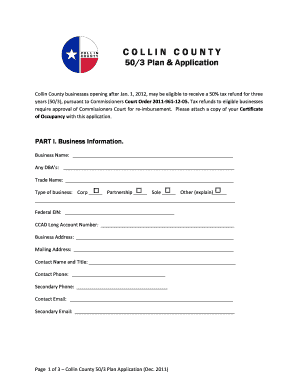
Get Application - Collin County Government
How it works
-

Open form follow the instructions
-

Easily sign the form with your finger
-

Send filled & signed form or save
How to fill out the Application - Collin County Government online
This guide provides clear instructions for completing the Application - Collin County Government online. It is designed to assist users, including those with limited legal experience, in successfully navigating the application process.
Follow the steps to fill out your application effectively.
- Press the ‘Get Form’ button to access the application document and open it in the editor for editing.
- In Part I, enter your business information. Provide the business name, any 'doing business as' (DBA) names, trade name, and select the type of business. Fill in your Federal Employer Identification Number (EIN) and CCAD Long Account Number.
- Enter the business address and mailing address. Complete the contact information by providing a contact name and title, as well as primary and secondary phone numbers and email addresses.
- In Part II, state whether this is a new business or an additional location. If it is an additional location, provide the addresses of other locations owned by the same taxpayer.
- Describe in detail the goods or services your business will provide. Be clear and concise in your description.
- Answer whether you or another company officer have conducted a similar business in the last 90 days and provide a description if applicable.
- Indicate how 75% of the revenues for this location will be generated and input the number of employees that will be created over the first three years.
- Include the average salary or hourly rate of all employees and the total estimated payroll for each of the three years.
- State the total estimated value of real property improvements and business personal property specific to your business for each year.
- Provide the business opening date and the date on which the Certificate of Occupancy was issued for the location.
- Affirm that the provided information is true by signing the application and dating it.
- If required, complete the notary acknowledgment portion by having a notary witness your signature.
- Once all information is filled out accurately, save your changes, and then you can download, print, or share the completed application.
Complete your application online today to take advantage of tax refund opportunities.
Collin County | County Clerk: Plano Location.
Industry-leading security and compliance
US Legal Forms protects your data by complying with industry-specific security standards.
-
In businnes since 199725+ years providing professional legal documents.
-
Accredited businessGuarantees that a business meets BBB accreditation standards in the US and Canada.
-
Secured by BraintreeValidated Level 1 PCI DSS compliant payment gateway that accepts most major credit and debit card brands from across the globe.