Loading
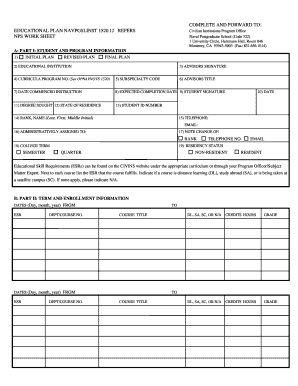
Get Educational Plan Navpgslinst 150.1j Refers Nps Work Sheet
How it works
-

Open form follow the instructions
-

Easily sign the form with your finger
-

Send filled & signed form or save
How to fill out the Educational Plan Navpgslinst 150.1J Refers NPS Work Sheet online
Filling out the Educational Plan Navpgslinst 150.1J Refers NPS Work Sheet is an essential step for students pursuing graduate education at civilian institutions. This guide provides clear, step-by-step instructions to ensure that you accurately complete the form online.
Follow the steps to fill out the Educational Plan.
- Click ‘Get Form’ button to obtain the form and open it in the editor.
- In Part I, identify if this is an Initial Plan, Revised Plan, or Final Plan. Input the relevant information accordingly.
- Specify the educational institution you will be attending in Block 2.
- Ensure Block 3 has the Academic Advisor's signature for Initial Plans; it's not needed for Revised or Final Plans.
- Enter the curriculum program number in Block 4, referring to OPNAVNOTE 1520 if needed.
- Input the subspecialty code in Block 5.
- Enter the Academic Advisor's title in Block 6.
- Insert the start date of your instruction in Block 7 using day, month, and year.
- Specify your expected completion date in Block 8; provide the month if the specific date is unknown.
- Sign your Educational Plan in Block 9 and enter the date of signature in Block 10.
- Enter the degree sought in Block 11 using the appropriate acronym.
- Indicate your state of residence in Block 12.
- In Block 13, input your university student identification number.
- Provide your rank and full name in Block 14.
- In Block 15, fill in your contact information including your telephone number and email address.
- Identify your administratively assigned unit in Block 16.
- If there's been a change in rank or telephone number, indicate it in Block 17.
- Specify whether your institution follows a semester or quarter schedule in Block 18.
- Indicate your residency status with the institution in Block 19.
- In Part II, provide course details for each term including dates, department/course number, title, and credits in the appropriate sections.
- Indicate if courses are distance learning, study abroad, or satellite campus, or mark as N/A if not applicable.
- In Part III, specify if there is a final project and describe it if applicable.
- Indicate credits listed on the plan in Block 23 and transfer credits allowed for the degree in Block 24.
- Complete Block 25 with the total credits required for the degree.
- Indicate the degree status in Block 26 and the full title of the degree sought in Block 27.
- Finally, ensure all sections are correctly filled, then save your changes, and download or print the form as needed.
Complete your documents online and ensure compliance with the required guidelines.