Loading
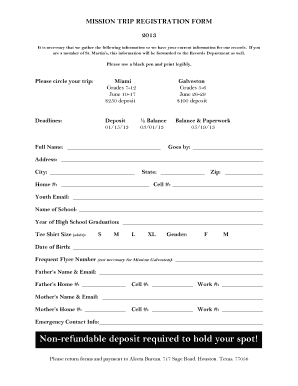
Get Badlands 2003 Mission Trip - Theislandlive.com
How it works
-

Open form follow the instructions
-

Easily sign the form with your finger
-

Send filled & signed form or save
How to fill out the Badlands 2003 Mission Trip - TheIslandLive.com online
Filling out the Badlands 2003 Mission Trip registration form is an important step in securing your place on this enriching experience. This guide is designed to walk you through each section of the form, ensuring that you provide all necessary information accurately and efficiently.
Follow the steps to complete your mission trip registration form easily.
- Press the 'Get Form' button to acquire the registration form and access it for completing the required fields.
- Begin by providing your full name as requested in the designated field. Ensure that this is your current legal name.
- In the ‘Goes by’ section, you can list any preferred name you would like the organizers to use when addressing you.
- Fill in your complete address, including city, state, and zip code. Accuracy is crucial here for communication purposes.
- Enter your home and cell phone numbers. This contact information is vital for any updates regarding the trip.
- Provide your youth email address in the appropriate field to receive any important updates regarding the trip.
- Indicate the name of your school and your expected year of high school graduation to assist in planning activities based on grade levels.
- Select your T-shirt size from the provided options: S, M, L, or XL.
- Circle your gender as indicated, ensuring your response is represented in the registration records.
- Enter your date of birth in the specified format to verify your age.
- If applicable, input your frequent flyer number. If you are not traveling by air, you may leave this field blank.
- Provide the names and contact details of your parents or guardians, as they will be the primary contacts in case of emergencies.
- Complete the emergency contact information field. This is important should the need arise during the trip.
- Read through the medical information section carefully and provide all requested health details, including allergies, chronic conditions, and any medications that will accompany you.
- Sign and date the consent for medical treatment, ensuring that you understand the implications of this release.
- Review the indemnity and general release section before signing. This is a critical part of the agreement related to your participation in the trip.
- Finish by confirming the media release, allowing your image to be used in promotional materials if photographed during the trip.
- Finally, save any changes you made to the form, and choose to download, print, or share the completed document as needed.
Complete your registration for the Badlands 2003 Mission Trip online today!
It can re-energize, give fresh vision, put new passion for deeper relationship with Jesus, encourage, and heal hurts in their lives. It can also help them in their long-term ministry with local people.
Industry-leading security and compliance
US Legal Forms protects your data by complying with industry-specific security standards.
-
In businnes since 199725+ years providing professional legal documents.
-
Accredited businessGuarantees that a business meets BBB accreditation standards in the US and Canada.
-
Secured by BraintreeValidated Level 1 PCI DSS compliant payment gateway that accepts most major credit and debit card brands from across the globe.