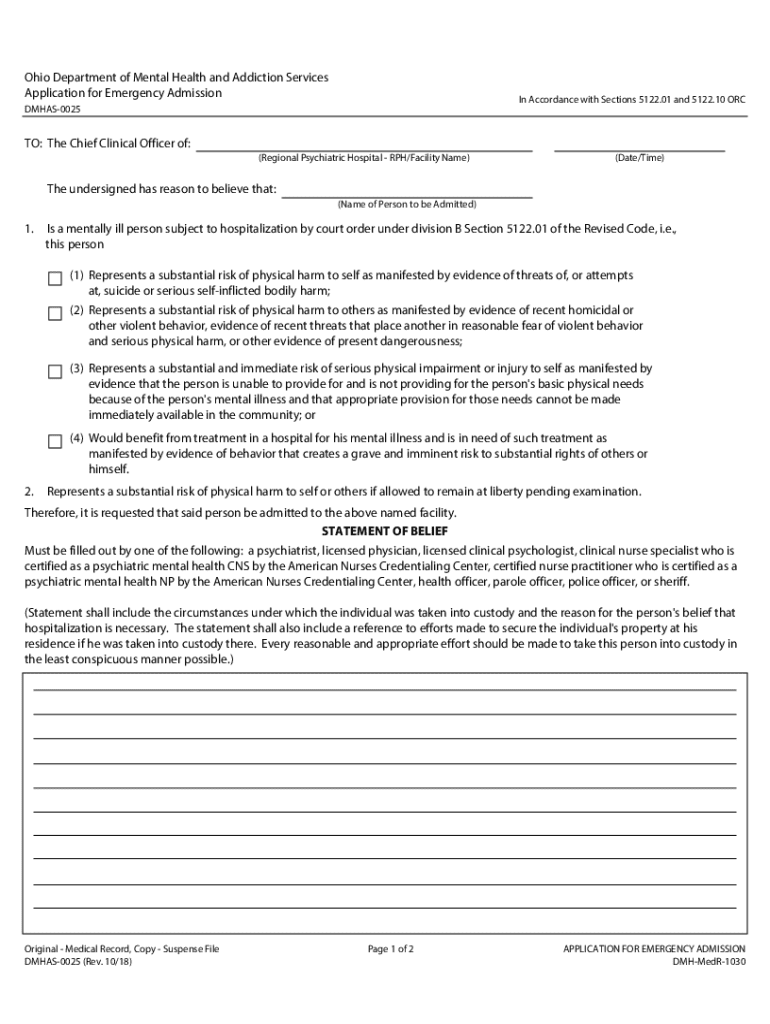
Ohio Department of Mental Health and Addiction Services Application for Emergency AdmissionIn Accordance with Sections 5122.01 and 5122.10 ORCDMHAS0025TO: The Chief Clinical Officer of: (Regional.
Loading

Open form follow the instructions

Easily sign the form with your finger

Send filled & signed form or save
How to fill out the OH DMHAS-0025 online
Filling out the OH DMHAS-0025 form for emergency admission is an important process that requires clear and accurate information. This guide provides detailed, step-by-step instructions to facilitate the online completion of the form, ensuring that all necessary details are captured correctly.
Follow the steps to successfully fill out the OH DMHAS-0025 form.
- Click the 'Get Form' button to access the OH DMHAS-0025 form and open it in the online editor.
- Begin by entering the name of the person to be admitted in the designated field. Ensure that the information is accurate and spelled correctly to avoid any delays in processing.
- In Section 1, indicate the reasons for the emergency admission. Review the list of criteria and check all that apply to the individual being admitted, providing specific details as necessary.
- In Section 2, provide a clear statement of belief from a qualified individual such as a psychiatrist or licensed physician. Be precise about the circumstances leading to the need for hospitalization and any actions taken to secure the individual’s property.
- Include the signature of the qualified person and their title or position. This part is crucial to validate the emergency admission request.
- If applicable, a statement of observation should be filled out by a psychiatrist or licensed clinical psychologist. Enter the place of observation and include their signature and title.
- Finally, input the approval signature of the Chief Clinical Officer along with the date and time of approval, if applicable.
- Once all fields are completed, review the form for any errors or missing information. Save your changes and proceed to download, print, or share the completed form as needed.
Complete your OH DMHAS-0025 form online today to ensure swift processing for emergency admission.
Experience a faster way to fill out and sign forms on the web. Access the most extensive library of templates available.
Related content
Ohio Department of Mental Health and Addiction Services. Application for Emergency...
What are “pink slips?” – Nickname for Ohio's Application for Emergency. Admission...
The right of publicity, sometimes referred to as personality rights, is the right of an...
Get answers to your most pressing questions about US Legal Forms API.
How do you get someone pink slipped?
In order to be pink slipped, you have to represent a substantial risk to yourself or someone else. To print the document, click the "Original Document" link to open the original PDF. At this time it is not possible to print the document with annotations.
Who can pink slip Ohio?
Not just anyone can fill out this form. Ohio laws limits this power to psychiatrists, licensed clinical psychologists, doctors, health officers, parole officers, probation officers, the sheriff or police officers. Once a person is pink-slipped, they have to be evaluated within 24 hours, Park said.
What does it mean to get pink slipped?
The term pink slip is a vernacular term that refers to a notice of dismissal given to an employee. A pink slip is an official notification that the worker's position has been eliminated or that the worker's services are no longer required. In other words, a pink slip is an informal name for a termination notice.
How do you involuntarily commit someone in Ohio?
Ohio's involuntary civil commitment process, or judicial hospitalization, allows the state to hospitalize individuals with a mental illness against their will provided certain criteria are met. ... Ordinarily, the civil commitment process must be initiated by the filing of an affidavit with the probate court.
What is a pink slip in a hospital?
Pink slip is the common. term for the paperwork used. to detain an individual for the. purpose of emergency. hospitalization.
What does it mean when a hospital pink slips you?
Pink slip is the common. term for the paperwork used. to detain an individual for the. purpose of emergency. hospitalization.
How long can a mental hospital hold a person?
This is used in emergency situations for people who present a grave and immediate danger to themselves or to others because of their mental state. They can be kept in the hospital against their will for up to 72 hours without permission from a judge.
What happens when someone is pink slipped?
The term pink slip is a vernacular term that refers to a notice of dismissal given to an employee. A pink slip is an official notification that the worker's position has been eliminated or that the worker's services are no longer required. In other words, a pink slip is an informal name for a termination notice.
Use professional pre-built templates to fill in and sign documents online faster. Get access to thousands of forms.
If you believe that this page should be taken down, please follow our DMCA take down process here.