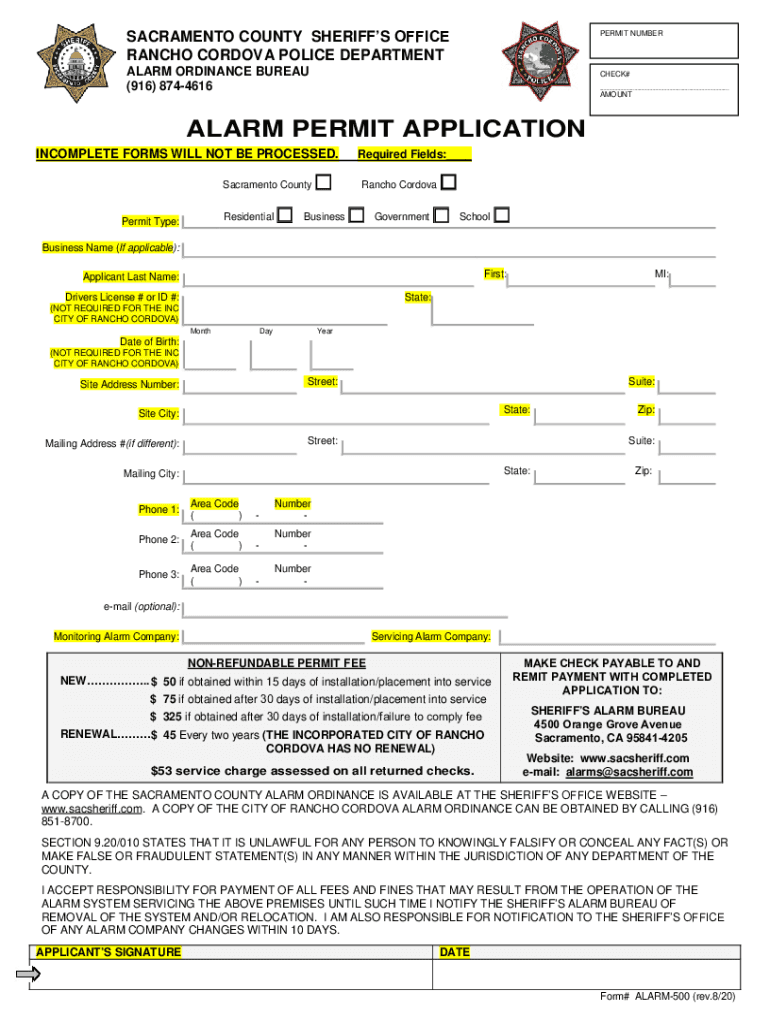
AMOUNT ALARM PERMIT APPLICATION INCOMPLETE FORMS WILL NOT BE PROCESSED. Sacramento County Residential Permit Type: Required Fields: Rancho Cordova Business Government School Business Name (If applicable): First: Applicant Last Name: Drivers License # or ID #: MI: State: (NOT REQUIRED FOR THE INC CITY OF RANCHO CORDOVA) Month Day Year Date of Birth: (NOT REQUIRED FOR THE INC CITY OF RANCHO CORDOVA) Street: Site Address Number: Suite: State: Site City: Zip:.
Loading

Open form follow the instructions

Easily sign the form with your finger

Send filled & signed form or save
How to fill out and sign CA ALARM-500 - Sacramento County online?
Get your online template and fill it in using progressive features. Enjoy smart fillable fields and interactivity.Follow the simple instructions below:
The times of distressing complex legal and tax forms are over. With US Legal Forms the procedure of submitting official documents is anxiety-free. The leading editor is directly close at hand providing you with various advantageous instruments for submitting a CA ALARM-500 - Sacramento County. These guidelines, combined with the editor will assist you through the entire process.
- Hit the Get Form option to start editing.
- Turn on the Wizard mode on the top toolbar to obtain more tips.
- Complete every fillable field.
- Make sure the data you fill in CA ALARM-500 - Sacramento County is updated and correct.
- Include the date to the document using the Date tool.
- Click on the Sign tool and make a signature. You will find 3 available alternatives; typing, drawing, or uploading one.
- Be sure that each and every area has been filled in correctly.
- Click Done in the top right corne to save and send or download the form. There are several options for getting the doc. As an instant download, an attachment in an email or through the mail as a hard copy.
We make completing any CA ALARM-500 - Sacramento County much faster. Get started now!
Tips on how to fill out, edit and sign CA ALARM-500 - Sacramento County online
How to fill and sign CA ALARM-500 - Sacramento County
Get your online template and fill it in using progressive features. Enjoy smart fillable fields and interactivity.Follow the simple instructions below:
The times of distressing complex legal and tax forms are over. With US Legal Forms the procedure of submitting official documents is anxiety-free. The leading editor is directly close at hand providing you with various advantageous instruments for submitting a CA ALARM-500 - Sacramento County. These guidelines, combined with the editor will assist you through the entire process.
- Hit the Get Form option to start editing.
- Turn on the Wizard mode on the top toolbar to obtain more tips.
- Complete every fillable field.
- Make sure the data you fill in CA ALARM-500 - Sacramento County is updated and correct.
- Include the date to the document using the Date tool.
- Click on the Sign tool and make a signature. You will find 3 available alternatives; typing, drawing, or uploading one.
- Be sure that each and every area has been filled in correctly.
- Click Done in the top right corne to save and send or download the form. There are several options for getting the doc. As an instant download, an attachment in an email or through the mail as a hard copy.
We make completing any CA ALARM-500 - Sacramento County much faster. Get started now!
How to edit CA ALARM-500 - Sacramento County
Simplify your paperwork preparation process and adjust it to your demands within clicks. Fill out and approve CA ALARM-500 - Sacramento County with a robust yet easy-to-use online editor.
Preparing paperwork is always difficult, particularly when you deal with it from time to time. It demands you strictly adhere to all the formalities and accurately fill out all areas with full and precise information. Nevertheless, it often occurs that you need to change the form or insert extra areas to fill out. If you need to optimize CA ALARM-500 - Sacramento County before submitting it, the most effective way to do it is by using our powerful yet simple-to-use online editing tools.
This comprehensive PDF editing solution enables you to easily and quickly fill out legal paperwork from any internet-connected device, make fundamental changes to the form, and add more fillable areas. The service enables you to pick a specific area for each data type, like Name, Signature, Currency and SSN and so on. You can make them required or conditional and decide who should fill out each field by assigning them to a specific recipient.
Make the steps listed below to improve your CA ALARM-500 - Sacramento County online:
- Open required sample from the catalog.
- Fill out the blanks with Text and drop Check and Cross tools to the tickboxes.
- Utilize the right-side panel to alter the template with new fillable areas.
- Choose the areas depending on the type of data you wish to be collected.
- Make these fields required, optional, and conditional and customize their order.
- Assign each field to a specific party using the Add Signer option.
- Verify that you’ve made all the required changes and click Done.
Our editor is a versatile multi-featured online solution that can help you easily and quickly optimize CA ALARM-500 - Sacramento County and other templates based on your needs. Optimize document preparation and submission time and make your paperwork look perfect without hassle.
How to fill and sign CA ALARM-500 - Sacramento County
Get your online template and fill it in using progressive features. Enjoy smart fillable fields and interactivity.Follow the simple instructions below:
The times of distressing complex legal and tax forms are over. With US Legal Forms the procedure of submitting official documents is anxiety-free. The leading editor is directly close at hand providing you with various advantageous instruments for submitting a CA ALARM-500 - Sacramento County. These guidelines, combined with the editor will assist you through the entire process.
- Hit the Get Form option to start editing.
- Turn on the Wizard mode on the top toolbar to obtain more tips.
- Complete every fillable field.
- Make sure the data you fill in CA ALARM-500 - Sacramento County is updated and correct.
- Include the date to the document using the Date tool.
- Click on the Sign tool and make a signature. You will find 3 available alternatives; typing, drawing, or uploading one.
- Be sure that each and every area has been filled in correctly.
- Click Done in the top right corne to save and send or download the form. There are several options for getting the doc. As an instant download, an attachment in an email or through the mail as a hard copy.
We make completing any CA ALARM-500 - Sacramento County much faster. Get started now!
Experience a faster way to fill out and sign forms on the web. Access the most extensive library of templates available.
Related content
OEM's mission is to protect, preserve, and enhance the quality of life for present and...
EMERGENCY RESPONSE GUIDELINES. Contra Costa Community College District. 500 Court Street...
NOTICE OF CHANGE TO TEXT AS ORIGINALLY PROPOSED. You are receiving this notice because you...
Get answers to your most pressing questions about US Legal Forms API.
What is the 311 number for Sacramento?
To submit non-emergency service requests, go to 311 Connect or call 3-1-1 (outside unincorporated county, call: 916-875-4311).
What is the non-emergency number for Sacramento County Police?
For non-emergency services within the City or County of Sacramento, please call 3-1-1 or (916) 875-5000.
Do you need an alarm permit in California?
It is a misdemeanor to operate an alarm system without the required alarm permit. A misdemeanor is punishable by a fine of up to $1,000 or a year in county jail or both.
How do I report a problem with Sacramento City?
For most complaints and reports of violations, the Sacramento County Environmental Management Department utilizes Sacramento County 311 Connect. Customer service representatives are available at 916-875-4311 or 311 or you can report a complaint on-line.
How much is the alarm permit in Sacramento?
How much is the permit? After 30 days, a failure to comply fee of $250.00 will be added, raising the permit fee to $325.00.
What is the phone number for Sacramento County?
Sacramento County 311 Connect Call: 3-1-1 or 916-875-4311 (if not in the unincorporated area of the County) or email, SacCo311@custhelp.com. Visit: https://311. saccounty.gov
What is the number for EBT in Sacramento?
If you think your benefits may have been stolen, immediately call the EBT customer service number at 877-328-9677 and your county office at 1-800-560-0976.
Use professional pre-built templates to fill in and sign documents online faster. Get access to thousands of forms.
If you believe that this page should be taken down, please follow our DMCA take down process here.