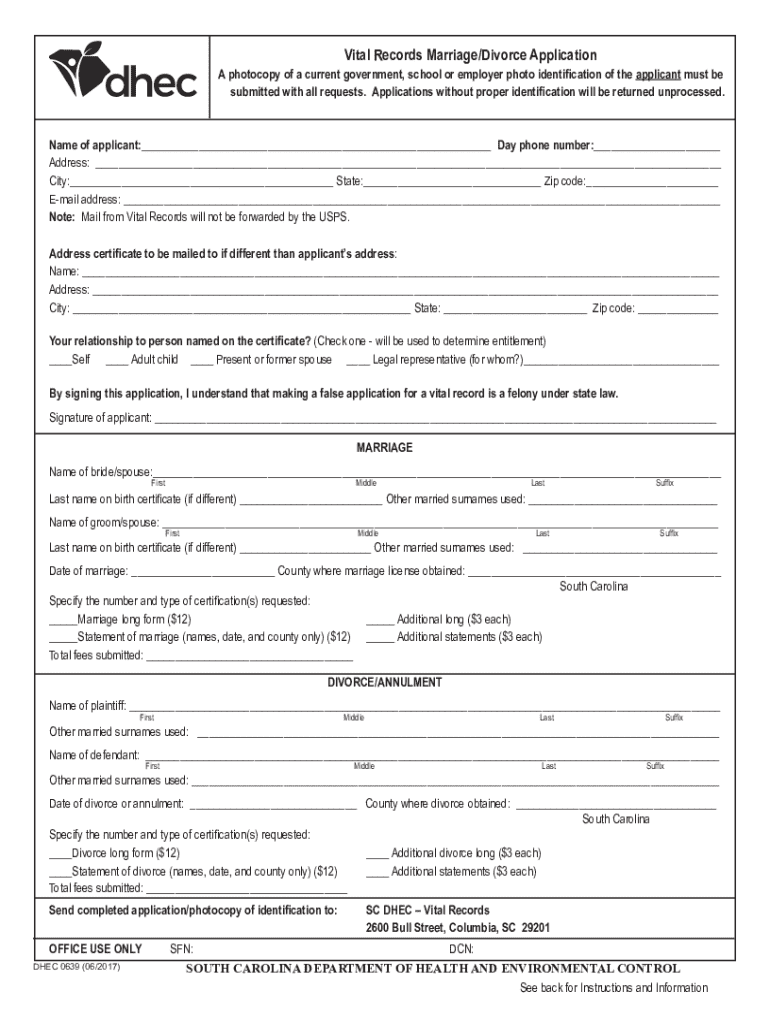
Er identification will be returned unprocessed. Name of applicant: Day phone number: Address: City: State: Zip code: E-mail address:.
Loading

Open form follow the instructions

Easily sign the form with your finger

Send filled & signed form or save
How to fill out the SC DHEC 0639 online
Filling out the SC DHEC 0639 form online can be a straightforward process if you follow the correct steps. This guide will provide detailed instructions to help you complete the vital records marriage/divorce application effectively.
Follow the steps to accurately complete the application.
- Click 'Get Form' button to access the application form and open it for editing.
- Begin by entering your personal information as the applicant. Fill in your name, daytime phone number, address, city, state, zip code, and email address in the designated fields. Ensure the accuracy of this information as it will be used for communication regarding your application.
- If the address where you want the certificate mailed is different from your own, provide the recipient's name, address, city, state, and zip code in the additional fields.
- Indicate your relationship to the person named on the certificate by checking the appropriate box, such as 'self', 'adult child', 'present or former spouse', or 'legal representative'. This identifies your entitlement to request the records.
- Sign the application form to acknowledge that providing false information is a felony under state law. Include the date of your signature.
- If you are applying for a marriage certificate, fill in the names of both the bride/spouse and the groom/spouse, including any previously married surnames and their respective last names on their birth certificates if different.
- Provide the date of marriage and the county where the marriage license was obtained. Specify the number and type of certification requested. Calculate and enter the total fees to be submitted.
- For divorce or annulment requests, input the names of the plaintiff and defendant, their respective surnames, and other married names. Also, include the date of divorce or annulment and the county where it was granted.
- Similar to the marriage request, specify the type of divorce certification needed, and enter the total fees required for your request.
- After completing all sections, save your changes, download a copy of the completed application, print it out, and ensure you include a photocopy of your current photo identification before mailing it to the SC DHEC – Vital Records address provided.
Complete your SC DHEC 0639 application online today for a hassle-free experience.
Experience a faster way to fill out and sign forms on the web. Access the most extensive library of templates available.
Related content
Oct 7, 2020 — Forms. Birth Certificate Application Form. English (766 KB PDF). Death...
forms of death (medical certification ... *Ths Spanish term Wrabajo realizado” is not...
Vital records are records of life events kept under governmental authority, including...
Get answers to your most pressing questions about US Legal Forms API.
How do I obtain a death certificate in New York State?
Contact the Vital Records Call Center at (855) 322-1022.
How do you determine immediate cause of death?
Immediate Cause of Death: Report the most recent disease, condition, or injury that occurred right before the person died that directly resulted in death. In cases where a single disease or condition is responsible for the death, report it on line “a” as the sole cause of death.
How is cause of death listed?
The most "immediate" or "recent" event that leads to death is listed in line a. The other conditions are listed in Line b to and then sequentially. The last and most remote condition leading to death is listed as the “underlying” cause of death.
What is reporting cause of death?
Reporting cause of death It is the responsibility of the medical practitioner signing the death certificate to indicate which morbid conditions led directly to death and to state any antecedent conditions giving rise to the underlying cause of death.
Can I view US death certificates online for free?
You can search most state archives online and easily access them from the comfort of your own home. These searches are also free. State archives often have death certificates that date to the founding of their state and beyond in some cases.
How do I get a copy of a death certificate in Louisiana?
You may complete an application for a certified copy of a death certificate, bring your photo identification and correct fees to the Vital Records Central Office. Walk-in services accepts cash, check, money order, and credit/debit cards as forms of payment.
How is cause of death reported?
When a death occurs, a certifier must determine the cause(s) of death and accurately report it on the death certificate. Guidelines for who can certify a death can vary by jurisdiction, but the certifier is typically a physician, medical examiner, or coroner.
Use professional pre-built templates to fill in and sign documents online faster. Get access to thousands of forms.
If you believe that this page should be taken down, please follow our DMCA take down process here.