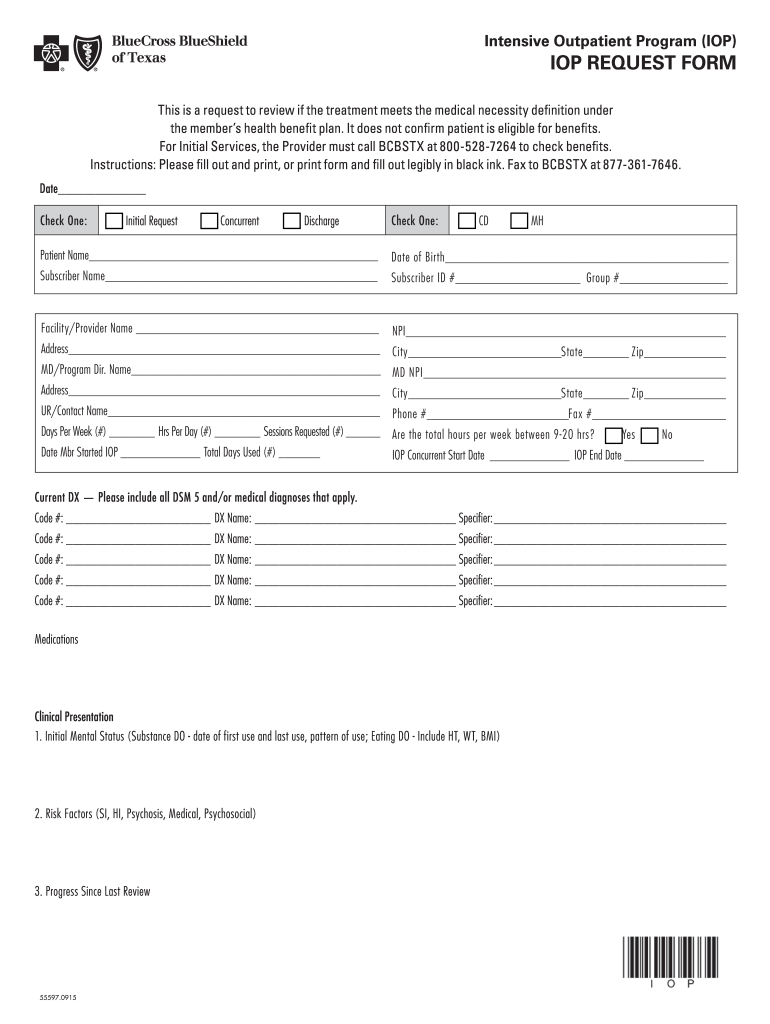
Irm patient is eligible for benefits. For Initial Services, the Provider must call BCBSTX at 800-528-7264 to check benefits. Instructions: Please fill out and print, or print form and fill out legibly in black ink. Fax to BCBSTX at 877-361-7646. Date Check One: c Initial Request c Concurrent c Discharge Check One: c CD c MH Patient Name Date of Birth Subscriber Name.
Loading

Open form follow the instructions

Easily sign the form with your finger

Send filled & signed form or save
How to fill out the TX Blue Cross And Blue Shield IOP Request Form online
Completing the TX Blue Cross And Blue Shield Intensive Outpatient Program (IOP) Request Form online is an important task that ensures treatment meets the medical necessity criteria under a health benefit plan. This guide provides clear, step-by-step instructions to help users navigate the form effectively.
Follow the steps to complete the IOP request form online.
- Click ‘Get Form’ button to obtain the IOP request form and open it in your preferred editor.
- Begin by entering the date in the designated field.
- Choose the type of request by checking one of the boxes for Initial Request, Concurrent, or Discharge.
- Indicate the type of treatment by checking either CD (Chemical Dependency) or MH (Mental Health).
- Fill in the patient's name, followed by their date of birth.
- Provide the subscriber's name and their identification number, along with the group number.
- Enter the facility or provider's name, their NPI (National Provider Identifier), and address, including city, state, and zip code.
- Complete the MD/Program Director's name and their NPI, along with their address.
- Record the name of the UR/contact person, along with their phone number and fax number.
- Input the number of days per week, hours per day, and the number of sessions requested.
- Indicate if the total hours per week fall between 9-20 and check 'Yes' or 'No'.
- Provide the date the member started IOP, along with the total days used.
- Enter the IOP concurrent start date and the IOP end date.
- List all current diagnoses, including DSM 5 and/or medical diagnoses, with corresponding codes and names.
- Detail the medication information, if applicable.
- Complete the clinical presentation section, including the initial mental status, risk factors, and progress since the last review.
- Fill out the mental health/chemical dependency treatment history for prior admissions.
- Specify the current treatment goals and outline the aftercare plan.
- If additional clinical information is necessary, prepare it to be faxed with this form.
- Sign and date the form to confirm that the requested services will be provided.
Complete your IOP request form online today.
Experience a faster way to fill out and sign forms on the web. Access the most extensive library of templates available.
Related content
Beginning September 1, 2015, health benefit plan issuers must accept the Texas Standard...
American Addiction Centers provides addiction treatment and mental health services at...
The RSM contains magnetic elements that are sensitive to magnetic fields on the aircraft...
Use professional pre-built templates to fill in and sign documents online faster. Get access to thousands of forms.
If you believe that this page should be taken down, please follow our DMCA take down process here.