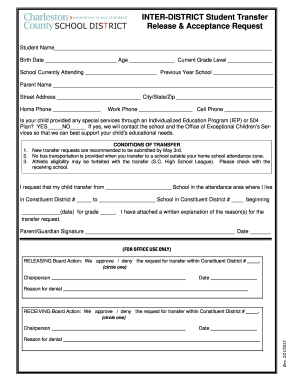
St School Transfer to Another Constituent District in Charleston County (Inter-District Transfer) Complete the Student Transfer Release and Acceptance Request Form. Attach the required explanation of the reason(s) for the transfer. Include the student’s name, your signature and the date of the request. Attach required additional information (if applicable). Take all completed materials (Items 1-3 above) to the constituent district office of the school you want your child to leave. The releas.

How it works
  • Open form

    Open form follow the instructions

  • Easily sign form

    Easily sign the form with your finger

  • Share form

    Send filled & signed form or save

How to fill out the Charleston Inter-District Student Transfer Release and Acceptance Request online

Filling out the Charleston Inter-District Student Transfer Release and Acceptance Request is an important step for families seeking to transfer students between schools in Charleston County. This guide provides clear, step-by-step instructions to assist you in completing this process online with ease.

Follow the steps to accurately complete the transfer request form.

  1. Click ‘Get Form’ button to obtain the form and open it in the editor.
  2. Begin by entering the student’s name, birth date, age, and current grade level in the appropriate fields.
  3. Fill in the school currently attending and the previous year’s school to provide context for the transition.
  4. Next, enter the parent or guardian's name along with their contact details, including street address, city, state, zip code, home phone, work phone, and cell phone.
  5. Indicate whether the student has any special services through an Individualized Education Program (IEP) or 504 Plan by checking 'YES' or 'NO'.
  6. In the section labeled ‘Conditions of Transfer’, remember to note the recommended submission date for new transfer requests and understand the impact on transportation and athletic eligibility.
  7. Clearly state the request for your child’s transfer from the current school to the desired school, including the date of the requested transfer and the grade.
  8. Attach a written explanation of the reasons for the transfer request, sign the form, and date it to confirm your submission.
  9. Once the form is completed, save your changes, and download or print the document for your records.
  10. Take all completed materials, including the form and attachments, to the constituent district office of the school your child wishes to leave.

Start filling out your Charleston Inter-District Student Transfer Release and Acceptance Request online today!

Get form

Experience a faster way to fill out and sign forms on the web. Access the most extensive library of templates available.

Related content

What is the procedure for requesting a student...

What is the procedure for requesting a student transfer from one school to another in the...

Learn more
College of Charleston Student Handbook

The College of Charleston is committed to a policy of equal opportunity for all persons...

Learn more
Daimler InterimReport Q 32018

Jul 20, 2018 — As the next step, the measures decided upon require the final approval of...

Learn more
Questions & Answers

Get answers to your most pressing questions about US Legal Forms API.

Contact support

What benefits do you get in Charleston County School District?

The Charleston County School District offers a variety of benefits, including access to quality educational resources, extracurricular activities, and experienced educators. Additionally, the district emphasizes community involvement and support for students' academic and personal growth. If you are considering transferring, these benefits can play a significant role in your Charleston Inter-District Student Transfer Release and Acceptance Request.

Resetting your RMS password requires accessing the reset feature usually found on the login page. Just enter your credentials and follow the instructions provided to change your password. Having access is vital, especially when you're managing your Charleston Inter-District Student Transfer Release and Acceptance Request.

To reset your DPS password, head to the district's provided password recovery tool. After entering the required identification information, follow the steps to create a new password. Make sure to complete this process if you are working on your Charleston Inter-District Student Transfer Release and Acceptance Request.

Resetting your CCSD password involves using the online password management system provided by the Charleston County School District. You need to enter your username and follow the prompts to securely update your password. This is particularly important as you prepare any submissions, including the Charleston Inter-District Student Transfer Release and Acceptance Request.

You can contact the Charleston County School District through their official website or by calling the administration office directly. They offer various resources and support to address your questions. If you have inquiries about the Charleston Inter-District Student Transfer Release and Acceptance Request, reaching out to them is a smart step.

To reset your Charleston County School District password, navigate to the district’s password reset portal. You will typically need to provide your username and answer security questions. Keeping your account secure is essential, especially if you are preparing to submit your Charleston Inter-District Student Transfer Release and Acceptance Request.

The Charleston County School District is led by a dedicated superintendent who oversees district operations and educational initiatives. This leadership role is crucial in setting the vision for the district and ensuring students receive high-quality education. If you're considering a transfer, staying updated on district leadership can be beneficial when completing your Charleston Inter-District Student Transfer Release and Acceptance Request.

In Charleston County, students are allowed to miss a limited number of school days each academic year. Exceeding this limit may affect your academic standing, so it’s important to stay informed about attendance policies. If you plan to transfer schools, keep in mind how your attendance might impact your Charleston Inter-District Student Transfer Release and Acceptance Request.

Resetting your school computer password typically involves visiting the school's designated password reset page. You may need to provide some personal information to verify your identity. If you encounter difficulties, check your school's IT support page or reach out for assistance; they can guide you as you prepare to submit your Charleston Inter-District Student Transfer Release and Acceptance Request.

To request a school transfer within Charleston County, you must fill out the necessary forms provided by your district. This process ensures that the transfer is properly documented and approved. For a seamless transfer experience, consider using a Charleston Inter-District Student Transfer Release and Acceptance Request to facilitate the steps involved.

Get This Form Now!

Use professional pre-built templates to fill in and sign documents online faster. Get access to thousands of forms.

If you believe that this page should be taken down, please follow our DMCA take down process here.

Get Charleston Inter-District Student Transfer Release and Acceptance Request