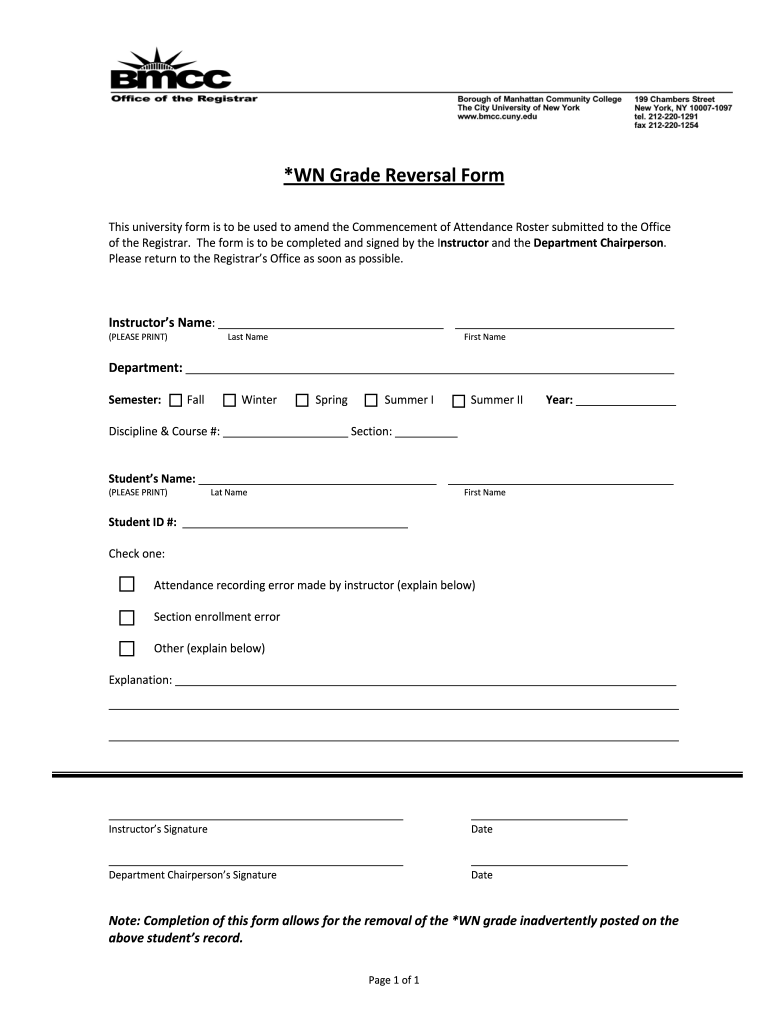
______________________________________ ___________________________________________________________________________________________ ___________________________________________________________________________________________ _______________________________________________ _________________________ Instructor’s Signature Date _______________________________________________ _________________________ Department Chairperson’s Signat.
Loading

Open form follow the instructions

Easily sign the form with your finger

Send filled & signed form or save
How to fill out the BMCC WN Grade Reversal Form online
Submitting a grade reversal request can be a straightforward process when you have clear guidance. This guide will help you navigate the BMCC WN Grade Reversal Form, ensuring that each section is completed accurately and efficiently.
Follow the steps to successfully complete the grade reversal form.
- Click ‘Get Form’ button to access the grade reversal form and open it for editing.
- In the first section, enter the instructor's name. Carefully print the last and first names as requested.
- Fill in the department where the course is offered. Make sure this information is accurate.
- Select the semester in which the course was taught. Options include Fall, Winter, Spring, Summer I, and Summer II. Also, indicate the year.
- Provide the discipline and course number as well as the corresponding section. Ensure that these details match official records.
- Enter the student's name by clearly printing both last and first names in the designated fields.
- Fill in the student ID number, which is critical for identifying the correct record.
- Choose one of the checkboxes to indicate the reason for the grade reversal. Options include: attendance recording error, section enrollment error, or other.
- In the explanation section, provide a detailed account of the circumstances that warrant the change in grade. Be thorough yet concise.
- The instructor must sign and date the form to validate the request. Ensure this is completed before proceeding.
- The department chairperson must also sign and date the form. This step is required for final approval.
- Once all sections are completed, save your changes. You can download, print, or share the form as necessary.
Complete the BMCC WN Grade Reversal Form online today to ensure your request is processed promptly.
Experience a faster way to fill out and sign forms on the web. Access the most extensive library of templates available.
Related content
by C Klaus · 2014 · Cited by 37 — While Wnt13A is glycolyzed and secreted as a typical...
The WN Reversal form is to be used to amend the Verification of Enrollment (VOE) Roster...
Get answers to your most pressing questions about US Legal Forms API.
What is WN grade BMCC?
The WN grade at BMCC indicates that a student was registered for a course but did not attend. This designation can affect your academic standing and financial aid eligibility. If you believe a WN grade was assigned unfairly, using the BMCC WN Grade Reversal Form can be an important step in addressing the situation.
Does a WN grade affect your GPA?
A WN grade does not directly impact your GPA since it is not assigned a numerical value. However, frequent WN grades could influence your academic standing and the perception of your academic commitment. If you want to correct a WN grade, consider the BMCC WN Grade Reversal Form to facilitate this process.
What does WN mean in grades?
In grading systems, WN indicates that a student did not attend the course after enrollment. It is important to understand its implications on your academic record. If this grade was issued in error or under circumstances you can clarify, the BMCC WN Grade Reversal Form can be your tool for resolution.
What does WN mean in college grades?
WN stands for 'Withdrawn, Never Attended' in college grades. It signifies that a student enrolled in a course but did not participate in any class activities. If you believe this grade does not accurately represent your situation, you might want to explore the BMCC WN Grade Reversal Form.
What happens if you get a WN grade?
Receiving a WN grade indicates that you stopped attending a class without officially withdrawing. This grade may lead to complications in your academic record. To address this, consider filling out the BMCC WN Grade Reversal Form to appeal the grade and explain your situation to your institution.
Can a WN grade be reversed?
Yes, a WN grade can be reversed under certain conditions. You must submit the BMCC WN Grade Reversal Form and provide a valid reason for your request. This process ensures that your academic record reflects your true performance under fair circumstances.
Does a grade of W hurt your GPA?
A grade of W does not affect your GPA directly because it does not carry a grade point value. However, having multiple W grades may raise questions about your academic progress. Therefore, it's crucial to manage your course load wisely and consider using the BMCC WN Grade Reversal Form if applicable.
How do you reverse a WN grade?
To reverse a WN grade, you need to complete the BMCC WN Grade Reversal Form. This form allows you to formally request a review of your grade status. Additionally, you should reach out to your academic advisor for guidance on necessary steps and any supporting documentation required for your appeal.
What is a WN reversal form?
A WN reversal form, specifically the BMCC WN Grade Reversal Form, allows you to request a review of your WN grade. This form serves as your official appeal to the academic department for reconsideration of your grade status. Filling it out accurately and completely is vital to maximizing your chances of a favorable outcome.
Does wn show up on transcript?
Yes, a WN grade will appear on your academic transcript, indicating that you withdrew from the course without successfully completing it. This can potentially affect how future institutions view your academic history. If you want to minimize the negative impact of a WN grade, you should consider using the BMCC WN Grade Reversal Form to appeal or correct the grade.
Use professional pre-built templates to fill in and sign documents online faster. Get access to thousands of forms.
If you believe that this page should be taken down, please follow our DMCA take down process here.