Loading
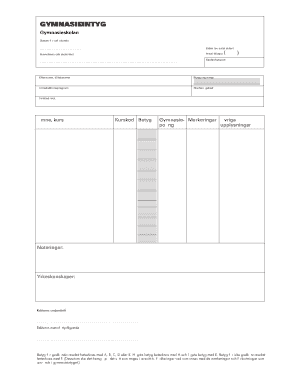
Get Se Gymnasieintyg 2015-2026
How it works
-

Open form follow the instructions
-

Easily sign the form with your finger
-

Send filled & signed form or save
How to fill out the SE Gymnasieintyg online
The SE Gymnasieintyg is a vital document that certifies a person's education achievements at the gymnasium level. This guide will assist you in accurately completing the form online, ensuring that you provide all necessary information in a clear and organized manner.
Follow the steps to complete the SE Gymnasieintyg online.
- Click the ‘Get Form’ button to obtain the form and open it in the editor.
- Enter the date of issuance in the respective field. Make sure to use the correct format for the date to avoid any discrepancies.
- Write the total number of pages in the designated space labeled 'Sidnr (av antal sidor)'. This helps in keeping track of the complete document.
- Fill in the name of the educational institution in the 'Huvudman och skolenhet' section. Be precise and accurate with the institution's official name.
- If there are any attachments, indicate the number in the 'Antal bilagor' field. This includes supplementary documents that support your application.
- Input the school unit code in the 'Skolenhetskod' section. This is typically assigned by the educational board of your region.
- Provide your last name and first name in the 'Efternamn, tilltalsnamn' field. Ensure that your name matches your official identification documents.
- Fill in your personal identification number in the 'Personnummer' field. This number is crucial for verifying your identity.
- Indicate the introductory program you participated in. This helps clarify your educational path and qualifications.
- Select and enter the study path code ('Studievägskod') applicable to your curriculum.
- Specify the focus area in the 'Inriktad mot' field to indicate your main subjects or specialties.
- List the subjects and courses you completed under 'Ämne, kurs'. It's important to be thorough and accurate in this section.
- Enter the course codes in the 'Kurskod' section. This ensures proper documentation of each course taken.
- Document your grades in the 'Betyg' field. Remember, passing grades are designated as A, B, C, D, or E, while an F denotes a failing result.
- Provide any additional notes or remarks in the 'Noteringar' section. This could include important information related to your academic achievements.
- Detail any vocational skills acquired in the 'Yrkeskunskaper' area. This enhances understanding of your professional qualifications.
- Ensure that the document is signed by the principal in the designated area for 'Rektorns underskrift' and provide the name of the principal in 'Rektorns namnförtydligande'.
- Once all fields are filled out correctly, review the document for any errors. Make any necessary corrections before finalizing.
- Save your changes, then download or print the form for your records. You might also choose to share it with relevant parties as needed.
Complete your SE Gymnasieintyg online today to ensure your educational credentials are correctly documented.