Loading
Get State Department Of Public Health And Addiction Services ... - Ct.gov
How it works
-

Open form follow the instructions
-

Easily sign the form with your finger
-

Send filled & signed form or save
How to use or fill out the State Department Of Public Health And Addiction Services listing application online
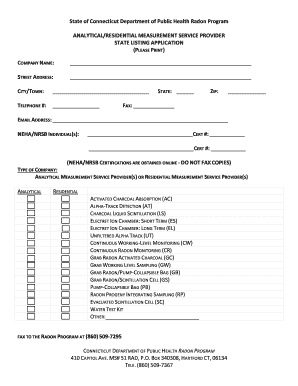
This guide provides a detailed walkthrough for users on how to effectively fill out the State Department Of Public Health And Addiction Services listing application for radon measurement services. Whether you are a new service provider or renewing your listing, following these instructions will ensure a smooth submission process.
Follow the steps to successfully complete the listing application.
- Click ‘Get Form’ button to access the application form and open it in your document editor.
- Fill in the company name in the designated field, ensuring it matches your registration details.
- Enter your street address accurately in the appropriate section.
- Input your city or town in the specified field.
- Provide a valid telephone number where you can be reached.
- Select your state from the dropdown menu.
- Complete the ZIP code section to identify your location.
- If applicable, include your fax number in the corresponding field.
- List your email address clearly to facilitate communication.
- Enter the names of the NEHA/NRSB individuals along with their certification numbers in the designated spaces.
- Indicate the type of company you are operating as either an analytical measurement service provider or a residential measurement service provider by checking the appropriate box.
- Select the types of radon measurement methods utilized by your company by marking the relevant boxes.
- Review all entries for accuracy and completeness.
- Save any changes made to the form, then choose to download, print, or share it as needed for submission.
Complete your State Department Of Public Health And Addiction Services listing application online today.
**In-Person Interview - If an in-person interview is required, you can make an appointment. An appointment can be made by calling the Benefits Center at 1-855-6-CONNECT (1-855-626-6632) to speak to an Eligibility Services Worker.
Industry-leading security and compliance
US Legal Forms protects your data by complying with industry-specific security standards.
-
In businnes since 199725+ years providing professional legal documents.
-
Accredited businessGuarantees that a business meets BBB accreditation standards in the US and Canada.
-
Secured by BraintreeValidated Level 1 PCI DSS compliant payment gateway that accepts most major credit and debit card brands from across the globe.