Loading
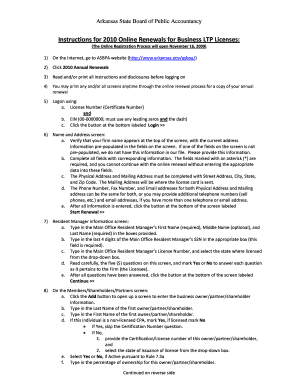
Get Instructions For Online Renewals: - State Ar
How it works
-

Open form follow the instructions
-

Easily sign the form with your finger
-

Send filled & signed form or save
How to fill out the Instructions For Online Renewals: - State Ar online
This guide is designed to help users navigate the online renewal process for Business LTP Licenses with the Arkansas State Board of Public Accountancy. By following these detailed instructions, you can complete your renewal efficiently and accurately.
Follow the steps to successfully complete your online license renewal.
- Click the ‘Get Form’ button to access the form and open it in the designated editing interface.
- Visit the Arkansas State Board of Public Accountancy website to begin the online renewal process, ensuring all necessary instructions are read and understood before proceeding.
- Log in using your License Number and EIN, ensuring to include any leading zeros and the dash in your EIN before clicking the ‘Login’ button.
- On the Name and Address screen, confirm that your firm's name and address are correctly pre-populated. Fill in any missing fields marked with an asterisk (*) that are required for completion.
- Provide the Physical and Mailing Address details including Street Address, City, State, and Zip Code, ensuring the Mailing Address matches where the license card should be sent.
- Input your Phone Number, Fax Number, and Email address for both addresses. You may reuse the same information for both or provide different details as necessary.
- Click the ‘Start Renewal’ button to proceed after completing the Name and Address section.
- On the Resident Manager information screen, fill in the required fields with the Main Office Resident Manager’s First Name, Last Name, last 4 digits of SSN, and License Number, then respond to the five questions provided.
- After verifying the Resident Manager's information, click the ‘Continue’ button to advance to the next section.
- In the Members/Shareholders/Partners section, select ‘Add’ to enter information for each business owner or shareholder. Complete all required fields accurately including ownership percentages and Licensing status.
- For any additional branches, use the ‘Add’ option to provide details such as DBA Name, Address, Branch Manager name, and relevant contact information, ensuring to save each entry.
- Answer the final six questions carefully; your responses must all be affirmative to complete the renewal process.
- Certify the accuracy and completeness of your information by entering the Main Office Resident Manager’s name and last four digits of their SSN before proceeding to payment.
- Make the payment using a credit or debit card, ensuring to include an email address for the receipt, then confirm the transaction.
- Verify your payment details and click ‘Submit’ to finalize the transaction. It is recommended to print the confirmation receipt for your records.
Complete your online renewal today to ensure your license remains active.
If you do not have the Renewal Reminder you can renew your registration with the Last 4 Digits of your Vehicle Identification Number (VIN), License Plate Number and Zip Code. You will need a valid credit card or electronic check information for payment.
Industry-leading security and compliance
US Legal Forms protects your data by complying with industry-specific security standards.
-
In businnes since 199725+ years providing professional legal documents.
-
Accredited businessGuarantees that a business meets BBB accreditation standards in the US and Canada.
-
Secured by BraintreeValidated Level 1 PCI DSS compliant payment gateway that accepts most major credit and debit card brands from across the globe.