Loading
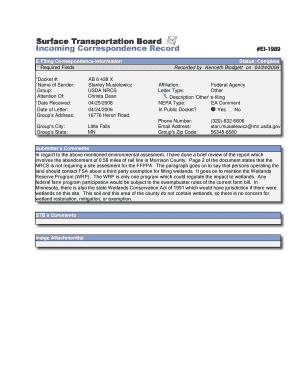
Get E-filing Correspondence Information - Stb Dot
How it works
-

Open form follow the instructions
-

Easily sign the form with your finger
-

Send filled & signed form or save
How to fill out the E-Filing Correspondence Information - Stb Dot online
Filling out the E-Filing Correspondence Information - Stb Dot form is a crucial step in submitting essential documentation online. This guide provides comprehensive instructions to help users navigate the form effectively and ensure all required information is accurately completed.
Follow the steps to complete the e-filing correspondence information form.
- Press the ‘Get Form’ button to access the form and open it in an editable format.
- Complete the *Docket #* field by entering the docket number related to your correspondence. This number is crucial for identifying your submission within the filing system.
- In the *Name of Sender* field, fill in your full name, which will serve as the point of contact for further inquiries regarding the e-filing.
- Next, input the *Group* field with the name of your organization or agency, ensuring it is accurate as it reflects your affiliation.
- Specify the person the correspondence is directed to in the *Attention Of* section to ensure it reaches the right individual.
- Enter the *Date Received*, which indicates when your correspondence was officially accepted. Follow this by selecting the appropriate *Date of Letter* to indicate when the correspondence was drafted.
- Fill in the *Group's Address* section, providing the street address, including the City, State, and Zip Code fields accurately.
- Indicate the status of the correspondence in the appropriate field and ensure that it aligns with the ongoing record-keeping requirements.
- Complete the *Phone Number* and *Email Address* fields for effective communication. Ensure that the information provided is current and correct.
- Next, provide the necessary details regarding the *Affiliation* and select the appropriate *Letter Type*, specifying if it is 'Other' and detailing your description accordingly.
- In the *NEPA Type* field, indicate the type relevant to your correspondence, ensuring it reflects the nature of the assessment.
- Confirm if the document is included in the public docket by selecting 'Yes' or 'No' in the relevant section.
- Finally, review the *Submitter's Comments* section, providing detailed insights or feedback related to your submission.
- Once all fields have been completed and reviewed for accuracy, you can save your changes, download, print, or share the completed form as needed.
Start completing your E-Filing Correspondence Information - Stb Dot form online today to ensure your submission is processed smoothly.
The Board is charged with the economic regulation of various modes of surface transportation, primarily freight rail. The Board has regulatory jurisdiction over railroad rate reasonableness, mergers, line acquisitions, new rail line construction, and abandonments of existing rail lines.
Industry-leading security and compliance
US Legal Forms protects your data by complying with industry-specific security standards.
-
In businnes since 199725+ years providing professional legal documents.
-
Accredited businessGuarantees that a business meets BBB accreditation standards in the US and Canada.
-
Secured by BraintreeValidated Level 1 PCI DSS compliant payment gateway that accepts most major credit and debit card brands from across the globe.