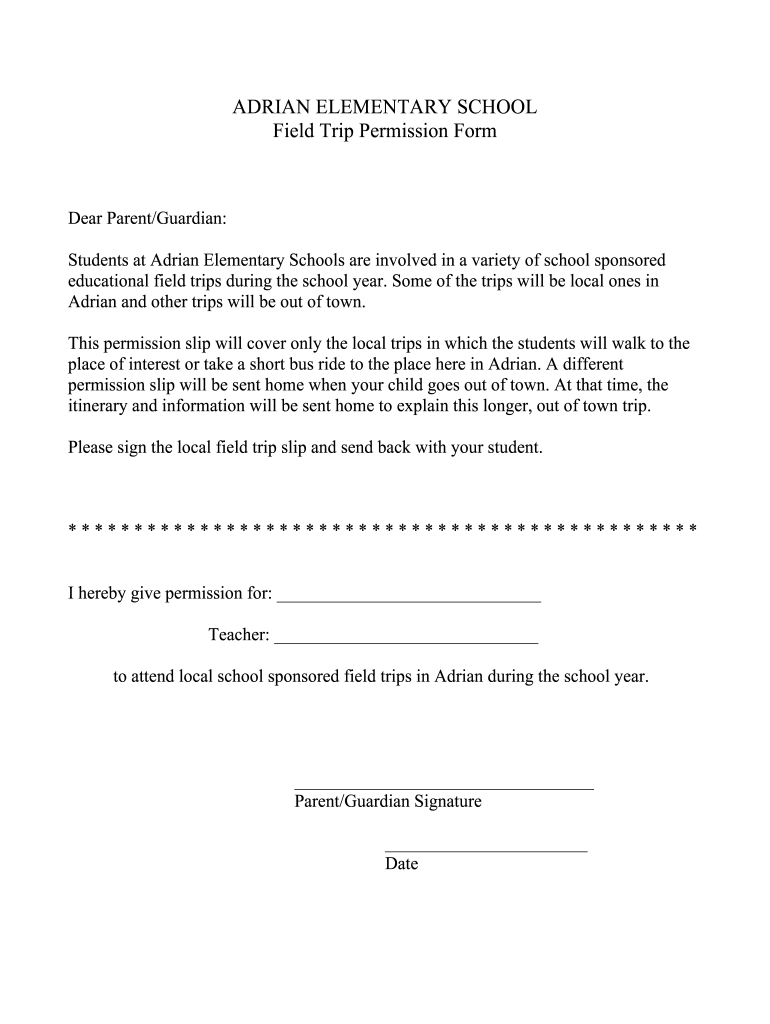
ADRIAN ELEMENTARY SCHOOL Field Trip Permission Form Dear Parent/Guardian: Students at Adrian Elementary Schools are involved in a variety of school sponsored educational field trips during the school.
Loading

Open form follow the instructions

Easily sign the form with your finger

Send filled & signed form or save
How to fill out the Adrian Elementary School Field Trip Permission Form online
Filling out the Adrian Elementary School Field Trip Permission Form online is a straightforward process that ensures your child can participate in local educational trips. This guide will provide you with step-by-step instructions to complete the form accurately and efficiently.
Follow the steps to fill out the form online:
- Press the ‘Get Form’ button to access the Adrian Elementary School Field Trip Permission Form and open the document for editing.
- In the first blank field, write the name of your child for whom you are providing permission.
- In the next section, specify the teacher’s name responsible for the field trips your child will attend.
- Review the information carefully, ensuring all entries are correct and reflect the current school year.
- Once all information is complete, you will need to sign the form in the designated signature field to validate your permission.
- Enter the date of signing in the appropriate field to confirm when the permission was granted.
- After filling out all sections, save the changes to your document. You may also choose to download, print, or share the filled form as needed.
Complete your forms online today to ensure timely processing.
Experience a faster way to fill out and sign forms on the web. Access the most extensive library of templates available.
Related content
Secure funding (if needed, 3-6 months before the trip) o You may need to fundraise to...
If you are interested in this opportunity and meet the qualifications noted on the...
PLEASE DO NOT RETURN YOUR FORM TO THE ABOVE ADDRESS. 1. REPORT DATE (DD-MM-YYYY). 2...
Get answers to your most pressing questions about US Legal Forms API.
Do you have field trips in high school?
Yes, high schools also organize field trips that provide students with real-world experiences tied to their studies. Trips can enhance learning in various subjects and promote personal development. To participate, students typically need to submit a signed Adrian Elementary School Field Trip Permission Form, confirming their eligibility and parental approval.
How do you organize a field trip?
Organizing a field trip begins with setting objectives and determining a suitable location. Collaborate with staff to arrange transportation and itinerary, securing all bookings in advance. Most importantly, communicate clearly with parents using the Adrian Elementary School Field Trip Permission Form to gather their consent and ensure everyone's on the same page.
How are field trips planned?
Field trips are planned by identifying educational goals that the trip will fulfill. Coordinate with teachers, administration, and transportation services to arrange logistics. Finally, ensure to distribute the Adrian Elementary School Field Trip Permission Form to parents for necessary approvals, making the planning process smoother and organized.
How to write a field trip permission slip?
Writing a field trip permission slip involves including essential information such as the trip destination, purpose, date, and times. Clearly state any costs involved and any activities planned. Ensure parents can easily fill out the Adrian Elementary School Field Trip Permission Form by providing spaces for signatures and emergency contact details.
How to propose a field trip?
To propose a field trip, draft a proposal that outlines the educational benefits and logistics of the trip. Include how it aligns with the curriculum and ensures student safety. Once prepared, present your proposal to school administrators for approval, and facilitate the completion of the Adrian Elementary School Field Trip Permission Form to secure parental consent.
How do I make a field trip form?
Creating a field trip form involves outlining key details about the trip. Include sections for trip location, dates, and activities, as well as parent and emergency contact information. Consider utilizing the Adrian Elementary School Field Trip Permission Form for a clear, comprehensive template that meets all necessary requirements.
How to fill consent form for field trip?
Filling out a consent form for a field trip requires careful attention to detail. First, input the student's information accurately. Then, review the field trip details, sign the Adrian Elementary School Field Trip Permission Form, and provide any additional information requested. This ensures the school has the necessary permissions and guidelines.
How do you set up a school field trip?
To set up a school field trip, start by identifying the educational objectives and destinations. Then, gather necessary approvals from school administration and parents. Lastly, use the Adrian Elementary School Field Trip Permission Form to obtain parental consent, ensuring all details are clear and accessible.
How to write a permission slip?
To write a permission slip, start with a title indicating the nature of the event. Provide information about the trip, including destination, date, and time, along with any costs involved. Include a section for parent signatures on the Adrian Elementary School Field Trip Permission Form to confirm their approval.
How to write a consent letter for a field trip?
When writing a consent letter for a field trip, begin with a clear introduction stating the purpose of the trip. Include essential details such as the date, location, and proposed activities. Finally, mention the Adrian Elementary School Field Trip Permission Form that parents must complete to provide their consent.
Use professional pre-built templates to fill in and sign documents online faster. Get access to thousands of forms.
If you believe that this page should be taken down, please follow our DMCA take down process here.