Loading
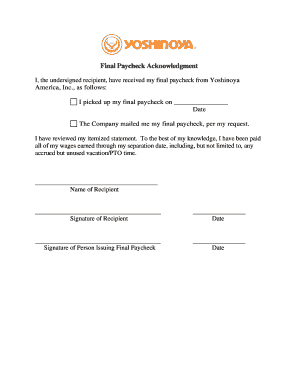
Get Yoshinoya Final Paycheck Acknowledgment
How it works
-

Open form follow the instructions
-

Easily sign the form with your finger
-

Send filled & signed form or save
How to fill out the Yoshinoya Final Paycheck Acknowledgment online
Filling out the Yoshinoya Final Paycheck Acknowledgment online is a straightforward process. This guide will walk you through each step to ensure that you complete the form accurately and efficiently.
Follow the steps to complete your acknowledgment form online.
- Click ‘Get Form’ button to obtain the form and open it in the editor.
- Begin by entering the date you picked up your final paycheck, if applicable. If the company mailed the paycheck, indicate that as well by selecting the appropriate option.
- Review the itemized statement provided. Ensure that you acknowledge you have received all wages earned up to your separation date, including any unused vacation or PTO time.
- Fill in your name in the designated field as the recipient of the final paycheck.
- Provide your signature in the appropriate space to confirm that you have received your final paycheck.
- Enter the date on which you are signing the acknowledgment.
- If applicable, the person issuing the final paycheck should also sign and date the acknowledgment in the designated spaces.
- Once you have filled out all necessary fields, review the entire form for accuracy and completeness.
- Finally, save your changes, download, print, or share the completed form as needed.
Complete your documentation seamlessly online today.
Related links form
After quitting, you will receive your final paycheck according to your employer's policy and state laws. It’s advisable to check with your HR department for the specific process. Keeping track of your Yoshinoya Final Paycheck Acknowledgment can help in ensuring you receive the payment you’re entitled to, even after your departure.