Loading
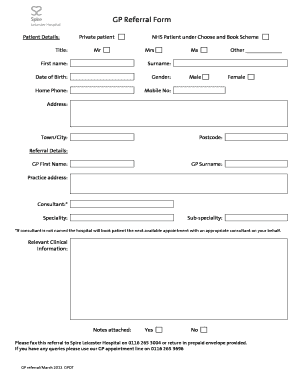
Get Uk Spire Gp Referral Form 2012-2026
How it works
-

Open form follow the instructions
-

Easily sign the form with your finger
-

Send filled & signed form or save
How to fill out the UK Spire GP Referral Form online
Completing the UK Spire GP Referral Form online can facilitate a smoother referral process. This guide provides clear, step-by-step instructions to help you fill out each section accurately and efficiently.
Follow the steps to complete your referral form online
- Click the ‘Get Form’ button to obtain the referral form and open it for editing.
- Begin by entering the patient details. Fill in the title, such as Mr, Mrs, or Ms, followed by the first name, surname, and date of birth. Specify the gender by selecting from the options provided.
- Provide contact information by entering the home phone number and mobile number to ensure clear communication.
- Complete the address section, including the street address, town or city, and postcode to allow for accurate location details.
- In the referral details section, enter the GP's first and last name, followed by the practice address.
- List the consultant name, specialty, and any sub-specialty if known. Note that if a consultant is not named, the hospital will assign the next available appointment with an appropriate consultant.
- Include relevant clinical information. If there are notes to attach, indicate whether they are included by selecting ‘Yes’ or ‘No’.
- After you have filled out all the required sections, review the information for accuracy. Finally, you have the option to save changes, download, print, or share the form as necessary.
Complete your GP referral form online today for efficient processing.
Related links form
Formulario De Autorizacion Gestiones Y Envio De ... - Asociart ART
Registration Form - Innocenti Lambretta - Lambrettaclubtriveneto
MATERIAL SAFETY DATA SHEET 16 Sections SECTION 1 CHEMICAL PRODUCT AND COMPANY IDENTIFICATION
Reading Comprehension - Mammals - Primary Leap Worksheets Year 6 English - Reading Comprehension
If you already know the type of consultant you need to see, you can call the hospital to make an appointment. Step 2: Your GP will recommend a specialist consultant and write a private patient referral letter on your behalf. You can then self-refer and call the hospital to make an appointment.