Loading
Get York 100.000-cl1 (909)
How it works
-

Open form follow the instructions
-

Easily sign the form with your finger
-

Send filled & signed form or save
How to fill out the York 100.000-CL1 (909) online
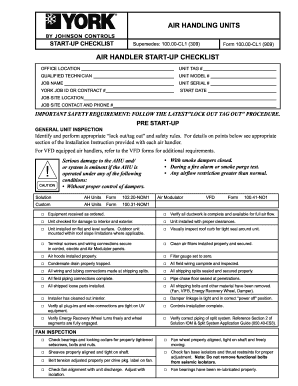
The York 100.000-CL1 (909) form is essential for conducting the start-up checklist for air handling units. This guide provides you with a clear, step-by-step approach to filling out the form online, ensuring that users can effectively document their process safely and accurately.
Follow the steps to fill out your York 100.000-CL1 (909) form successfully.
- To begin, press the ‘Get Form’ button to obtain the York 100.000-CL1 (909) form and open it in your web-based editor.
- In the first section, complete the office location by providing the name of your office or facility. Next, fill in the unit tag number that identifies the specific unit you are servicing.
- Provide the name of the qualified technician responsible for the unit's start-up. Ensure that you enter their details accurately to maintain traceability and accountability.
- Enter the unit model number and the job name related to this specific installation. This gives context to your checklist and helps link responsibilities if questions arise.
- Record the unit serial number followed by the York job ID or contract number, which are crucial for record-keeping and follow-up actions.
- Specify the start date of this task. This date is important for scheduling and accountability for maintenance activities.
- Fill in the job site location to ensure that all parties are aware of where the unit and associated checklist pertain.
- Include the job site contact name and their phone number to facilitate communication regarding the project's progress and address any immediate concerns.
- Proceed with the checklist items. For each inspection point listed, mark whether the corresponding task has been completed. This includes verifying equipment condition, ensuring proper installations, and checking all relevant safety measures.
- After completing the checklist, document the required data such as voltage, amperage, and fan specifications. It is essential for future maintenance reviews and troubleshooting.
- Review the entire form for accuracy and completeness. Once satisfied, you can either save your changes, download a copy for your records, print the form, or share it as needed.
Complete your York 100.000-CL1 (909) form online today for efficient air handling unit management.
In New York, unclaimed funds are managed by the Office of the State Comptroller. You can reach out to this office by calling 1-800-221-9311 for assistance with unclaimed funds inquiries. This service is vital for individuals or businesses seeking lost assets, and it connects back to resources like York 100.000-CL1 (909) for comprehensive legal support.