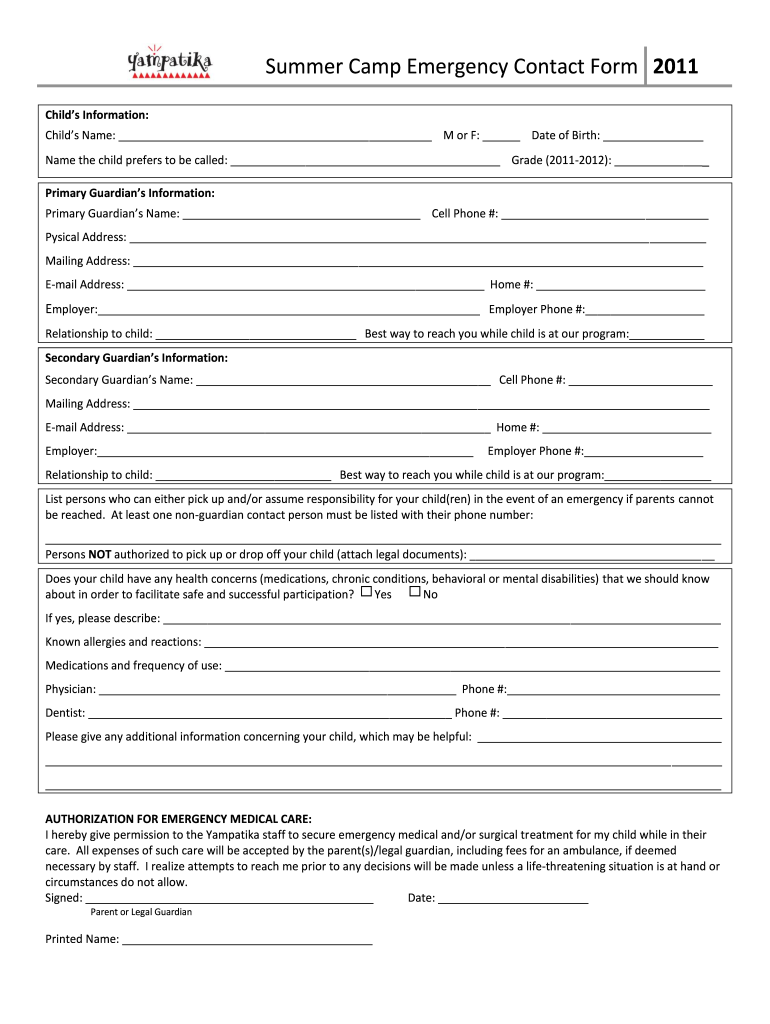
Summer Camp Emergency Contact Form 2011 Child's Information: Child's Name: M or F: Date of Birth: Name the child prefers to be called: Grade (2011-2012): Primary Guardian's Information: Primary Guardian's.
Loading

Open form follow the instructions

Easily sign the form with your finger

Send filled & signed form or save
How to fill out the Yampatika Summer Camp Emergency Contact Form online
Filling out the Yampatika Summer Camp Emergency Contact Form is an essential step in ensuring your child’s safety during their summer camp experience. This guide provides clear instructions on how to complete the form accurately and efficiently online.
Follow the steps to successfully complete the emergency contact form.
- Click the ‘Get Form’ button to access the form and open it in your preferred online editor.
- Begin by entering your child's information. Fill in their full name, gender, and date of birth. Include the name they prefer to be called and their grade for the 2011-2012 school year.
- Next, provide the primary guardian's information. This includes the full name, cell phone number, physical and mailing addresses, email address, home phone number, employer details, and the best way to reach the guardian while the child is at camp.
- Then, fill out the secondary guardian's information similarly to the primary guardian's. Ensure all required fields, such as their name, cell phone number, addresses, email, and relationship to the child, are completed.
- List individuals authorized to pick up or assume responsibility for your child in case of an emergency when guardians cannot be contacted. At least one non-guardian contact must be included with their phone number.
- Indicate persons who are not authorized to pick up or drop off your child, attaching any legal documents if necessary.
- Answer whether your child has any health concerns, allergies, or medications they take regularly. If ‘yes’, provide detailed descriptions in the designated fields.
- Include the contact information for your child’s physician and dentist, including names and phone numbers.
- Fill in any additional information regarding your child that may assist in their safe participation in camp activities.
- Read and accept the authorization for emergency medical care by signing and dating the form as the parent or legal guardian. Finally, include your printed name.
- After completing all sections, save your changes, and choose to download, print, or share the completed form as necessary.
Complete the Yampatika Summer Camp Emergency Contact Form online today to ensure your child's safety!
Experience a faster way to fill out and sign forms on the web. Access the most extensive library of templates available.
Related content
The purpose of this report is to evaluate and document the results of implementing the...
The BAER report describes watershed pre- and post-fire watershed response information...
Get answers to your most pressing questions about US Legal Forms API.
How do I put someone down as an emergency contact?
To designate someone as your emergency contact, gather their information including name, phone number, and relationship to you. Fill out the Yampatika Summer Camp Emergency Contact Form with these details and submit it through the specified channels. It's a good idea to inform your emergency contact of their role, ensuring they are ready to support you in any situation.
How to create an emergency contact?
Creating an emergency contact involves selecting someone trusted who can assist you in urgent situations. It's crucial to ensure this individual is aware of your needs and understands how to fill out the Yampatika Summer Camp Emergency Contact Form if necessary. You can provide them with relevant information, making them fully prepared to act effectively when required.
How do I create an emergency contact list on my iPhone?
To set up an emergency contact list on your iPhone, access the Health app and navigate to the Medical ID tab. Here, you can add emergency contacts by entering their information, ensuring you include reliable contacts who are familiar with the Yampatika Summer Camp Emergency Contact Form process. Your iPhone will allow quick access to this information during emergencies, which can enhance safety.
How do I create an emergency contact form?
Creating an emergency contact form involves outlining the necessary details clearly. Begin by visiting the US Legal Forms website, where you can discover templates tailored for the Yampatika Summer Camp Emergency Contact Form. Customize the chosen template by adding any additional relevant fields to meet your specific needs, ensuring it is user-friendly for parents and guardians.
How to make an emergency contact form?
To create an effective emergency contact form, start by identifying essential information you need, such as names, phone numbers, and relationships to the individual. You can use platforms like US Legal Forms that offer customizable templates, specifically designed for the Yampatika Summer Camp Emergency Contact Form. After gathering your requirements, organize the information clearly and ensure it is easy to fill out.
Use professional pre-built templates to fill in and sign documents online faster. Get access to thousands of forms.
If you believe that this page should be taken down, please follow our DMCA take down process here.