Loading
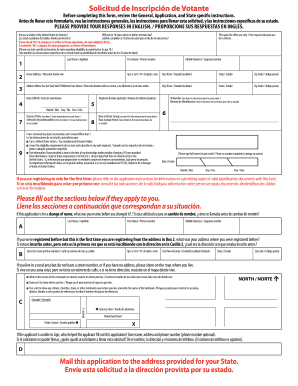
Get National Voter Registration Application Form For U.s. Citizens (spa) - Eac
How it works
-

Open form follow the instructions
-

Easily sign the form with your finger
-

Send filled & signed form or save
How to fill out the National Voter Registration Application Form For U.S. Citizens (SPA) - Eac online
This guide provides clear and supportive instructions for filling out the National Voter Registration Application Form For U.S. Citizens, enabling users to complete the process correctly and efficiently online.
Follow the steps to complete your voter registration form online.
- Click 'Get Form' button to access the application form and open it in your preferred editor.
- Begin by reviewing the General, Application, and State-specific instructions to understand all requirements and deadlines associated with voter registration.
- Answer the questions at the top of the form to confirm your citizenship and age. Ensure you respond in English and do not complete the form if the answer is 'No' to either question.
- In Box 1, enter your name in the order of last name, first name, and middle name if applicable. Avoid using nicknames or initials.
- Provide your home address in Box 2. This should be your legal residence, not a P.O. Box. If you are changing your registered name, indicate your previous name in Box A.
- If applicable, select your party affiliation in Box 7, based on your state's requirements for participation in primaries and caucuses.
- In Box 3, enter your mailing address if it differs from your home address. If you do not have a home address, use a contact address where you can receive mail.
- Fill in your date of birth in Box 4, ensuring it's formatted as month, day, and year.
- Provide your phone number in Box 5, which is optional but may help if there are questions regarding your application.
- In Box 6, enter your identification number as per your state's instructions. This may be a driver's license number or Social Security number.
- Complete Box 8 regarding your race or ethnic group if required by your state. Refer to state instructions for details.
- Sign and date the form in Box 9. Ensure you read the affirmations carefully before signing. If you are assisting someone else, provide their details in Box D.
- Once the form is complete, save your changes and choose to download, print, or share the form as needed.
Take the first step towards making your voice heard by completing the voter registration application online today.
Industry-leading security and compliance
US Legal Forms protects your data by complying with industry-specific security standards.
-
In businnes since 199725+ years providing professional legal documents.
-
Accredited businessGuarantees that a business meets BBB accreditation standards in the US and Canada.
-
Secured by BraintreeValidated Level 1 PCI DSS compliant payment gateway that accepts most major credit and debit card brands from across the globe.