Loading
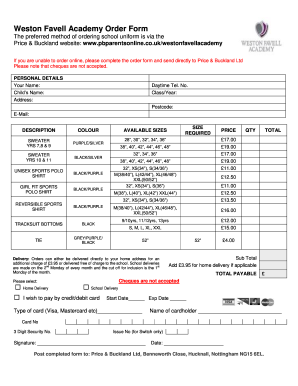
Get Weston Favell Academy Order Form
How it works
-

Open form follow the instructions
-

Easily sign the form with your finger
-

Send filled & signed form or save
How to fill out the Weston Favell Academy Order Form online
Filling out the Weston Favell Academy Order Form online is an essential part of ordering your child's school uniform. This guide will provide clear instructions to help users complete the form accurately and efficiently.
Follow the steps to complete the form successfully.
- Click the ‘Get Form’ button to access the order form and open it in your preferred editor.
- Input your personal details in the designated sections. Provide your name, your child's name, address, daytime telephone number, class/year, postcode, and email address.
- Select the items needed for your child from the options provided. For each item, indicate the color and size required. Ensure you fill in the quantity for each selected item.
- Choose the delivery method: either home delivery for an additional charge or school delivery at no extra cost. Make sure to understand the delivery terms referencing the schedule.
- In the payment section, indicate your preferred method of payment. Fill in the details for your credit/debit card, including card type, card number, expiration date, and security number. Include the name of the cardholder as it appears on the card.
- Review all the entered information for accuracy. Confirm that you have not selected a payment method that is not accepted, such as cheques.
- Once you have filled out the form completely, save your changes. You can also download, print, or share the form as needed.
Complete your Weston Favell Academy Order Form online today!
To contact Weston Favell Academy, visit their website for various communication options, including email and phone contact. This is particularly useful for accessing information about the Weston Favell Academy Order Form. Make sure to describe your inquiry clearly to facilitate a prompt reply.