Loading
Get Duke Id - Hr Duke
How it works
-

Open form follow the instructions
-

Easily sign the form with your finger
-

Send filled & signed form or save
How to fill out the Duke ID - Hr Duke online
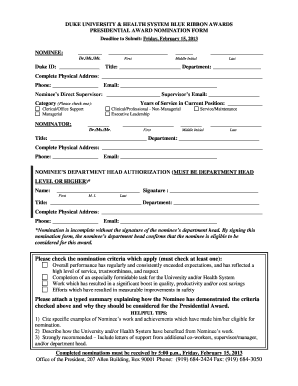
Filling out the Duke ID - Hr Duke form is a critical step in the nomination process for the Blue Ribbon Awards at Duke University and Health System. This guide provides clear instructions to help users complete the form efficiently and accurately.
Follow the steps to successfully complete the Duke ID - Hr Duke form.
- Use the ‘Get Form’ button to obtain the Duke ID - Hr Duke form. Opening the document in your preferred editor will allow you to begin filling it out.
- Start by entering the nominee's information. Include their title (Dr./Ms./Mr.), Duke ID, first name, middle initial, and last name in the designated fields.
- Provide the nominee's title and department, followed by their complete physical address, phone number, and email address. Ensure that each entry is accurate to prevent any contact issues.
- Specify the nominee's direct supervisor's name and their email address for further validation and communication.
- Locate the category section and check one box that best describes the nominee's role, selecting from options like clerical/office support, managerial, clinical/professional - non-managerial, service/maintenance, or executive leadership.
- Fill out the nominator section by entering your title, first name, middle initial, last name, years of service in the current position, department, complete physical address, phone number, and email address.
- Acquire the necessary authorization by having the nominee’s department head sign the form. Include the department head's name, title, department, complete physical address, phone number, and email address.
- Check off at least one of the nomination criteria that apply to the nominee. Ensure these criteria reflect the nominee's achievements and contributions.
- Prepare and attach a typed summary detailing how the nominee meets the checked criteria and justifying their nomination for the Presidential Award.
- Optionally, include specific examples of the nominee’s work, along with letters of support. After completing the form, save your changes and consider downloading or printing the document for your records.
Complete the Duke ID - Hr Duke form online to ensure your nomination is submitted by the deadline!
Your eight-digit EWU ID number, which is found at the top of your acceptance letter and in a series of emails you received to your personal email address during your application process. Your Username, which is also on your acceptance letter to Running Start.
Industry-leading security and compliance
US Legal Forms protects your data by complying with industry-specific security standards.
-
In businnes since 199725+ years providing professional legal documents.
-
Accredited businessGuarantees that a business meets BBB accreditation standards in the US and Canada.
-
Secured by BraintreeValidated Level 1 PCI DSS compliant payment gateway that accepts most major credit and debit card brands from across the globe.