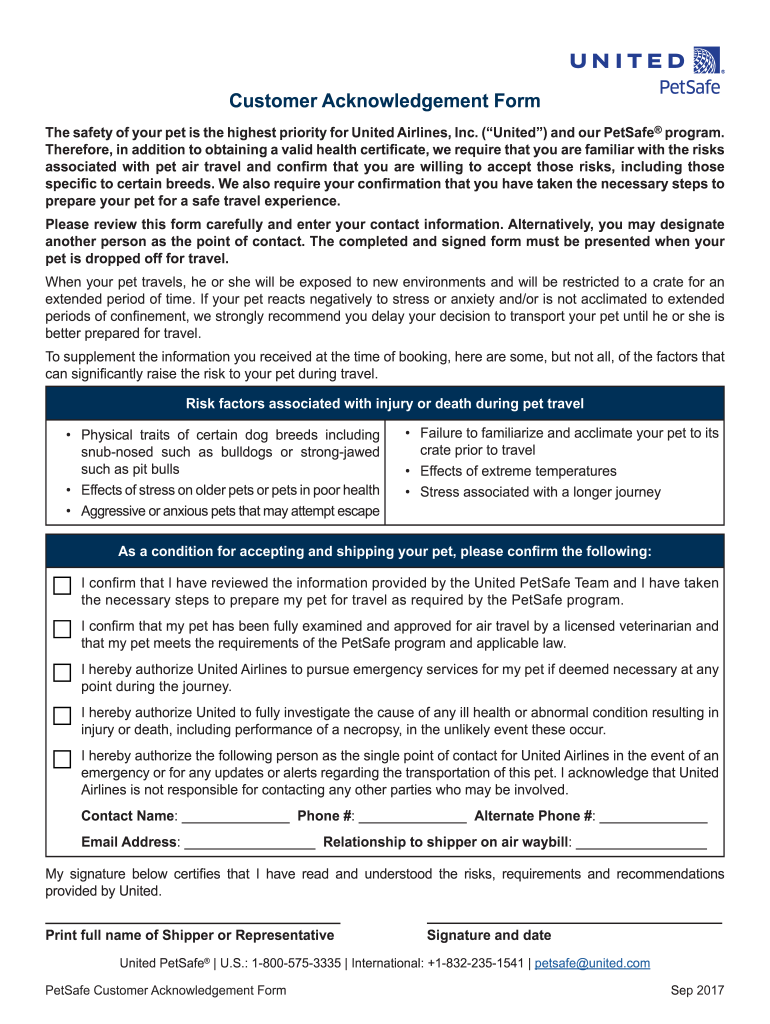
Customer Acknowledgement Form The safety of your pet is the highest priority for United Airlines, Inc. (United) and our PetSafe program. Therefore, in addition to obtaining a valid health certificate,.
Loading

Open form follow the instructions

Easily sign the form with your finger

Send filled & signed form or save
How to fill out the United PetSafe Customer Acknowledgement Form online
Filling out the United PetSafe Customer Acknowledgement Form online is a crucial step in ensuring the safety and well-being of your pet during air travel. This guide provides clear and detailed instructions to help you complete the form accurately and efficiently, ensuring you are well-informed of the associated risks and responsibilities.
Follow the steps to successfully complete the form online.
- Press the ‘Get Form’ button to obtain the United PetSafe Customer Acknowledgement Form and open it for completion.
- Begin by entering your contact information as required. Ensure that all details are accurate, as this information is vital in case of emergencies or updates regarding your pet's travel.
- If necessary, designate another person as the point of contact. Include their full contact details to ensure smooth communication.
- Review the risk factors associated with pet travel outlined in the form. Acknowledge each point carefully to understand the potential risks your pet may face.
- Confirm that you have reviewed the information provided by the United PetSafe Team and that you have prepared your pet for travel as per the PetSafe program's requirements.
- Confirm that your pet has been examined and approved for air travel by a licensed veterinarian. You must verify your pet meets all the requirements set by the PetSafe program.
- Authorize United Airlines to pursue emergency services for your pet if necessary during the journey. This is a crucial step for your pet's safety.
- Complete the section for designating a single point of contact, including their name, phone number, and relationship to the shipper.
- Finally, print your full name, provide your signature and date at the end of the form to certify that you have read and understood all the risks and requirements.
- Once you have filled out the form completely, save your changes. You can then download, print, or share the completed form as needed.
Complete your documents online to ensure a safe travel experience for your pet.
Experience a faster way to fill out and sign forms on the web. Access the most extensive library of templates available.
Related content
United and Contractor acknowledge and agree that any fuel provided to Contractor pursuant...
Get answers to your most pressing questions about US Legal Forms API.
How do you add a pet to an airline ticket?
To add a pet to your airline ticket, you should contact United Airlines' customer service after booking your flight. They will guide you through the process and inform you about any required documents, including the United PetSafe Customer Acknowledgement Form. Be prepared to provide details about your pet’s health and other important information. Completing this process promptly ensures a smooth travel experience for you and your furry companion.
Is United PetSafe still suspended?
As of now, the United PetSafe service has been reinstated, allowing pets to travel with their owners again. This service offers comprehensive solutions to ensure your pet's comfort and safety during the flight. However, it is important to keep updated by visiting the United Airlines website and checking for any changes. For your convenience, using the United PetSafe Customer Acknowledgement Form will streamline the booking process for pets.
Does United Airlines require a pet health certificate?
Yes, United Airlines requires a pet health certificate for all animals traveling in their care. This certificate should be issued by a licensed veterinarian and must comply with United's specific guidelines. Completing the United PetSafe Customer Acknowledgement Form will include sections dedicated to your pet’s health status, ensuring that you are prepared for your journey. Always verify the latest requirements before your travel date.
Can you add a pet to a flight after booking?
Yes, you can add a pet to your flight after booking, but it's essential to do this as soon as possible. United Airlines requires pet owners to complete the United PetSafe Customer Acknowledgement Form to ensure all necessary information is provided. Contact United Airlines directly to check availability and confirm any additional fees. Act quickly to secure your pet's spot.
Did United change its pet policy?
Yes, United has made changes to its pet policy in recent times. The revisions reflect a commitment to both safety and convenience for pet travelers. As a result, clarity regarding requirements, such as the United PetSafe Customer Acknowledgement Form, becomes even more crucial. Always review the latest pet travel guidelines before planning your journey with United.
Does United require a pet health certificate?
Yes, United Airlines does require a health certificate when traveling with pets. This certificate must confirm that the pet is healthy and fit for travel. It's essential for pet owners to ensure that their health documentation aligns with the United PetSafe Customer Acknowledgement Form requirements. Therefore, be sure to consult a veterinarian for the necessary paperwork before booking.
Why did United stop PetSafe?
United discontinued the PetSafe program due to various challenges, including safety concerns and exceeding operational demands. The airline aims to provide a better travel experience for both pets and their owners. By halting this service, United can focus on refining their pet travel policies. Keep an eye on any future announcements surrounding the United PetSafe Customer Acknowledgement Form for updates.
How do I add my pet to my United flight?
To add your pet to your United flight, you should contact United Airlines directly or use their online system for pet reservations. Make sure you have the necessary information handy, including the details noted on the United PetSafe Customer Acknowledgement Form. It's crucial to make this arrangement well in advance of your flight to secure a spot for your pet. Always verify any fees or additional requirements associated with pet travel.
What paperwork do you need to fly with a service dog?
When flying with a service dog, you typically need to provide documentation that verifies your dog's status as a service animal. It's beneficial to have the United PetSafe Customer Acknowledgement Form ready, alongside any required forms from your healthcare provider. This paperwork helps ensure that you and your service dog travel smoothly. Always check with your airline to confirm specific documentation requirements.
Does United require a health certificate for dogs?
Yes, United Airlines mandates a health certificate for all dogs transported via their airline. This health certificate should be issued by a licensed veterinarian, ensuring your dog is healthy for travel. When preparing for your journey, refer to the United PetSafe Customer Acknowledgement Form to gather necessary details and documentation. Remember to plan ahead to avoid any last-minute complications.
Use professional pre-built templates to fill in and sign documents online faster. Get access to thousands of forms.
If you believe that this page should be taken down, please follow our DMCA take down process here.
This form is available in several versions. Select the version you need from the drop-down list below.