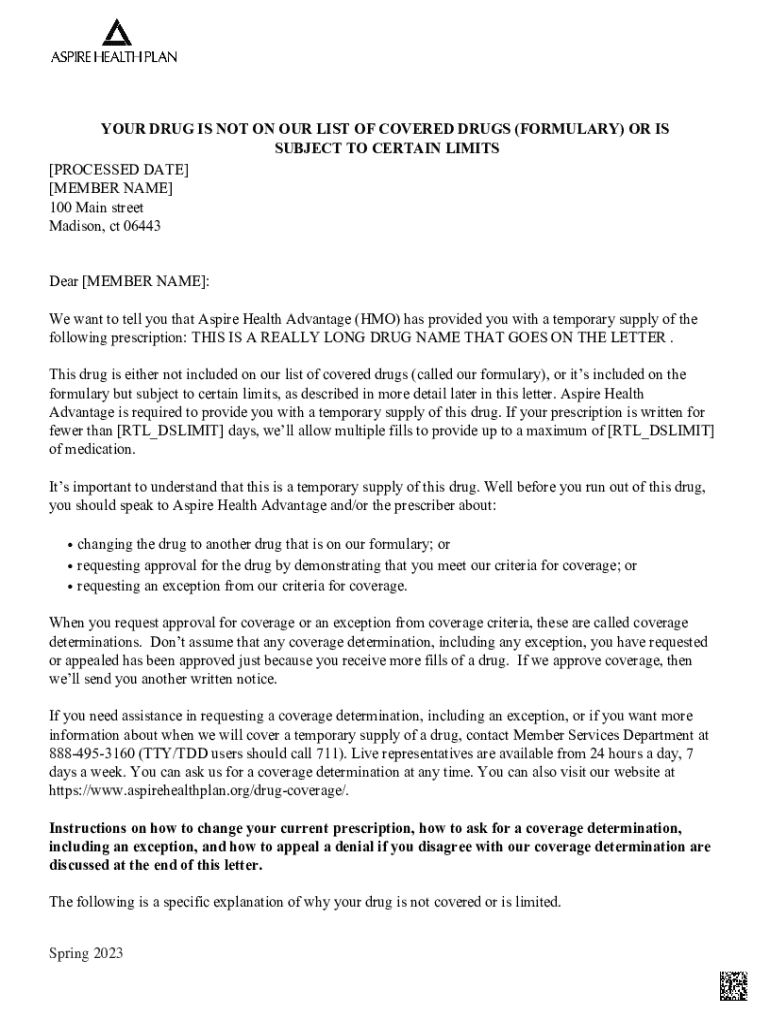
At Aspire Health Advantage (HMO) has provided you with a temporary supply of the following prescription: THIS IS A REALLY LONG DRUG NAME THAT GOES ON THE LETTER . This drug is either not included on our list of covered drugs (called our formulary), or it s included on the formulary but subject to certain limits, as described in more detail later in this letter. Aspire Health Advantage is required to provide you with a temporary supply of this drug. If your prescription is written for fewer tha.
Loading

Open form follow the instructions

Easily sign the form with your finger

Send filled & signed form or save
How to fill out the CA Aspire Health H8764 online
Filling out the CA Aspire Health H8764 form online can seem overwhelming, but with guided steps, it can be a straightforward process. This guide aims to provide clear and supportive instructions to help users complete the form accurately.
Follow the steps to successfully fill out the CA Aspire Health H8764 online.
- Press the ‘Get Form’ button to obtain the CA Aspire Health H8764 form and open it in your preferred online editor.
- Begin by entering your personal information in the designated fields. This typically includes your full name, address, and date of birth.
- Next, review the section regarding your prescription. Ensure that all details about the medication, including the drug name and its prescribed quantity, are accurately filled in.
- In the subsequent section, indicate whether you are requesting coverage determination or an exception for a non-formulary medication. Be sure to provide a detailed explanation to support your request.
- Next, confirm your prescriber’s information, including their name and contact details, as these may be required for additional approvals.
- Once all necessary sections have been completed, review the form for any errors or omissions. Ensuring accuracy is crucial before submission.
- Finally, save your changes, and you may choose to download, print, or share the completed form as needed.
Start filling out the CA Aspire Health H8764 online to ensure your prescription needs are met promptly.
Experience a faster way to fill out and sign forms on the web. Access the most extensive library of templates available.
Related content
Montage Health, H8764, Aspire Health Advantage (HMO), March 2017, Urban, CA. 465, New York...
Sep 1, 2023 — H8764 - ASPIRE HEALTH. PLAN. Montage Health. Customer. Service. 8555701600...
... Health Plan - MyCare Ohio (Medicare-Medicaid Plan) 2021 2022 1 H0028 007 0 ... H8764...
Get answers to your most pressing questions about US Legal Forms API.
How many members does Health Net have?
We have more than 90,000 network providers who serve more than three million members across California. Health Net also provides access to: Substance abuse programs.
What is qualified health insurance California?
An insurance plan that's certified by the Health Insurance Marketplace ®, provides essential health benefits, follows established limits on cost-sharing (like deductibles, copayments, and out-of-pocket maximum amounts), and meets other requirements under the Affordable Care Act.
Who is the CEO of Aspire Health?
Munson, MBA. MONTEREY, Calif. — Aspire Health, a community-centered, not-for-profit organization supported by Montage Health and Salinas Valley Memorial Healthcare System (SVMHS), has announced the arrival of Tyler W.
Who owns Aspire Health Plan?
Aspire Health, owned by Montage Health and Salinas Valley Health, is committed to inspiring every individual to live life to the fullest.
Who bought Aspire Health?
Anthem, Inc. Completes Acquisition of Aspire Health.
How many members does Aspire Health Plan have?
“All together, we're supporting about 65,000 residents in our community,” says Tyler Munson, Chief Executive Officer at Aspire Health. “We are committed to elevating the health and wellness of Monterey County, our community, right now and long into the future.”
Use professional pre-built templates to fill in and sign documents online faster. Get access to thousands of forms.
If you believe that this page should be taken down, please follow our DMCA take down process here.