Loading
Form preview
  • US Legal Forms
  • Other Templates
  • Miscellaneous Forms
  • Multi-State Miscellaneous Forms
  • Troop 601 Patrol Meal Planner

Get Troop 601 Patrol Meal Planner

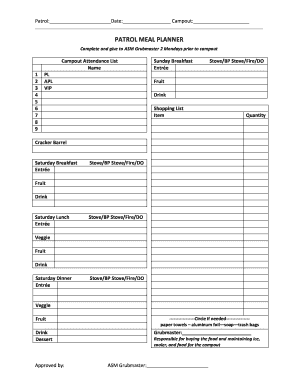
Patrol: Date: Campout: PATROL MEAL PLANNER Complete and give to ASM Grubmaster 2 Mondays prior to campout Campout Attendance List Name 1 2 3 4 5 6 7 8 9 PL APL VIP Sunday Breakfast Entre Stove/BP.

How it works

  1. Open form

    Open form follow the instructions

  2. Easily sign form

    Easily sign the form with your finger

  3. Share form

    Send filled & signed form or save

How to fill out the Troop 601 Patrol Meal Planner online

The Troop 601 Patrol Meal Planner is a vital tool for organizing meals during campouts. Properly filling out this form ensures that all dietary needs are met and responsibilities are clearly assigned. This guide will provide you with step-by-step instructions to help you complete the form efficiently.

Follow the steps to accurately complete the meal planner.

  1. Press the ‘Get Form’ button to access the Patrol Meal Planner. This will open the form for you to complete.
  2. Fill out the patrol name, date, and campout information at the top of the form. This identifies which group and event the meal planning is for.
  3. In the Campout Attendance List section, list the names of all attendees in the provided fields. Ensure all participants are included to accurately plan meals.
  4. Next, proceed to the meal sections starting with Sunday Breakfast. Fill in the Entrée, specify the cooking method (Stove, BP Stove, Fire, or Dutch Oven), and list the required fruit and drink.
  5. Continue with the Saturday meals: Breakfast, Lunch, and Dinner. For each meal, repeat the process of filling in the Entrée, cooking method, fruit, veggie, drink, and any dessert for dinner.
  6. In the Shopping List section, indicate the items needed along with their respective quantities, making sure to account for all meals planned.
  7. If required, mark any additional items such as paper towels or trash bags by circling the necessary options.
  8. At the bottom of the form, designate the Grubmaster and ASM Grubmaster by entering their names. This designates responsibility for meal preparation and management.
  9. Once all sections have been completed, review the form for accuracy. Make sure all necessary information is filled in to avoid issues during the campout.
  10. Finally, save your changes, download the completed form, or print it out for submission to the ASM Grubmaster.

Complete your Troop 601 Patrol Meal Planner online today and ensure a successful campout experience.

Get form

Experience a faster way to fill out and sign forms on the web. Access the most extensive library of templates available.
Get form

Related content

Army Food Program
Jul 17, 2019 — Meal and menu standards, menu planning guides, and subsistence product...
Learn more
FM 7-21.13 Soldier's Guide
Feb 2, 2004 — The Soldier is the ultimate guardian of America's freedom. In over. 120...
Learn more
GROUND CONTROL
This Field Commander's Handbook will teach you how to interact with the. Ground Control...
Learn more

Related links form

City Of Brainerd Construction Site Erosion Control Inspection Form BUILDING PERMIT - The City Of Pigeon Forge Tennessee Trane Credit Application Backflow Test Report Form - Town Of Clayton

Questions & Answers

Get answers to your most pressing questions about US Legal Forms API.

Contact support

Making a meal prep calendar begins with determining when your meals will be prepared and consumed. Use the Troop 601 Patrol Meal Planner to create a visual layout of your meals, including prep days and serving days. This structured approach keeps you organized and helps reduce stress during busy weeks, ensuring you're always ready for meal times.

To make a meal plan for someone, start by discussing their preferences and dietary restrictions. Then, utilize tools like the Troop 601 Patrol Meal Planner to organize meal options, grocery lists, and prep schedules. This app allows for collaboration and adjustment, ensuring the meal plan is tailored and enjoyable for whoever you’re planning for.

The five basic steps of meal planning include setting your goals, selecting recipes, creating a shopping list, preparing meals, and reviewing your plan. The Troop 601 Patrol Meal Planner helps streamline these steps by offering preset recipes and easy-to-use grocery lists. This ensures that your meal prep is efficient and aligns with your overall plan for success.

Creating a meal plan for someone involves understanding their dietary preferences and needs. With the Troop 601 Patrol Meal Planner, you can easily customize meal options based on their tastes and nutritional requirements. It allows you to map out meals for specific days, ensuring variety while accommodating any dietary restrictions.

Yes, there are several apps available that can create meal plans tailored to your needs. One great option is the Troop 601 Patrol Meal Planner, designed specifically for groups like yours. This app simplifies meal planning by letting you input dietary preferences, budgets, and the number of people you plan to feed, ensuring everyone enjoys delicious meals together.

Get This Form Now!

Use professional pre-built templates to fill in and sign documents online faster. Get access to thousands of forms.
Get form
If you believe that this page should be taken down, please follow our DMCA take down processhere.
Get Troop 601 Patrol Meal Planner
Get form
  • Adoption
  • Bankruptcy
  • Contractors
  • Divorce
  • Home Sales
  • Employment
  • Identity Theft
  • Incorporation
  • Landlord Tenant
  • Living Trust
  • Name Change
  • Personal Planning
  • Small Business
  • Wills & Estates
  • Packages A-Z
  • Affidavits
  • Bankruptcy
  • Bill of Sale
  • Corporate - LLC
  • Divorce
  • Employment
  • Identity Theft
  • Internet Technology
  • Landlord Tenant
  • Living Wills
  • Name Change
  • Power of Attorney
  • Real Estate
  • Small Estates
  • Wills
  • All Forms
  • Forms A-Z
  • Other Templates
  • Legal Hub
  • About Us
  • Help Portal
  • Legal Resources
  • Blog
  • Affiliates
  • Contact Us
  • Delete My Account
  • Site Map
  • Industries
  • Forms in Spanish
  • Localized Forms
  • State-specific Forms
  • Forms Kit
  • Real Estate Handbook
  • All Guides
  • Notarize
  • Incorporation services
  • For Consumers
  • For Small Business
  • For Attorneys
  • USLegal
  • FormsPass
  • pdfFiller
  • signNow
  • altaFlow
  • DocHub
  • Instapage
Form Packages
  • Adoption
  • Bankruptcy
  • Contractors
  • Divorce
  • Home Sales
  • Employment
  • Identity Theft
  • Incorporation
  • Landlord Tenant
  • Living Trust
  • Name Change
  • Personal Planning
  • Small Business
  • Wills & Estates
  • Packages A-Z
Form Categories
  • Affidavits
  • Bankruptcy
  • Bill of Sale
  • Corporate - LLC
  • Divorce
  • Employment
  • Identity Theft
  • Internet Technology
  • Landlord Tenant
  • Living Wills
  • Name Change
  • Power of Attorney
  • Real Estate
  • Small Estates
  • Wills
  • All Forms
  • Forms A-Z
  • Other Templates
Customer Service
  • Legal Hub
  • About Us
  • Help Portal
  • Legal Resources
  • Blog
  • Affiliates
  • Contact Us
  • Delete My Account
  • Site Map
  • Industries
  • Forms in Spanish
  • Localized Forms
  • State-specific Forms
  • Forms Kit
Legal Guides
  • Real Estate Handbook
  • All Guides
Prepared for you
  • Notarize
  • Incorporation services
Our Customers
  • For Consumers
  • For Small Business
  • For Attorneys
Our Sites
  • USLegal
  • FormsPass
  • pdfFiller
  • signNow
  • altaFlow
  • DocHub
  • Instapage
Social Media
Call us now toll free:
+1 833 426 79 33
As seen in:
© Copyright 1999-2026 airSlate Legal Forms, Inc. 17 Station Street, Suite 303, Brookline, MA 02445
  • Your Privacy Choices
  • Terms of Service
  • Privacy Notice
  • Content Takedown Policy
  • Bug Bounty Program