Loading
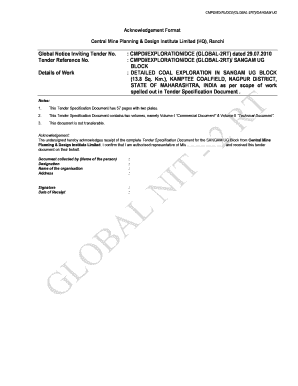
Get Sangam - Nit-cum-tsd.doc
How it works
-

Open form follow the instructions
-

Easily sign the form with your finger
-

Send filled & signed form or save
How to fill out the Sangam - NIT-cum-TSD.doc online
This guide provides a step-by-step approach to filling out the Sangam - NIT-cum-TSD.doc form online. Designed to accommodate users with varying levels of experience, it emphasizes clarity and user-friendliness.
Follow the steps to complete the form accurately.
- Press the ‘Get Form’ button to acquire the document. This will open the form in the editor, allowing you to proceed with the filling process.
- Fill in the Global Notice Inviting Tender Number and Tender Reference Number in the designated fields. Ensure that this information is accurate as it sets the context for your application.
- Detail the 'Details of Work' section, specifying the scope of the work as outlined in the tender documentation, and any unique markers like the area of the block and geological context.
- Complete the Acknowledgment section by providing the name of the person collecting the document, their designation, organization, address, and signature. This confirms the receipt of the tender specifications.
- Confirm the Date of Receipt. This is crucial for tracking the timeline of the submission process.
- Prepare any supplementary documentation required, including your Qualifications and Experience and any specific technical data relevant to the tender.
- Once you have filled out all the necessary sections, carefully review the document for any errors or omissions. Correct these before finalizing the submission.
- After confirming the accuracy of the filled-out form, you can save the changes, download the completed document, print it, or share it as necessary.
Ensure to complete and submit your documents online diligently for a successful bid.
Industry-leading security and compliance
US Legal Forms protects your data by complying with industry-specific security standards.
-
In businnes since 199725+ years providing professional legal documents.
-
Accredited businessGuarantees that a business meets BBB accreditation standards in the US and Canada.
-
Secured by BraintreeValidated Level 1 PCI DSS compliant payment gateway that accepts most major credit and debit card brands from across the globe.