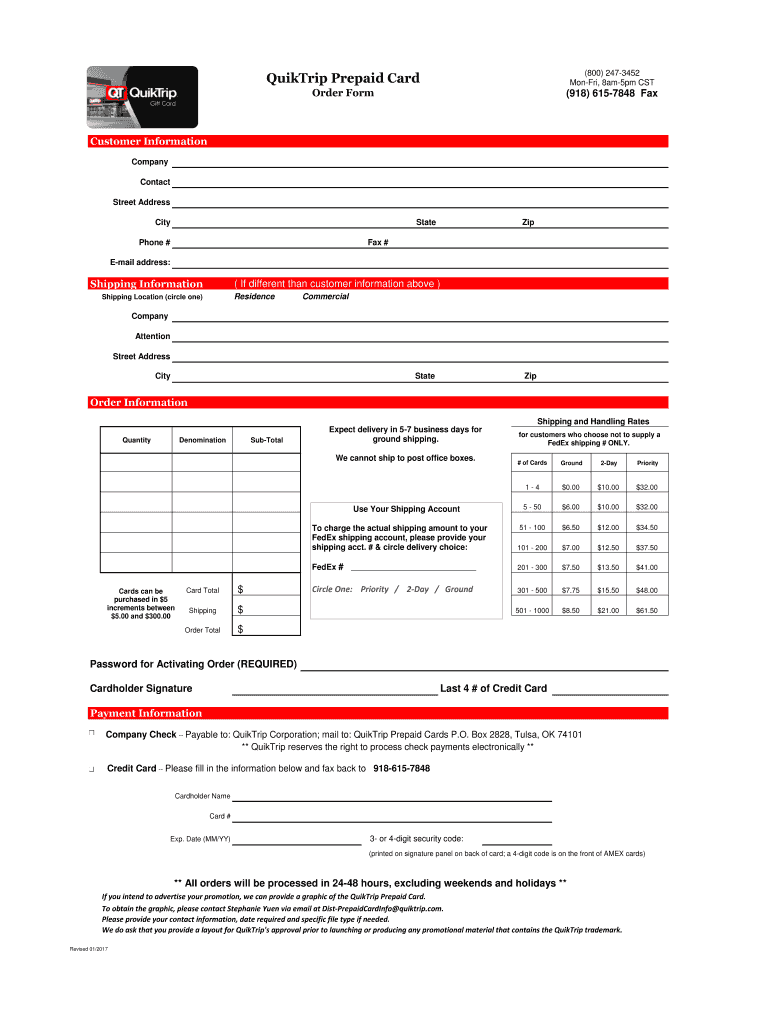
Ifferent than customer ) Residence Shipping Location (circle one) Commercial Company Attention Street Address City State Zip Order Information Shipping and Handling Rates Quantity Denomination Sub-Total Expect delivery in 5-7 business days for ground shipping. We cannot ship to post office boxes. Use Your Shipping Account Cards can be purchased in $5 increments between $5.00 and $300.00 Card Total $ Shipping $ Order Total $ for customers who choose not to supply a FedEx shippin.
Loading

Open form follow the instructions

Easily sign the form with your finger

Send filled & signed form or save
How to fill out the QuikTrip Prepaid Card Order Form online
Filling out the QuikTrip Prepaid Card Order Form online is a straightforward process that allows users to easily order prepaid cards for various needs. This guide provides clear, step-by-step instructions to help you complete each section of the form accurately.
Follow the steps to complete your order form effectively.
- Click ‘Get Form’ button to access the QuikTrip Prepaid Card Order Form and open it in the editor.
- In the 'Customer Information' section, enter your company name, contact person, street address, city, state, phone number, zip code, fax number, and email address.
- If your shipping address is different from your customer information, fill out the 'Shipping Information' section. Specify whether it is a commercial location or residence, and provide the necessary details such as attention name, street address, city, state, and zip code.
- In the 'Order Information' section, select the quantity of prepaid cards you wish to order and the denomination (available in $5 increments). Input the sub-total based on the quantity and denomination chosen.
- Review the shipping and handling rates applicable to your order and calculate the total order amount including shipping costs. Ensure to note that delivery will occur in 5-7 business days.
- If you are using your shipping account, enter your FedEx shipping account number and circle your preferred delivery option: Ground, 2-Day, or Priority.
- Complete the 'Payment Information' section by selecting either company check or credit card payment. If using a credit card, fill out the cardholder name, card number, expiration date, and security code.
- Sign the form with your cardholder signature and include the last four digits of your credit card.
- After reviewing all the entered information for accuracy, save your changes, and proceed to download, print, or share the completed form as needed.
Start your order today by completing the QuikTrip Prepaid Card Order Form online.
Experience a faster way to fill out and sign forms on the web. Access the most extensive library of templates available.
Related content
Cardpool, our gift card exchange business, offers consumers an online marketplace and...
Visit with transfer representatives in the Transfer Centers on any campus and enter your...
7 days ago — A convenience store is a small retail store that was introduced with the...
Get answers to your most pressing questions about US Legal Forms API.
Can you use a QuikTrip credit card anywhere?
Where can I use QT Pay? QT Pay can only be used at participating QuikTrip locations to pay and save on your mobile order in the QuikTrip app, in-store and at the pump.
What can you use QuikTrip gift cards for?
QT Gift Cards Perfect for gifts, awards, or anyone wanting to budget specific amounts for delicious drinks, fresh food, and high-quality fuel at all QT locations.
Can I use my gift card anywhere?
An open-loop gift card can be used anywhere that brand of card is accepted. For example, if you have a gift card that's branded with the Visa logo, you could use it to make purchases anywhere Visa is accepted. Some prepaid gift cards charge a fee to purchase them.
Does QuikTrip sell prepaid Visa cards?
Postage stamps. QuikTrip gift cards; Visa, Mastercard and American Express prepaid cards; sports betting gift cards and phone cards. Money orders. Event tickets, stickers and passes.
Can I use my QuikTrip gift card anywhere?
QuikTrip Gift Cards are redeemable at any store operated by QuikTrip West and/or QuikTrip. QuikTrip Gift Cards are available for purchase at quiktripgiftcards.cashstar.com.
How do I get a QT pump start card?
To get your own QT PumpStart® card, simply show your driver's license at the counter of any QuikTrip store and immediately receive your card. For questions regarding your QT PumpStart® card, please call 800-247-3452.
How long do QuikTrip gift cards last?
There is no expiration date on your Gift Card. We recommend that you redeem it soon after you receive it, so you don't forget.
Use professional pre-built templates to fill in and sign documents online faster. Get access to thousands of forms.
If you believe that this page should be taken down, please follow our DMCA take down process here.