Loading
Get Motion For Leave To Amend Complaint 2020-2026
How it works
-

Open form follow the instructions
-

Easily sign the form with your finger
-

Send filled & signed form or save
How to fill out the Motion For Leave To Amend Complaint online
Completing the Motion For Leave To Amend Complaint can seem daunting, but with a structured approach, you can successfully fill out this important legal document online. This guide will provide you with clear, step-by-step instructions to ensure your form is completed accurately.
Follow the steps to complete your Motion For Leave To Amend Complaint.
- Press the ‘Get Form’ button to obtain the form and open it in the editor.
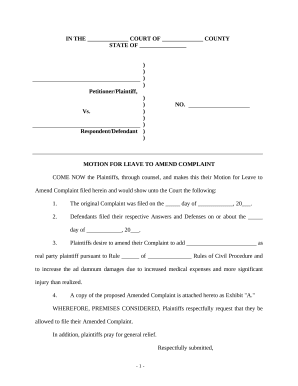
- In the first section, fill in the title of the court and county where the case is filed. This includes the statement 'IN THE ______________ COURT OF ______________ COUNTY' at the top of the form.
- Next, indicate the state in which your case is being filed by completing the blank in 'STATE OF ______________.'
- Fill in the section regarding the Petitioner/Plaintiff and Respondent/Defendant. You can enter the names and titles as necessary, ensuring you include 'No.' followed by the case number assigned to your motion.
- In the body of the motion, provide the date the original Complaint was filed in the designated blank.
- Specify the date when the Defendants filed their respective Answers and Defenses.
- Articulate the purpose of your motion by detailing what amendments you wish to make regarding the Complaint. This should include adding any new parties and explaining the reasons for changes in damages as indicated.
- Attach the proposed Amended Complaint as Exhibit 'A' and reference it within the motion by including a note stating 'A copy of the proposed Amended Complaint is attached hereto as Exhibit "A."'
- Conclude the motion with 'WHEREFORE, PREMISES CONSIDERED' and state your request to file the Amended Complaint. This section helps to summarize your request succinctly.
- In the signature area, fill in the date and your name, title, contact information, and attorney number as required.
- Complete the Certificate of Service section, where you will certify that you have mailed a copy of the motion to the appropriate parties. Ensure you include the date and address where the copy was sent.
- Once you have thoroughly reviewed the completed form and ensured all fields are filled out correctly, you can save your changes, download, print, or share the form as required.
Take the first step by completing your Motion For Leave To Amend Complaint online today.
A motion for leave to amend complaint or petition is a request made by the plaintiff or petitioner to the court to allow them to make changes or additions to their original complaint or petition.