Loading
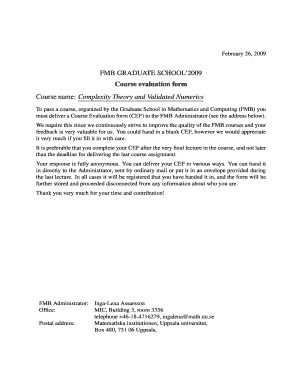
Get Fmb Graduate School'2009 Course Evaluation Form Course ...
How it works
-

Open form follow the instructions
-

Easily sign the form with your finger
-

Send filled & signed form or save
How to fill out the FMB Graduate School 2009 Course Evaluation Form online
This guide provides a comprehensive overview of the process for completing the FMB Graduate School 2009 Course Evaluation Form online. By carefully filling out this form, you contribute valuable feedback to improve the quality of courses offered by the Graduate School in Mathematics and Computing.
Follow the steps to successfully complete your course evaluation form
- Click the ‘Get Form’ button to access the Course Evaluation Form and open it in your preferred online editor.
- Begin by entering your course name in the designated field. For this instance, you will input 'Complexity Theory and Validated Numerics'.
- Indicate your status as a graduate student by selecting 'Yes' or 'No' for whether you are a FMB graduate student.
- Provide feedback on your background knowledge in relation to the course material by responding to the first question.
- Proceed to assess the theoretical level of the course and provide additional comments if necessary.
- Evaluate the balance between theory and practical examples in the course, and suggest modifications if applicable.
- Reflect on the meaningfulness of the assignments and how they supported your learning process.
- Share your thoughts regarding the course literature, including the relevance and availability of materials used.
- Comment on the structure of the course and the organization of the lectures.
- Evaluate the performance of the lecturer(s), marking your assessment on each provided line and adding additional thoughts.
- Assess your satisfaction with course organization and the relevance of knowledge gained to your field of research.
- Express any expectations you had going into the course and give a general experience rating by marking your opinion.
- Quantify your overall opinion on the course by selecting a rating from very bad to very good.
- Provide any final comments or suggestions for improvements regarding the course and your experiences.
- Once you have filled out all necessary fields and sections, you can save your changes, download the completed form, print it, or share it as required.
Submit your completed Course Evaluation Form online to make your voice heard and contribute to the enhancement of future courses.
Course-by-Course Report Identifies, describes, and provides a U.S. equivalency for each credential. Lists all subjects with their corresponding credits, grades, and a calculated GPA expressed in U.S. terms.
Industry-leading security and compliance
US Legal Forms protects your data by complying with industry-specific security standards.
-
In businnes since 199725+ years providing professional legal documents.
-
Accredited businessGuarantees that a business meets BBB accreditation standards in the US and Canada.
-
Secured by BraintreeValidated Level 1 PCI DSS compliant payment gateway that accepts most major credit and debit card brands from across the globe.