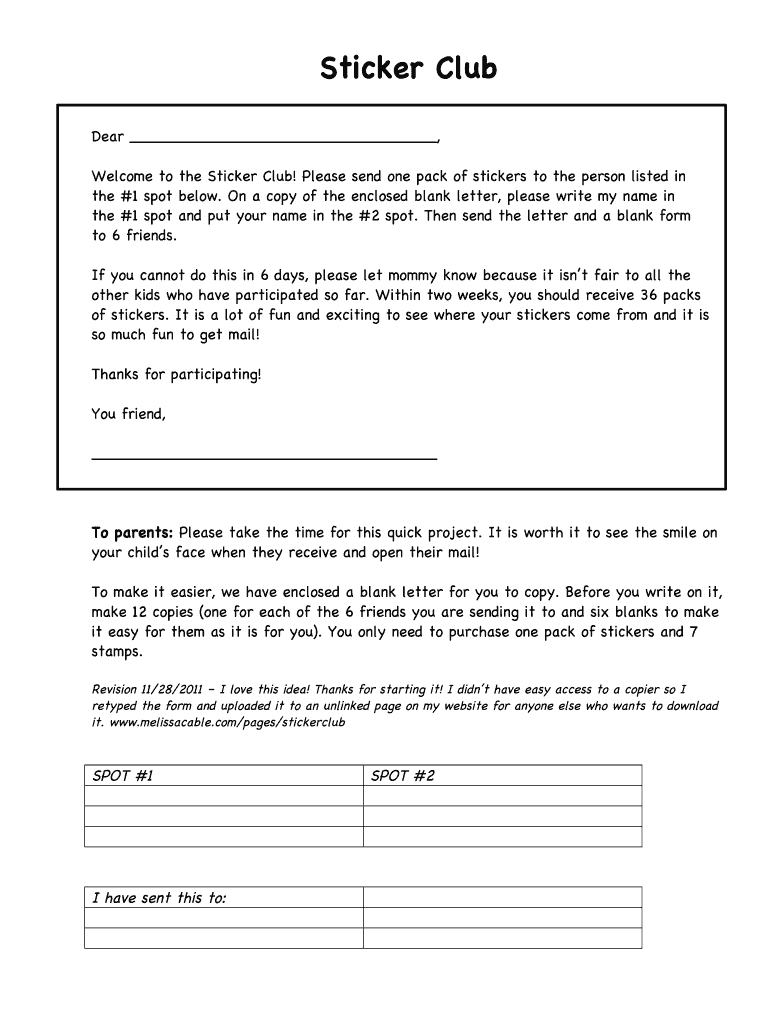
Sticker Club Dear , Welcome to the Sticker Club! Please send one pack of stickers to the person listed in the #1 spot below. On a copy of the enclosed blank letter, please write my name in the #1.
Loading

Open form follow the instructions

Easily sign the form with your finger

Send filled & signed form or save
How to fill out the Sticker Club online
Welcome to the comprehensive guide on filling out the Sticker Club form. This step-by-step instruction will help you navigate the process with ease, ensuring that you successfully participate in this fun and engaging activity.
Follow the steps to successfully complete the Sticker Club form.
- Click the ‘Get Form’ button to obtain the Sticker Club form and open it in your preferred editor.
- In the first designated spot labeled SPOT #1, enter the name of the person to whom you are sending a pack of stickers.
- In SPOT #2, write your own name as the sender, clearly indicating who is participating in the Sticker Club.
- Make sure to follow the instructions to send the completed letter and blank forms to six friends. Remember to ensure that your letters and forms are ready for mailing.
- It is advisable to notify a parent or guardian if you are unable to complete this mailing in the suggested timeframe to maintain fairness.
- After completing the required sections, save the changes you've made. You can then download, print, or share the completed Sticker Club form as needed.
Get started on your Sticker Club form today and enjoy sharing the joy of stickers!
Experience a faster way to fill out and sign forms on the web. Access the most extensive library of templates available.
Related content
Sep 8, 2025 — Sticker Club A new monthly sticker club for kids ages 3 and up will begin...
Aug 29, 2025 — The Carthage Sticker Society is a sticker-of-the-month type club in which...
Instale o pacote de figurinhas Club Penguin para Whatsapp! Este é um conjunto de 21...
Get answers to your most pressing questions about US Legal Forms API.
Is the Sticker Club legit?
Yes, the Sticker Club is a legitimate service that has garnered positive feedback from users across the country. Many members appreciate the quality and variety of stickers available, making it a trusted option for those seeking unique designs. The Sticker Club prioritizes customer satisfaction and strives to provide an enjoyable experience. You can feel confident joining the Sticker Club and exploring its benefits.
How does the Sticker Club work in PDF?
The Sticker Club offers a seamless PDF integration that allows you to create, download, and print your stickers effortlessly. Once you choose your stickers, they are available in PDF format for easy access and printing. This feature ensures that you can customize your stickers and use them in a way that fits your specific needs. With PDF, your sticker designs are just a click away from being brought to life.
How does Sticker Club work?
Sticker Club allows you to easily access a wide range of custom stickers for various purposes. When you join the Sticker Club, you receive exclusive designs that can enhance your personal or business projects. You can browse through the collection, select your favorites, and have them delivered right to your door. It’s a fun way to express your creativity while enjoying the convenience of home delivery.
Who owns Pipsticks?
Pipsticks was founded by a passionate sticker lover named Mohini J. She envisioned a place where sticker enthusiasts could find unique designs and affordable options. Her dedication to the sticker community has turned Pipsticks into a beloved brand, making the Sticker Club a favorite among fans.
What is the Sticker Club?
The Sticker Club is a subscription service that delivers a curated selection of stickers to your doorstep each month. Operated by Pipsticks, it offers a fun way to explore new designs and themes. Whether you are a sticker enthusiast or looking for creative supplies, the Sticker Club brings joy with each package.
How do I cancel my Pipsticks subscription?
You can easily cancel your Sticker Club subscription by logging into your Pipsticks account. From there, navigate to your account settings where you can manage your subscription details. If you face any issues, the Pipsticks customer support team is ready to assist.
Are Pipsticks stickers waterproof?
Yes, many Pipsticks stickers are waterproof, making them ideal for various surfaces. You can use them on water bottles, laptops, and even outdoor items without worrying about damage. This feature adds to the versatility of the Sticker Club experience.
How long does it take for Pipsticks to ship?
Pipsticks typically ships orders within a few business days. Once shipped, you can expect your Sticker Club package to arrive within 5 to 10 business days, depending on your location in the U.S. This prompt shipping means you won’t have to wait long to enjoy your new stickers.
Is Sticker Club legit?
Yes, Sticker Club is a legitimate subscription service. It provides high-quality stickers curated by Pipsticks, a well-known name in the sticker community. You can trust that each package promises delightful designs and surprises each month, enhancing your sticker collection.
Are stickers in high demand?
Yes, stickers remain in high demand across various demographics, especially among young people and creatives. Stickers are used for personalizing items, gifts, and even marketing purposes. The popularity of sticker clubs highlights this ongoing interest in tactile and decorative art forms. With platforms like US Legal Forms, you can easily set up a sticker business tailored to fulfill this demand.
Use professional pre-built templates to fill in and sign documents online faster. Get access to thousands of forms.
If you believe that this page should be taken down, please follow our DMCA take down process here.