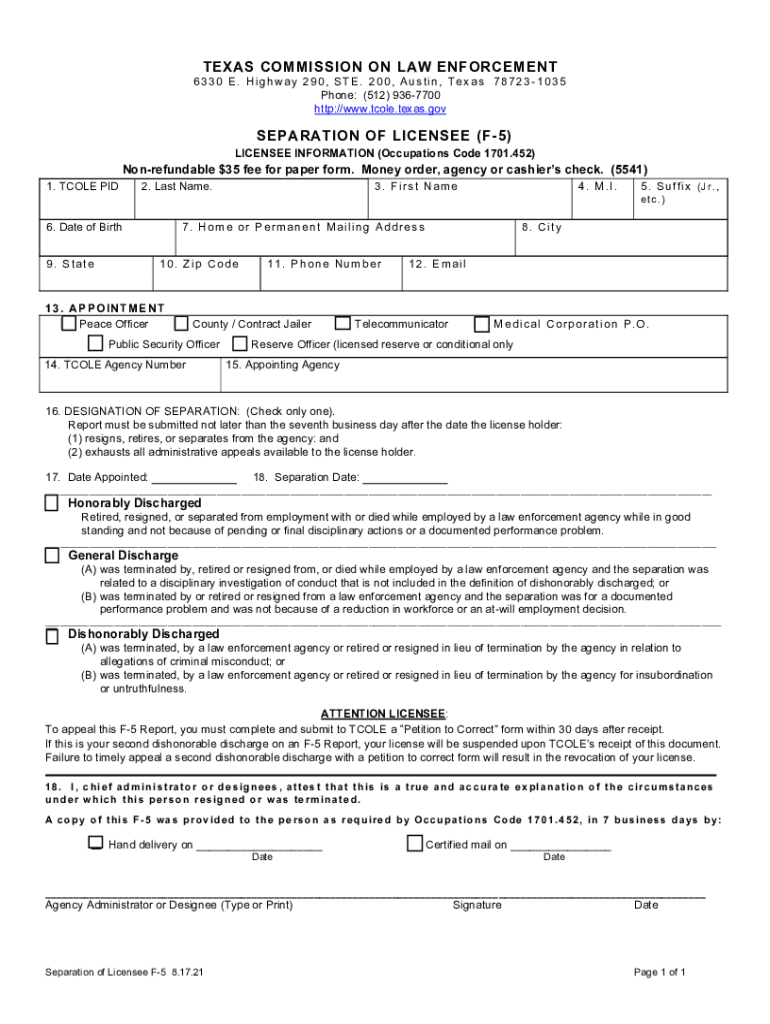
Cupations Code 1701.452) 1. TCOLE PID Non-refundable $35 fee for paper form. Money order, agency or cashier s check. (5541) 2. Last Name. 6. Date of Birth 9. State 3. First Name 4. M.I. 7. Home or Permanent Mailing Address 10. Zip Code 13. APPOINTMENT Peace Officer 11. Phone Number County / Contract Jailer Public Security Officer 14. TCOLE Agency Number 5. Suffix (Jr., etc.) 8. City 12. Email Telecommunicator Medical Corporation P.O. Reserve Officer (licensed reserve or conditi.
Loading

Open form follow the instructions

Easily sign the form with your finger

Send filled & signed form or save
How to fill out the TX F-5 online
The Texas F-5 form, also known as the Separation of Licensee form, is essential for documenting the separation of licensed personnel from law enforcement agencies. This guide will walk you through the steps of filling out the TX F-5 online, ensuring you complete each section accurately.
Follow the steps to complete the TX F-5 online.
- Click the ‘Get Form’ button to access the TX F-5 form and open it in your preferred editor.
- Begin by filling out the licensee information. Enter the TCOLE PID (if applicable), last name, first name, middle initial, and suffix (if any). Ensure that all names are accurately spelled.
- Input the date of birth, home or permanent mailing address, city, state, and zip code. This information is crucial for correct identification.
- Provide the phone number and email address to enable communication regarding the separation process. Ensure the information is current.
- Indicate the appointment type by checking the appropriate box: Peace Officer, County/Contract Jailer, Public Security Officer, Telecommunicator, Medical Corporation P.O., or Reserve Officer.
- Enter the TCOLE agency number and the name of the appointing agency.
- Select the designation of separation by checking only one box that accurately reflects the reason: Honorably Discharged, General Discharge, or Dishonorably Discharged. Familiarize yourself with the definitions provided to ensure the correct selection.
- Enter the date appointed and the separation date, noting that the report must be submitted no later than the seventh business day after separation.
- The agency administrator or designee must attest that the information presented is true and accurate. This step includes typing or printing their name and providing a signature with the corresponding date.
- Finally, ensure that a copy of the F-5 has been provided to the person, documenting whether it was hand-delivered or sent via certified mail, along with the respective dates.
- Once all fields are completed, save your changes, and consider downloading or printing the form for your records or further processing.
Complete your TX F-5 form online today for a streamlined separation process.
Experience a faster way to fill out and sign forms on the web. Access the most extensive library of templates available.
Related content
Licensee Request for Release of (F-5) Separation of License, Get Form. Request...
DP-54 Use of Force Report (Revised 5/16/13). DP-55 Field Training Orientation Form ·...
This user's guide describes the TI RTTT software application that operates, tests, debugs...
Get answers to your most pressing questions about US Legal Forms API.
When was the last EF5?
The nation's last EF-5 tornado struck Moore, Oklahoma, on May 20, 2013.
What is the criteria for EF5?
EF5 tornadoes are the most violent tornadoes ing to the EF Scale. They have winds of more than 200 miles per hour and are capable of damaging or destroying even large buildings.
Is EF5 the strongest tornado?
Based on its damage, each tornado is graded on a tornado scale called the Enhanced Fujita Scale. The scale ranges from the weakest tornadoes at EF0 to the strongest tornadoes at EF5.
What is an example of EF5 damage?
A well-constructed home leveled to the ground, with debris swept clean from its foundation, is the most often-cited example of damage sufficient to earn an EF5 rating. This four-sided brick home was leveled and its debris tossed 40 yards in the Hackleburg, Alabama, EF5 tornado on April 27, 2011.
What would an EF5 tornado generally cause?
An EF5 is the most powerful tornado, causing incredible damage with winds over 200 mph. Capable of destroying schools and large shopping complexes, and causing permanent structural deformation to even 20-story buildings, EF5 tornadoes are rare.
What's the difference between F5 and EF5?
The old scale lists an F5 tornado as wind speeds of 261–318 mph (420–512 km/h), while the new scale lists an EF5 as a tornado with winds above 200 mph (322 km/h), found to be sufficient to cause the damage previously ascribed to the F5 range of wind speeds.
What is the difference between an F5 and an EF5 tornado?
The old scale lists an F5 tornado as wind speeds of 261–318 mph (420–512 km/h), while the new scale lists an EF5 as a tornado with winds above 200 mph (322 km/h), found to be sufficient to cause the damage previously ascribed to the F5 range of wind speeds.
Use professional pre-built templates to fill in and sign documents online faster. Get access to thousands of forms.
If you believe that this page should be taken down, please follow our DMCA take down process here.