Loading
Get Canada Ltb N4 - Ontario 2022-2026
How it works
-

Open form follow the instructions
-

Easily sign the form with your finger
-

Send filled & signed form or save
How to fill out the Canada LTB N4 - Ontario online
This guide provides users with a clear and comprehensive approach to filling out the Canada LTB N4 form for Ontario, specifically designed for situations involving non-payment of rent. By following these steps, you will ensure your form is completed accurately and efficiently.
Follow the steps to successfully complete the N4 form.
- Click 'Get Form' button to access the form and open it for editing.
- Carefully read the notice to ensure you understand the purpose of the form. This notice is crucial as it details the reason for the termination of tenancy related to non-payment of rent.
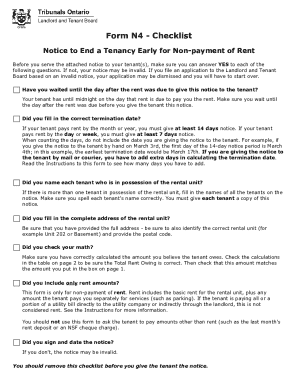
- Fill in the tenant's names. Ensure you include all individuals in possession of the rental unit, with correct spelling of each name.
- Provide the full address of the rental unit, specifying the correct unit number (e.g., Unit 202), along with the postal code.
- Indicate the amount of rent owed by the tenant. Make sure to verify your calculations to ensure accuracy.
- Set the termination date, ensuring it respects the minimum notice period based on the payment frequency of rent (14 days for monthly or yearly tenants, 7 days for daily or weekly tenants).
- Review your form for completeness, ensuring you have included only rent amounts and have not included unrelated charges or fees.
- Sign and date the notice. Without your signature, the notice may be deemed invalid, and processing will be compromised.
- Remove the checklist before serving the notice to the tenant. This ensures that only the relevant document is presented.
- Once all fields are accurately filled, you can save the changes, download the completed form, print it, or share it as needed.
Complete your documents online today to ensure compliance and clarity in your tenancy matters.